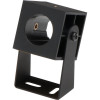
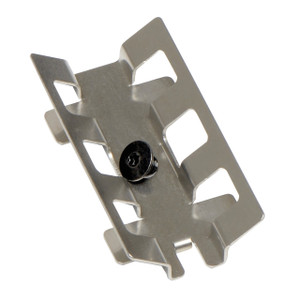
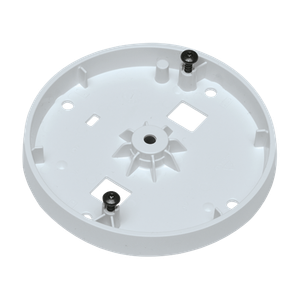
Axis 5503-991 P12 Camera Mounting Bracket 5-Pack
The Axis 5503-991 is a rack-mount bracket solution designed for Axis P12 series cameras. This five-piece package addresses a specific deployment problem: managing multiple P12 cameras in centralized or distributed rack environments where cable organization and repeatable installation matter. Unlike ad-hoc mounting, rack-mounted brackets ensure consistent alignment, simplified cabling runs, and faster commissioning across multi-camera sites.
Key Features
- Rack Mount Design: Mounts directly into standard EIA racks or wall-mounted 19-inch rails. This eliminates cable sag and reduces the number of separate wall penetrations — meaningful when you're consolidating 5–20 cameras in a single equipment room or field cabinet.
- P12 Series Compatibility: Engineered fit for Axis P12 cameras only — no universal adapter guess work. If you're mixing P12 with other Axis lines, this bracket won't work for those units, so verify your camera models before ordering.
- Five-Unit Bundle: Cost per bracket drops when purchased as a pack. One 5503-991 box covers half a dozen typical retail or office expansion projects without buying oversized quantities.
- Durable Construction: Built from materials rated for commercial and light industrial environments. Not rated for harsh outdoor, chemical, or extreme temperature exposure — if your site is outdoors or corrosive, confirm material compatibility with the manufacturer or your integrator.
- Secure Mounting Platform: Provides stable support for long-term operation. Cameras stay aligned for consistent field of view and don't shift under vibration — important in facilities with door closers, HVAC, or vehicle traffic nearby.
Integration & Compatibility
The 5503-991 is purpose-built for Axis P12 series surveillance cameras. Before purchasing, confirm that all cameras in your deployment are P12 models. Axis also produces mounting solutions for other camera lines — consult your equipment inventory or contact your integrator if you're deploying mixed models. Rack and wall mounting accessories are often overlooked in initial budgeting; factor bracket costs into your bill of materials early.
Deployment Scenarios
Typical use cases include retail multi-store rollouts (head office monitoring of branch locations), office building expansions (consolidating cameras in a central cabinet), industrial facilities (organizing cameras in a control room), and data centers (where cable management and space efficiency are non-negotiable). For distributed outdoor sites or remote warehouses with only one or two cameras, individual wall or pendant mounts may be more practical than a rack solution.
When to Choose a Different Approach
If your P12 cameras are deployed across multiple scattered locations or outdoors in unheated cabinets, individual weatherproof wall mounts or pendant kits may serve better than a 5-pack of rack brackets. If you're deploying Axis cameras outside the P12 line, the 5503-991 won't fit — check the model number on your camera body or look for a family-specific mounting solution.
Specification Summary
- Mount Type: Rack (standard 19-inch EIA rail compatible)
- Quantity per Package: 5 brackets
- Model Number: 5503-991 (also searched as 5503 991)
- Product Class: Mounting Accessory
Frequently Asked Questions
Q: Is the 5503-991 suitable for outdoor or weatherproof installations?
A: No. The 5503-991 is designed for indoor rack mounting in commercial and light industrial environments. For outdoor camera mounting, consult weatherproof or IP-rated bracket solutions.
Q: Can I use the 5503-991 with Axis camera models outside the P12 series?
A: No. This bracket is engineered specifically for P12 series cameras. Using it with other Axis models risks improper fit and camera instability. Verify your camera model before purchasing.
Q: Does the 5503-991 work in wall-mounted cabinets, or is it rack-only?
A: The bracket is designed for standard 19-inch EIA racks. It can be installed in wall-mounted cabinets that include standard rack rails, but it is not a standalone wall mount.
Q: What hardware or tools are required for installation?
A: Standard rack mounting typically requires a Phillips screwdriver and basic hand tools. Consult the mounting guide or your integrator for torque specifications and cable tie recommendations to ensure repeatable installations across multiple cameras.
Q: How does rack mounting affect cable management compared to individual wall mounts?
A: Rack mounting consolidates all camera cables into a single cabinet, reducing the number of wall penetrations and simplifying future troubleshooting or camera replacement. It's especially valuable in multi-camera deployments where consistent cable routing reduces service time.
Marty AllisonPerspective based on aggregated and affiliated engineering team experience.
The Axis 5503-991 solves a real problem in scaled deployments: consistency at scale. When you're rolling out 10, 20, or 50 P12 cameras across multiple sites, the 5503-991 moves you from improvised wall mounts to a repeatable, documented installation method. Cable dressing becomes predictable. Technicians don't waste time improvising custom brackets. Troubleshooting is faster because the physical layout is consistent from site to site.
Technical Highlights:
- Rack Mount Form Factor: Five brackets per box means a full 24-camera rollout requires only five packages — easy to budget and track in a procurement system.
- EIA Standard Compatibility: Standard 19-inch rack mounting means integration into existing equipment cabinets, remote enclosures, and wall-mounted racks without custom fabrication.
- P12-Specific Engineering: Not a universal adapter. Precision fit eliminates wobble and alignment drift — a small thing until a camera drifts 2 degrees during a 6-month deployment and you're debugging lost forensic footage.
Deployment Considerations:
- This accessory is for indoor or climate-controlled environments only — no IP rating, no UV-hardened materials. If cameras are mounted outdoors in weatherproof enclosures, that's fine; if the bracket itself sits in sun or rain, failure risk rises quickly.
- P12 model verification is non-negotiable before purchase. Mixing camera families or models will waste time and money — verify the SKU on every camera body or consult your bill of materials.
- Rack space and cable routing planning should happen before installation. Five cameras in one cabinet can create airflow and heat management challenges if not properly spaced.
Best fit: multi-site retail or office chains, warehouse operations, and centralized monitoring facilities where consistency, future scalability, and cable management efficiency justify the rack mounting overhead. Skip it if you have fewer than three cameras or a genuinely distributed topology where on-site mounting is the only option.