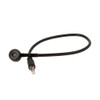
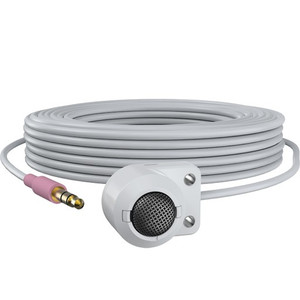
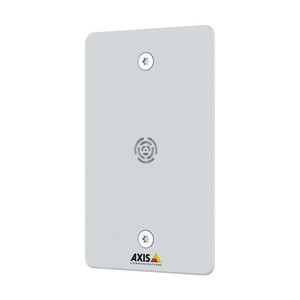
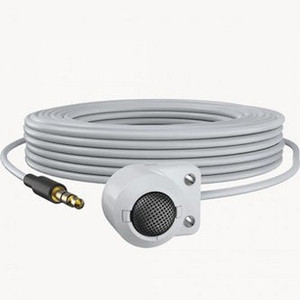
Axis 01963-001 Device Microphone B Omnidirectional Audio Extension
The Axis 01963-001 is a purpose-built omnidirectional microphone designed to add audio recording capability to Axis IP cameras and devices that support audio input but lack integrated microphone hardware. Deployed in retail, access control, workplace safety, and facility monitoring applications, this accessory bridges the gap between video-only surveillance and forensically complete audio-video records.
Key Features
- Omnidirectional pickup pattern: Captures audio from all directions without dead zones or positioning constraints — eliminates the need to angle or reorient equipment to catch conversation or ambient sound from a specific direction.
- Terminal Block to 3.5mm audio extension cable: Connects directly to the audio input terminal on compatible AXIS devices, simplifying retrofit installations where cameras were originally deployed without audio capability.
- Compatible with AXIS P32 series and audio-enabled AXIS devices: Works with Axis surveillance cameras that feature audio input connectors but no internal microphone. Verify your specific camera model supports audio input before ordering.
- Plug-and-play connectivity: No firmware updates or complex configuration required — connect the cable and audio input is immediately active once your NVR or video management system is configured to record from the audio channel.
- Seamless integration with existing AXIS infrastructure: Pairs with Axis network video recorders and management software without requiring additional codecs, drivers, or middleware.
Integration & Compatibility
The 01963-001 uses a terminal block connector on the device end and a standard 3.5mm audio jack on the microphone end, delivering flexibility for wall, ceiling, or pendant mounting alongside your existing camera. This cable-based design supports retrofit scenarios — a common requirement when audio forensics become necessary months or years after initial video deployment. The omnidirectional design ensures consistent coverage without repositioning the camera itself. Confirm that your target AXIS camera model includes an audio input terminal (check the camera's user manual or Axis camera documentation); not all models support audio input.
Typical Applications
- Retail transaction verification: Audio of cash register interactions, customer disputes, or employee conversations paired with video footage for complete incident documentation.
- Access control points: Audio capture at doors, gates, or security checkpoints to document unauthorized entry attempts or altercations.
- Office and workplace safety: Ambient sound recording in common areas or break rooms to support HR investigations or safety incident reviews.
- Facility monitoring: Warehouse, storage, or equipment areas where audio of alarms, equipment failure, or unauthorized access adds investigative value beyond video alone.
When to Choose a Different Approach
If your camera includes a built-in microphone, the 01963-001 is unnecessary — use the internal audio input instead. For applications requiring specialized audio features (such as directional pickup, noise cancellation, or very long cable runs), consult your integrator or contact Axis NVR support for recommendations on alternative Axis audio accessories. If you need audio input but your target camera lacks an audio connector entirely, you may need to select a different camera model from the Axis camera line that includes audio support.
Frequently Asked Questions
Q: Is the Axis 01963-001 compatible with my AXIS camera?
A: The 01963-001 is certified compatible with AXIS P32 series cameras and other AXIS devices that include audio input connectors. Check your camera's user manual or technical specifications to confirm an audio input terminal is present. Not all AXIS cameras support audio input.
Q: Do I need to configure anything in my NVR or VMS after connecting the 01963-001?
A: Once the microphone cable is physically connected, your NVR or video management software must be configured to record the audio channel. Refer to your NVR or VMS documentation for audio input setup and recording schedule configuration.
Q: What is the cable length of the 01963-001?
A: Consult the manufacturer datasheet or your distributor for exact cable length. Standard audio extension cables typically range from 10 to 25 feet; confirm the 01963-001 specifications before order placement.
Q: Will the omnidirectional pickup capture unwanted background noise?
A: Yes — omnidirectional microphones record audio from all directions equally, so HVAC, facility noise, or conversations distant from your target area will be captured. Evaluate microphone placement to minimize irrelevant audio, or consult your NVR's audio filtering or noise reduction settings if available.
Q: Can I use the 01963-001 outdoors?
A: This accessory has no published IP rating for weatherproofing. Do not expose the microphone capsule or cable connectors to direct rain or spray. Install in a covered area or wall-recessed location to protect from moisture.
Q: What is the warranty on the Axis 01963-001?
A: Warranty terms are not specified in available product documentation. Contact the manufacturer or your specialty distributor for warranty details and support options.
Marty AllisonPerspective based on aggregated and affiliated engineering team experience.
The Axis 01963-001 (often searched as 01963 001) solves a real retrofit problem: you've deployed cameras in a facility years ago, recorded video-only, and now an incident requires audio documentation that wasn't originally captured. Rather than replace working cameras, this terminal-block-to-3.5mm extension gets audio into the existing infrastructure quickly. The omnidirectional design is both strength and limitation — you'll capture everything in the room, which is forensically valuable but also captures HVAC, ambient noise, and irrelevant chatter equally.
Deployment Reality:
- Omnidirectional pickup without blind spots: Works in retail or access control where conversation or ambient sound source direction is unknown or variable. Don't expect any directionality — a loud HVAC duct five feet away will be as prominent as a person speaking three feet in front of the mic.
- Terminal block connection simplifies installation on camera-mounted hardware: Most AXIS cameras with audio input use terminal blocks; this cable eliminates needing a separate adapter or custom wiring. Typical integration takes minutes, not hours.
- No weatherproofing — plan installation accordingly: This is not an outdoor or semi-outdoor mic. Moisture ingress into the terminal block connectors or microphone capsule will degrade or kill audio capture. Recessed wall mounting or ceiling installation in controlled spaces is the norm.
Deployment Considerations:
- Verify audio input support on your target camera before purchase: AXIS P32 series support audio, but not every AXIS camera includes audio connectors. Check the device manual or datasheet — a missing audio terminal means this accessory won't work.
- Cable length and routing logistics matter: The exact cable length of the 01963-001 is not published in readily available specs. Request this from your supplier to confirm it reaches from your mounting location to the camera's terminal block without tension or pinching.
- Omnidirectional audio + noise in busy retail or warehouses = heavy post-incident playback filtering: If you're deploying this in a loud environment (warehouse, retail floor), expect to listen through significant background noise during forensic review. Consider microphone placement that minimizes distance to your target conversation area.
Best fit: retail transactions at the register, access control entry points, and office/workplace incidents where audio context is critical and the camera location already supports audio input. Avoid open-plan warehouses or HVAC-heavy spaces unless you're comfortable with mixed signal-to-noise ratios during playback.