HPE R0X43C Aruba 6400 24-Port SFP+ and 4-Port SFP56 v2 Expansion Module
Overview
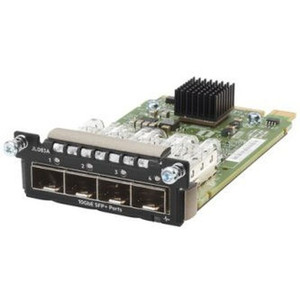
The HPE R0X43C is a 28-port fiber uplink expansion module designed exclusively for the Aruba 6400 modular chassis, delivering 24 SFP+ ports at up to 10GbE and 4 SFP56 ports at up to 50GbE in a single rack-mountable blade. If you're running a high-density campus core or datacenter aggregation tier and need to collapse multiple 10G uplinks alongside high-speed 25G/50G spine connections into one module slot, this is the blade to spec. The R0X43C v2 replaces the original revision with the same port density and a refined internal architecture suited to the 6400's fabric capacity.
The 6400 chassis is HPE's flagship enterprise-grade modular switching platform — purpose-built for environments where port density, redundancy, and centralized management through Aruba Central or AOS-CX CLI matter more than per-port cost. This module slots into that ecosystem without compromise, supporting the full protocol stack from Fast Ethernet legacy devices all the way to 50GbE spine interconnects. Explore the full HPE networking catalog to see how this module fits into a broader Aruba fabric deployment.
Key Features
- 24 SFP+ Ports at 100M/1G/10G: Each SFP+ port auto-negotiates from 100 Mbps through 10GbE, which means you can mix 1G access uplinks and 10G server connections on the same module without strapping additional transceivers or fixed-speed ports. That flexibility matters in environments where not every rack device has moved to 10G yet.
- 4 SFP56 Ports at 1G/10G/25G/50G: The four SFP56 slots support the full speed range up to 50GbE, giving you spine-facing or inter-chassis uplinks running at 25G or 50G — practical for scenarios where 10G uplinks to the core are already saturated during backup windows or bulk data transfers. SFP56 at 50G is approximately 5× the throughput of a 10GbE port on the same copper footprint.
- 28 Ports Total in One Module Slot: Consolidating 28 fiber uplinks into a single 6400 line card means fewer inter-chassis cables, cleaner cabling runs, and more chassis slots free for other roles — PoE distribution blades, management modules, or additional uplink capacity as the network grows.
- Multi-Rate SFP+ Compatibility: Ports 1–24 support 100M, 1G, and 10G transceivers interchangeably. Purchasing a mixed transceiver inventory is simpler: you're not locked to a specific speed tier at provisioning time. This is useful in phased migration projects where some edge switches haven't yet been upgraded to 10G uplinks.
- Optical Fiber Media: All 28 ports are fiber-only — no copper SFP or RJ45 options on this blade. That's the correct choice for inter-building runs, long-distance inter-rack cabling, and environments with ground potential differences where copper would introduce risk. Confirm your transceiver inventory and fiber plant before speccing this module into a purely copper-access design.
- Rack-Mountable Form Factor: The module installs directly into the Aruba 6400 chassis bay — no external mounting hardware, no separate power supply. Power and switching fabric are provided by the chassis, keeping the physical footprint consistent with the rest of the blade lineup.
- Fast Ethernet Through 50GbE Protocol Support: The R0X43C's port stack supports Fast Ethernet, Gigabit Ethernet, 10GbE, 25GbE, and 50GbE simultaneously. In practice this means the module can serve as an aggregation point for legacy 100M infrastructure while simultaneously backhauling to a 50G spine — without the segmented VLANs or speed-mismatch workarounds you'd need on a fixed-rate module.
Integration and Compatibility
The R0X43C is designed exclusively for the Aruba 6400 switch chassis — it is not a standalone device and will not operate in any other HPE chassis or third-party enclosure. Verify your chassis model and available module slots before ordering; the 6400 product family includes multiple chassis configurations with different slot counts and fabric capacities.
Transceiver selection is a key planning step. SFP+ slots accept standard HPE or HPE-compatible SFP+ modules for 1G and 10G fiber runs. The SFP56 slots require SFP56 transceivers for 25G or 50G operation — standard SFP28 transceivers will operate at 25G in SFP56 slots on supported configurations, but confirm compatibility with HPE's transceiver matrix before purchasing third-party optics. For guidance on planning fiber uplink density and transceiver budgets, see our PoE and uplink switch planning resources.
Management integrates through the Aruba 6400's existing AOS-CX operating system stack — no additional licensing is required specifically for this module. The 6400 chassis supports Aruba Central cloud management, on-premises Aruba NetEdit, and traditional CLI/SNMP management, all of which apply to ports on this blade without extra configuration. For related fiber infrastructure — patch panels, fiber trunks, and enclosures — the network accessories category includes structured cabling components that pair with high-density fiber deployments like this one.
If your deployment includes managed core switches at multiple campus buildings, the SFP56 ports on this module are the logical interconnect — 50GbE inter-building links eliminate the bandwidth tax that stacked 10G LAGs impose during peak hours.
Frequently Asked Questions
Q: Is the HPE R0X43C compatible with any switch chassis other than the Aruba 6400?
A: No. The R0X43C is designed exclusively for the HPE Aruba 6400 modular switch chassis. It will not seat or operate in any other HPE chassis or third-party enclosure. Confirm your chassis model before ordering.
Q: What is the warranty on the R0X43C?
A: HPE provides a 3-year manufacturer warranty on the R0X43C. This covers the module as a factory-new unit.
Q: Can the SFP+ ports on the R0X43C run at 1G as well as 10G?
A: Yes. All 24 SFP+ ports support 100M, 1G, and 10G Ethernet — the port auto-negotiates based on the installed transceiver. This allows mixed-speed deployments without replacing the module as you upgrade edge devices.
Q: What speeds do the 4 SFP56 ports support?
A: The four SFP56 ports support 1G, 10G, 25G, and 50G Ethernet. At 50G they provide roughly five times the throughput of a 10GbE SFP+ port, making them suitable for spine uplinks or high-bandwidth inter-chassis connections.
Q: Are the R0X43C's ports copper or fiber?
A: All 28 ports are fiber-only (optical fiber media). There are no copper SFP or RJ45 options on this module. Ensure your fiber plant and transceiver inventory are in place before deployment.
Q: Does the R0X43C require separate power or is it powered by the chassis?
A: The module draws power through the Aruba 6400 chassis backplane — no external power supply is needed. Verify your chassis power supply configuration supports the additional load when adding modules.
The R0X43C is a module I recommend specifically when a campus core team is hitting the wall on 10GbE uplink density and needs to introduce 25G or 50G spine interconnects without rearchitecting the chassis footprint. The 4 SFP56 ports at up to 50GbE are the deciding spec here — they give you a clean migration path from oversubscribed 10G LAGs to single-port 50G uplinks, all inside the same Aruba 6400 slot.
Technical Highlights:
- 24 SFP+ at 100M/1G/10G: Multi-rate auto-negotiation across all 24 ports means you're not committed to a single transceiver type at install time — useful for phased 10G rollouts where not every upstream device has upgraded yet.
- 4 SFP56 at up to 50GbE: A 50G SFP56 uplink carries approximately the same traffic as five fully-loaded 10GbE ports. In high-throughput aggregation scenarios — video surveillance storage backhaul, hyperconverged infrastructure inter-node traffic, bulk backup windows — that headroom eliminates the LAG management overhead you'd otherwise carry.
- 28 Ports, One Chassis Slot: Consolidating this port count into a single blade keeps adjacent chassis slots available for PoE line cards or redundant supervisor modules, which matters in 6400 deployments where slot count is the primary capacity constraint.
Deployment Considerations:
- All 28 ports are fiber-only — budget for SFP+ transceivers on ports 1–24 and SFP56 transceivers on ports 25–28 before the module arrives. Transceiver lead times on high-density orders can exceed module lead times.
- The R0X43C is chassis-exclusive: it installs only in the Aruba 6400. Verify your chassis revision and available module bay count; some 6400 configurations have slot constraints that affect how many uplink blades can run simultaneously at full throughput without fabric oversubscription.
This module fits best in campus distribution or datacenter aggregation tiers where a single Aruba 6400 chassis is consolidating uplinks from multiple access-layer stacks and needs a clear path to 25G/50G spine bandwidth without a forklift upgrade of the chassis itself.