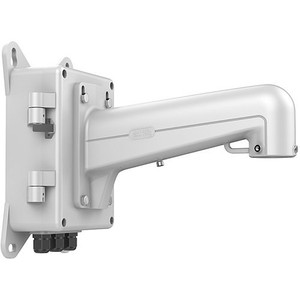
Hikvision WMLB Wall Mount with Junction Box
The Hikvision WMLB is a wall-mounted installation bracket combining a structural mount with an integrated junction box. It's designed to simplify cable routing and power distribution during camera deployment on flat wall surfaces. The aluminum alloy construction handles corrosion in outdoor and semi-outdoor environments, making it practical for commercial buildings, retail spaces, parking facilities, and perimeter monitoring where weather exposure and neat cable management matter.
Key Features
- Aluminum Alloy Construction: Resists rust and corrosion in outdoor and damp indoor settings — meaningful for installations where the mount itself is exposed to rain or salt spray. Avoids the steel-rusting-in-6-months failure mode.
- 110 lbs Maximum Weight Capacity: Accommodates most turret, dome, and bullet cameras plus associated junction box hardware. Verify your combined camera-and-bracket weight does not exceed one-third of this limit (the safe working load) — this is non-negotiable for structural safety.
- Integrated Junction Box: Houses power and data connections internally, reducing visible cable runs on the building exterior. Tidier appearance and less weather exposure for connectors and splice points.
- Fully Waterproof Design: Seals internal cavities from direct rainfall and spray. Does not imply submersion-rated; suited for standard outdoor wall mounting, not for areas subject to flooding or high-pressure washdown.
- Compatible with Pendant Caps: Works with standard camera pendant mounting interfaces, allowing flexibility in camera model selection within the same installation framework.
- Flat Wall Mounting: Designed for vertical wall surfaces only — not for corner mounts, angled surfaces, or non-planar applications.
Integration & Compatibility
The WMLB pairs with Hikvision IP cameras and other ONVIF-compliant surveillance devices using standard pendant-style mounting connections. The integrated junction box accepts M20 or similar conduit entries for structured cabling — coordinate with your network switch and PoE power planning to ensure adequate cable routes and strain relief. For multi-camera installations, plan cable runs from your network video recorder or managed switch to each mount location ahead of time.
Installation & Load Considerations
Before drilling, confirm that your wall substrate (concrete, brick, or wood framing) can support a static load of at least three times the combined weight of your camera and this mount assembly. Use appropriate anchors for your wall type — masonry fasteners for concrete or brick, lag bolts for wood. The WMLB itself must be level; even slight tilting can affect camera field of view. Ensure the junction box is accessible for future maintenance without climbing or lifting the camera.
When to Choose a Different Model
If your mounting surface is not flat or vertical — such as a corner installation, angled soffit, or pole-mounted scenario — evaluate alternative mount designs in the Hikvision accessory range. If weight capacity is marginal after adding a large turret camera and power distribution hardware, consult the manufacturer for a load analysis. For installations requiring complete submersion or high-pressure washdown environments, verify IP67 or higher ratings on any junction box variant before purchase.
Frequently Asked Questions
Q: Can the WMLB be mounted on stucco or composite siding?
A: Yes, but use fasteners rated for your specific substrate material. Stucco requires carbide or masonry bits and anchors; composite siding may require backing plates to distribute load. Always verify local building codes for exterior camera mounting.
Q: Does the junction box accommodate power supplies or only cable connections?
A: The WMLB provides internal space for splicing power and data cables. It is not designed to house a full power supply or surge protector; those should be mounted separately near your PoE switch or power distribution panel.
Q: What size conduit does the junction box accept?
A: Refer to the WMLB datasheet for exact entry sizes. Most Hikvision wall mounts accept M20 (metric) conduit; verify your specific cable gauge fits before installation.
Q: Is the WMLB suitable for vertical pole mounting?
A: No — the WMLB is engineered for flat wall surfaces only. For pole or angled mounting, select a pole-mount or adjustable bracket variant.
Q: What is the warranty on the WMLB?
A: Warranty terms depend on your purchase channel and region. Contact your supplier or the manufacturer directly for warranty details and claim procedures.
Ted PerryPerspective based on aggregated IP Security Depot and affiliated engineering team experience.
I specify the WMLB frequently in outdoor surveillance builds where cable aesthetics and weather sealing both matter. The 110 lbs load capacity is sufficient for most single-camera deployments, but do the math before commissioning: a turret camera (3–4 lbs) plus the mount bracket itself (2–3 lbs) plus internal junction-box hardware leaves you with a comfortable safety margin. The integrated junction box is the real differentiator here — it keeps power and data splices out of the elements, which extends connector life and reduces field troubleshooting headaches.
Technical Highlights:
- 110 lbs Capacity: Safe working load is approximately one-third of rated capacity (36 lbs) — plan your camera selection accordingly. Most IP dome and turret cameras fall comfortably within this envelope.
- Aluminum Alloy + Waterproof Design: Corrosion resistance is real in coastal or high-humidity areas. Compared to untreated steel, aluminum survives 3–5 years longer before structural degradation in salt spray or constant moisture.
- Integrated Junction Box: Internal cavity reduces visible external cabling and weather-exposed connector points. Translates to lower mean-time-to-failure on power and signal connections — a measurable reliability gain in 24/7 monitoring.
Deployment Considerations:
- Wall Substrate Verification: Confirm your mounting surface can support 3× the combined load. Mounting to hollow drywall without backing or stucco without proper anchors is a common failure point — coordinate with site structural assessment before ordering.
- Flat Surfaces Only: The WMLB is explicitly engineered for vertical flat walls. Attempting corner, angled, or pole mounting will misalign the camera and void any support claims. Plan mounting locations in layout phase, not during installation.
- Conduit Entry Sizing: Confirm M20 (or whatever entry is specified for your variant) accommodates your cable bundles before installation. Pinched cables in the junction box cause signal noise and power loss over time.
The WMLB is well-suited for retail perimeter monitoring, warehouse entry-point documentation, and commercial building façade mounting where neat cable runs and corrosion resistance are non-negotiable. Skip it if you need pole, corner, or angled mounting — choose a specialized bracket variant instead. For straightforward flat-wall outdoor deployment, it's a solid, low-maintenance baseline.