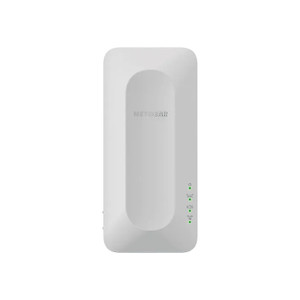
NETGEAR MK72-100NAS AX3000 Mesh WiFi 2-Pack System
The NETGEAR MK72-100NAS is a mesh networking system designed for residential and small-office deployments requiring seamless WiFi coverage across multiple floors or larger spaces. Each unit in this two-pack delivers AX3000 wireless performance paired with four Gigabit Ethernet ports, enabling both wireless and wired client connectivity. The system architecture distributes processing across multiple nodes, eliminating single-point-of-failure coverage gaps typical of single-router deployments.
Key Features
- AX3000 Wireless Standard: 802.11ax (WiFi 6) with ~3 Gbps aggregate throughput. Supports simultaneous dual-band operation (2.4 GHz + 5 GHz) for optimal device placement without frequency congestion.
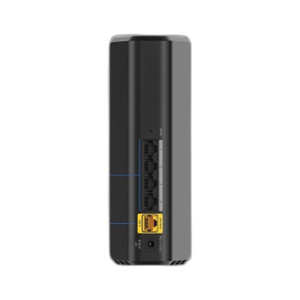
- Four Gigabit Ethernet Ports per Unit: Each mesh node includes four LAN ports rated at Gigabit speeds (1 Gbps). Enables wired backhaul between nodes and direct Ethernet connections to security systems, NAS, or workstations without wireless bottleneck.
- Mesh Architecture (2-Pack Bundle): Two units allow primary router + secondary extender topology or dual-node mesh failover. Roaming clients maintain connection as they move between nodes without manual reconnection.
- Compact Footprint: 4.8" W × 4.8" H × 2.52" D per unit (0.64 lbs). Wall-mountable or desktop placement without cabling clutter; suitable for office closets, equipment racks, or residential shelving.
- DHCP/Bridge Mode Flexibility: Operates as primary DHCP router or as wireless bridge/extender into existing network infrastructure. Simplifies integration into heterogeneous office network topologies.
- Dual-Band Simultaneous Operation: 2.4 GHz band for legacy device compatibility and range; 5 GHz band for high-bandwidth workloads (video conferencing, file transfer). Dynamic band steering optimizes client association.
Mesh systems outperform single-router + external WiFi extender chains because backhaul traffic (node-to-node communication) uses dedicated bandwidth allocation rather than consuming the client-facing wireless channel. In environments with 15–25 active WiFi clients distributed across 3,000–4,000 sq ft, the two-node MK72 avoids the throughput cliff observed in single-point topologies. Wired backhaul via Gigabit Ethernet between the two units maximizes available bandwidth for clients; wireless backhaul is available if cabling is infeasible.
The four Gigabit ports per unit are critical for small-office deployments. A primary node can provision wired connections to a network printer, desktop workstation, and security NVR simultaneously, while the secondary node handles WiFi coverage for mobile users in the far office zone. This eliminates dependency on secondary switches and reduces cabling complexity in constrained installations.
NETGEAR's management platform (via web GUI or mobile app) provides straightforward SSID/security configuration, guest network isolation, and device-level QoS controls. Firmware updates are delivered over-the-air. The system does not require cloud account registration for basic operation, though advanced analytics (client monitoring, bandwidth per-device tracking) are available via optional registration. Wake-on-LAN and port forwarding are supported for remote access to LAN devices.
This mesh system is suitable for residential households with multiple users and devices, small offices (5–15 employees) without IT infrastructure, and distributed work-from-home scenarios where secondary nodes extend coverage to home offices or meeting spaces. For security integrators, the dual Gigabit ports and bridge-mode capability make it a lightweight alternative to enterprise WiFi when VPN or wired backhaul connectivity is already in place.
Marty AllisonPerspective based on aggregated IP Security Depot and affiliated engineering team experience.
We've deployed consumer and prosumer mesh systems into small-office and residential security installations where WiFi coverage is fragmented — typically older buildings with stone/concrete walls or floor-plan layouts that defeat single-router reach. The MK72 trades off the managed features of enterprise WiFi (802.1X authentication, RF site survey integration, centralized AP management) for plug-and-play simplicity and genuine Gigabit Ethernet backhaul support, which matters more than marketing specs in the field. The dual four-port configuration is the real asset here. In a typical small-office security deployment (NVR + access-control gateway + IP phones + mobile clients), you often run out of switch ports quickly. Mesh nodes with built-in Gigabit switching eliminate one infrastructure dependency and reduce power-distribution complexity. That said, the MK72 is not a replacement for site-survey WiFi planning — if your office has RF dead zones due to metallic shelving or HVAC ducts, no mesh system fills those gaps without supplementary nodes (i.e., a three-pack). Know your coverage goal before committing to a two-pack.
Technical Highlights:
- Gigabit Ethernet (four ports per unit): Both wired backhaul (node-to-node) and client connectivity operate at full 1 Gbps. Critical for NVR deployments or file-heavy workloads; PoE injectors can power secondary devices directly from mesh node ports if planning includes IP camera or access-control hardware needing 12–24 VDC injection.
- AX3000 (802.11ax): 3 Gbps aggregate across 2.4 GHz and 5 GHz bands with OFDMA and spatial multiplexing. Supports 8 simultaneous clients at high throughput; degrades gracefully on legacy 802.11n or 802.11ac devices without network-wide slowdown.
- Bridge/Extender Mode Toggle: Primary unit operates as DHCP router; secondary unit can run as bridge (extends existing LAN) or extender (creates new SSID). Flexibility simplifies retrofit into environments where core network infrastructure is already in place.
- Compact, Wall-Mountable Design: 4.8" cube form factor fits behind monitors, inside equipment cabinets, or mounted on walls without structural load concerns. No external antennas to catch and break off on crowded equipment shelves.
- Firmware OTA Updates: NETGEAR regularly releases security patches and feature updates over-the-air. No manual USB recovery process required; updates can be scheduled during off-hours.
Deployment Considerations:
- Two-pack footprint: 3,000–4,000 sq ft coverage in residential/light-commercial buildings with typical drywall construction. If your office spans 5,000+ sq ft or includes multiple metal-frame glass partitions, spec a three-pack and plan backhaul cabling before installation.
- Wired backhaul is strongly recommended if available: run Cat6 between primary and secondary nodes to maximize client-facing wireless bandwidth. Wireless backhaul mode (when no Ethernet run is feasible) halves available channel bandwidth for client traffic.
- Power consumption: Each unit draws ~10–15W during normal operation. In permanent installations (office, retail), account for 24/7 consumption (~260 kWh per unit annually). Ensure adequate outlet capacity and consider UPS backup if mesh availability is mission-critical.
- Uplink capacity: If primary node is connected to a single upstream WAN link (cable modem, DSL, business Internet), mesh expansion does not increase WAN throughput — it only improves LAN distribution. Bandwidth bottleneck remains at the upstream pipe, not the mesh.
- Guest network isolation: Secondary SSIDs and guest networks are available. Verify firewall rules if security systems or access-control gateways need inter-VLAN communication; default guest isolation may block client access to NVR or door-controller LAN ports.
Choose the MK72 when your requirement is straightforward WiFi coverage expansion combined with wired Ethernet switching for NVR, access control, or legacy wired clients — and you want genuine plug-and-play operation without IT overhead. For larger deployments or sites needing 802.1X and RF management, consider enterprise WiFi (Ubiquiti, Cisco Meraki). For single-room coverage, a standalone high-end router is often cheaper. The mesh sweet spot is 2–4 nodes across 2,500–6,000 sq ft with mixed wired and wireless clients. Explore more options in the NETGEAR catalog.