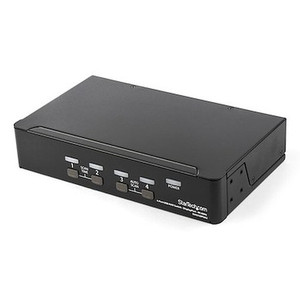
StarTech P4A20132-KM-SWITCH 4-Port USB 3.2 KM Switch with Mouse Switching
Overview
The StarTech P4A20132-KM-SWITCH is a 4-port keyboard-and-mouse (KM) switch built for multi-PC workstations where you need to share a single keyboard, mouse, and audio setup across four USB-connected systems without the overhead of a full KVM stack. If you run parallel workstations — think a control room operator managing separate systems, a developer splitting time between a primary workstation and a build machine, or a security analyst toggling between dedicated threat platforms — this switch lets you do it with a single desk setup and zero display duplication cost.
Port switching is handled three ways: physical push button on the unit, keyboard hotkeys, or mouse-based switching, which is the differentiator here. Mouse switching means you can drag your cursor to the edge of the active display and the switch follows automatically — no button press, no key sequence. That's a meaningful workflow improvement in environments where speed of context-switching matters.
Key Features
- USB 3.2 Gen 1 at 5Gbps: The host-side connection runs at USB 3.2 Gen 1 (5Gbps) via Type-B ports — fast enough that USB 3.x peripherals like external SSDs or high-resolution capture devices connected to your console won't be throttled by the switch itself. This matters if you're sharing storage peripherals across workstations.
- 4-Port Configuration: Supports four host PCs simultaneously with no need to disconnect and reconnect — switch between any of the four without interrupting the other sessions. For control room or SOC environments, this replaces four separate desk setups with one.
- Mouse Switching Support: In addition to push button and hotkey switching, the P4A20132-KM-SWITCH supports mouse-based port switching. This is the spec to look at if your operators are switching frequently and keyboard shortcuts break concentration or workflow.
- Analog Stereo Audio Pass-Through: A 3.5mm stereo female jack on the host side and console side means you can route 2-channel analog audio through the switch — headset or speakers follow the active port. No need to physically replug headphones when switching between systems.
- Compact Form Factor: At 8.7 x 5.1 x 1.3 inches and 1.8 lbs, this sits flat on a desk or mounts cleanly in a tight workstation environment. It doesn't require rack space and won't compete for real estate with your monitors and peripherals.
- Universal Power Input (100–240V AC): The included power supply accepts 100–240V AC input and delivers 12V DC at 1.5A to the unit. That global input range means no transformer needed for international deployments or mixed-voltage environments — useful for facilities with varied electrical infrastructure.
- LED Port Indicators: Onboard LED indicators show which host port is currently active. In a multi-machine setup, knowing at a glance which system has keyboard and mouse control prevents input-to-wrong-machine errors — a real operational risk in parallel-workstation environments.
- Operating Temperature 0°C to 40°C: Rated for standard commercial indoor environments. Not designed for industrial or unconditioned spaces — install in a temperature-controlled room or enclosure if ambient conditions vary significantly.
Integration and Compatibility
The P4A20132-KM-SWITCH uses USB 3.2 Type-B connectors on the host side and USB 3.2 Type-A plus USB 2.0 Type-A on the console side. This combination means your keyboard and mouse connect via the Type-A console ports, and the four host machines connect via the included Type-B cables. Any USB HID-class keyboard and mouse will work; no proprietary peripheral required.
The GL3523 chipset handles USB hub and switching logic. Audio is handled independently through 3.5mm analog stereo — no driver required for audio routing, which keeps the setup simple and OS-agnostic. The switch is compatible with any OS that supports standard USB HID devices, including Windows, macOS, and Linux.
For teams running KM and KVM switches across a multi-seat control room, the P4A20132 KM SWITCH (often searched as P4A20132 KM SWITCH) is sized for individual operator stations rather than centralized rack-mounted KVM infrastructure. Pair it with USB hub accessories if your console needs additional peripheral ports beyond what the switch's Type-A outputs provide. If you're evaluating this for a network operations center or security operations workstation, also review StarTech's broader StarTech peripheral switching line to confirm this model covers your exact port and display-sharing requirements.
Frequently Asked Questions
Q: Does the P4A20132-KM-SWITCH support video switching, or is it keyboard and mouse only?
A: This is a KM switch, not a KVM switch. It shares keyboard, mouse, and analog stereo audio across four host PCs but does not switch video signals. Each connected PC drives its own monitor independently. If you need video switching, look at a full KVM switch with HDMI or DisplayPort output.
Q: What switching methods does the P4A20132-KM-SWITCH support?
A: Three methods: physical push button on the unit, keyboard hotkey sequences, and mouse-based switching. Mouse switching allows you to move your cursor to the edge of the screen to trigger a port change automatically — no button or key press required.
Q: What is the USB speed of the host connections on this switch?
A: Host ports run at USB 3.2 Gen 1, supporting up to 5Gbps data transfer. This is fast enough to pass through USB 3.x storage devices or peripherals without creating a bottleneck at the switch.
Q: Does the P4A20132-KM-SWITCH require a power supply?
A: Yes, external power is required. The switch draws 18W and ships with a power supply that accepts 100–240V AC input and outputs 12V DC at 1.5A. It is not bus-powered from the host machines.
Q: What is the warranty on the P4A20132-KM-SWITCH?
A: StarTech provides a 2-year manufacturer warranty on the P4A20132-KM-SWITCH.
Q: Is this switch compatible with macOS and Linux in addition to Windows?
A: Yes. Because the switch uses standard USB HID class drivers for keyboard and mouse, it is OS-agnostic. It works with any operating system that supports standard USB HID input devices, including Windows, macOS, and Linux distributions.
The feature I keep coming back to on the P4A20132-KM-SWITCH is mouse switching — specifically because it eliminates a behavioral friction point that sounds minor until you're watching an operator handle four machines through a busy shift. At 5Gbps via USB 3.2 Gen 1, the host connections are fast enough that USB storage or capture hardware connected through the console won't bottleneck, which is something the older USB 2.0-based KM switches couldn't claim.
Technical Highlights:
- Mouse-Driven Port Switching: Cursor-edge switching across four hosts means zero hand movement off the mouse — in an analyst or monitoring role, that's faster than any hotkey sequence and avoids input errors on the wrong machine.
- USB 3.2 Gen 1 Host Interface (5Gbps): Unlike switches that drop to USB 2.0 on the host link, this unit maintains 5Gbps — meaning USB 3.x external drives or docking stations passed through the switch won't be artificially throttled.
- Analog Stereo Audio (3.5mm): 2-channel audio follows the active port through the 3.5mm pass-through — headset audio switches with keyboard and mouse, so operators don't manage a separate audio selector.
Deployment Considerations:
- The 18W power draw requires the included external supply — plan your desk power layout accordingly. This unit is not bus-powered, so a power outlet at the workstation is non-negotiable.
- Operating temperature is rated to 40°C maximum. In dense control rooms with poor airflow, verify ambient temps stay within range — this isn't rated for unconditioned or high-heat environments.
The P4A20132-KM-SWITCH is the right call for a four-seat analyst station or a developer workstation where all four machines are running simultaneously and operators need sub-second switching without interrupting display output. It's not the right call if you need consolidated video — for that, step up to a KVM with display output.