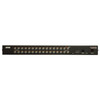
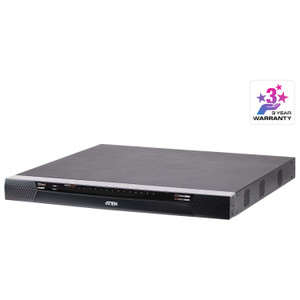
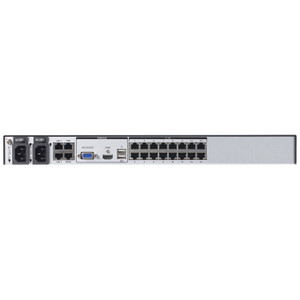
ATEN KH1532A 32-Port Cat5 KVM Switch
Overview
The ATEN KH1532A is a rack-mounted, 32-port Cat5 KVM switch built for data centers, server rooms, and network operations centers where administrators need centralized keyboard, video, and mouse control over a large number of servers without pulling dedicated cables to every console. At its core, the KH1532A lets a single operator station manage up to 32 servers directly — and by daisy-chaining multiple units, that ceiling extends to 1,024 nodes, which covers everything from a mid-market colocation bay to a full enterprise server floor.
Port selection is available three ways: on-screen display (OSD), hotkey sequences, or the front-panel pushbutton — giving operators flexibility whether they're working remotely via KVM-over-IP extension or physically at the rack. The two-digit, seven-segment orange station ID display on the front panel makes it immediately clear which unit you're looking at in a multi-switch stack, which matters when you're troubleshooting a daisy-chain at 2 AM.
Key Features
- 1,024-Node Daisy-Chain Scalability: A single KH1532A manages 32 servers. Chain units together and that number climbs to 1,024 — meaning you can start with one switch today and expand without replacing your infrastructure as the server count grows. No forklift upgrade required.
- 1920 x 1200 Video at 30 Meters: Full WUXGA resolution is maintained over Cat5 cable runs up to 30 meters. At 40 m you drop to 1600 x 1200, and at 50 m to 1280 x 1024 — still more than adequate for BIOS-level server management at typical rack-to-console distances. Plan your cable runs against these thresholds before deployment.
- PS/2 and USB Keyboard/Mouse Support: The KH1532A accepts both PS/2 and USB input devices at the console port, which matters in mixed-vintage environments where some administrators still use PS/2 peripherals or where USB hubs are already in use. No adapter dongles needed for either type.
- OSD, Hotkey, and Pushbutton Port Selection: Three independent switching methods mean operators can access any server without taking their hands off the keyboard — hotkey sequences handle most routine switching, the OSD gives a named server list for less-frequent access, and the physical pushbutton is a reliable fallback if software layers are unresponsive.
- Configurable Scan Interval (1–255 Seconds): The auto-scan function cycles through connected servers at an operator-defined interval anywhere from 1 to 255 seconds. A short interval (5–10 s) suits active monitoring of critical systems; a longer interval (60–120 s) is appropriate for routine health checks across a large server pool without creating alert fatigue.
- Universal Power Input (100–240V AC, 50/60 Hz): The KH1532A's IEC 60320/C14 inlet accepts any global power standard, so the same unit deploys equally in North American, European, or Asian facilities without a transformer or power adapter. Useful for organizations with geographically distributed data centers running standardized hardware.
- Firmware Field-Upgradeable: The most recent firmware release (v1.2.111, dated 2025-06-09) is available as a downloadable package, meaning you can patch the switch in place without a hardware swap. Keeping firmware current is a straightforward practice for maintaining access-control integrity on a device that sits in front of every server console.
- Front-Panel Station ID Display: The two-digit seven-segment orange LED display shows the active station ID instantly. In a multi-switch daisy-chain, this eliminates guesswork about which physical unit is selected — critical during incident response when every second counts.
Integration and Compatibility
The KH1532A connects to servers via Cat5 (or better) structured cabling using KVM adapter cables (sold separately) — this means you can leverage existing horizontal cable plant in most structured-wiring environments rather than running proprietary cable. The switch supports both PS/2 and USB server connections depending on the adapter cable used, covering virtually the entire installed base of rack servers from legacy to current-generation hardware.
Daisy-chaining requires compatible ATEN KVM switches in the same KH series family. When planning a multi-unit stack, verify that all units in the chain share a compatible firmware revision to avoid OSD sync issues. The KH1532A fits standard 19-inch rack enclosures and draws at most 1A at full rated input voltage — a negligible load on any properly provisioned PDU. For larger KVM switch deployments or mixed server management environments, confirm adapter cable types per server generation before ordering.
Frequently Asked Questions
Q: How many servers can the KH1532A manage in total?
A: Directly, the KH1532A manages 32 servers. By daisy-chaining compatible ATEN KVM switches in the same family, the total node count scales to 1,024 servers from a single console.
Q: What video resolution does the KH1532A support, and does it degrade over distance?
A: Yes, resolution scales with cable run length. At up to 30 m, full 1920 x 1200 @ 60 Hz is supported. At 40 m the maximum drops to 1600 x 1200 @ 60 Hz, and at 50 m to 1280 x 1024 @ 75 Hz. Plan your cable runs against these thresholds during rack layout.
Q: Does the KH1532A support USB keyboards and mice, or only PS/2?
A: Both. The KH1532A accepts PS/2 and USB keyboard and mouse input at the console port, covering both legacy and current-generation peripherals without requiring adapters.
Q: Can the KH1532A firmware be updated in the field?
A: Yes. ATEN provides firmware upgrade packages — the current release is v1.2.111 (2025-06-09) — allowing in-place updates without removing or replacing the hardware.
Q: What power supply does the KH1532A require?
A: The KH1532A uses a universal input rated 100–240V AC, 50/60 Hz, 1A via an IEC 60320/C14 inlet. It works with standard data center PDUs in any region without a step-down transformer.
Q: What switching methods are available on the KH1532A?
A: Three methods: on-screen display (OSD) menu, hotkey sequences from the keyboard, and the physical front-panel pushbutton. All three are available simultaneously; no configuration is required to enable them.
The spec that stands out to me on the KH1532A is the video distance-resolution matrix: you get full 1920 x 1200 to 30 m, then the switch steps down gracefully to 1600 x 1200 at 40 m and 1280 x 1024 at 50 m. That's not a limitation you work around — it's a structured cabling planning parameter. Map your console-to-server distances in the rack layout phase and you'll never hit a degraded-video surprise post-installation.
Technical Highlights:
- 1,024-Node Daisy-Chain: At 32 direct ports per unit, you need 32 switches to hit the 1,024-node ceiling — achievable in a large enterprise NOC without any controller appliance in the middle.
- Triple Port Selection: OSD + hotkey + pushbutton means no single point of failure in the switching interface. If an OSD rendering issue surfaces after a firmware change, hotkeys still work; if hotkeys conflict with a remote session tool, the pushbutton is always there.
- Universal 100–240V AC Input: One SKU for all regions. The IEC C14 inlet is universally compatible with PDU outputs in every major data center standard — no region-specific SKU management required for global deployments.
Deployment Considerations:
- Adapter cables are not included — you need ATEN KVM adapter cables matched to each server's console port type (PS/2 or USB). Order these at the same time as the switch; a missing adapter on day one delays commissioning.
- At 50 m cable runs, maximum resolution drops to 1280 x 1024. If your NOC console is more than 40 m from the nearest rack row, budget for a KVM extender rather than running long Cat5 directly to the switch.
The KH1532A is the right call for a high-density enterprise server room or colocation environment where a single administrator needs BIOS-level access to 32 or more servers, the cable plant is already Cat5 or better, and the team wants OSD-driven server naming rather than port-number memorization.