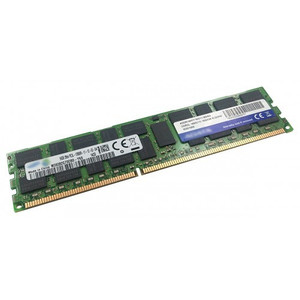
QNAP RAM-16GDR4ECT0-RD-2400 16GB DDR4 ECC Registered DIMM
Overview
The RAM-16GDR4ECT0-RD-2400 is a 16GB DDR4 ECC Registered DIMM running at 2400MHz, designed to expand memory capacity in compatible QNAP NAS systems. ECC (Error-Correcting Code) memory detects and corrects single-bit memory errors on the fly — critical in always-on NAS environments where a silent memory fault can corrupt data across an entire volume. The R-DIMM (registered) form factor provides signal stability at higher capacities, making this the right choice when you're populating multiple DIMM slots or running memory-intensive workloads like virtualization, large ZFS ARC caches, or concurrent surveillance stream indexing on a NAS storage appliance.
Compatibility
This module is validated for use with compatible QNAP NAS models that support DDR4 ECC R-DIMM slots at 2400MHz. QNAP maintains a hardware compatibility list (HCL) on their accessory portal — verify your specific NAS model against that list before ordering, as not all QNAP units accept registered DIMMs (some require unbuffered UDIMM instead). Systems built around Intel Xeon-class processors typically support R-DIMM; ARM-based and entry-level Intel Celeron/Pentium units generally do not. Mixing registered and unbuffered DIMMs in the same system is not supported. If you are also planning storage expansion, pair this with compatible NAS hard drives sourced for your enclosure.
Installation Notes
Power down the NAS completely before installing. Loosen the three rear panel screws, remove the case cover, and locate the DIMM slots on the motherboard. Seat the module firmly until both retaining clips engage. QNAP recommends populating slots in the sequence specified in your model's hardware guide to maintain dual-channel operation where supported. Handle by the edges — avoid contact with gold contacts. After reassembly, the NAS will perform a memory check on first boot; allow additional startup time. For mixed-capacity configurations, consult the QNAP compatibility list for your specific model to confirm supported combinations.