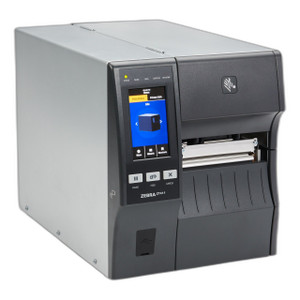
Zebra ZT41142-T01000GA 4-Inch Desktop Thermal Printer
Overview
The Zebra ZT41142-T01000GA is a compact 4-inch desktop thermal printer engineered for warehouse, logistics, and light industrial label printing. This model delivers 14 inches per second print speed at 203 dpi resolution, supported by wired Ethernet, dual-band Wi-Fi, and Bluetooth 4.1 connectivity. The integrated 2D barcode scan engine eliminates the need for a separate handheld scanner in label verification workflows, making it practical for shipping labels, asset tags, and supply chain compliance marking. The ZT41142-T01000GA balances form factor efficiency with operational capability—it won't consume desktop real estate like a full-size industrial printer, yet won't bottleneck throughput in mid-volume operations.
Key Features
- Print Speed: 14 inches per second at native 203 dpi means label batches print in real time without workflow delays. If barcode density or print quality demands increase, the printer steps up to 300 or 600 dpi without a hardware swap—trade-off is reduced speed, but the flexibility matters when label requirements vary across different SKUs or compliance zones.
- Print Width: 4-inch maximum print width handles standard shipping labels, GS1-128 pallet markers, and ASN (advance shipping notice) labels common across North American warehouses. Not suitable for wide-format labels or multi-SKU consolidation tickets.
- Resolution Flexibility: Native 203 dpi works for most barcode and QR applications, but the option to output at 300 or 600 dpi supports high-density 2D codes and fine-detail graphics without requiring a different printer model.
- Integrated 2D Scan Engine: Built-in barcode scanner supports QR Code, Data Matrix, PDF417, Code 128, Code 39, UPC, and EAN symbologies. This means you can print a label and immediately verify it scans correctly without reaching for a handheld device—cuts verification time and reduces human error in label fulfillment.
- Ethernet (Gigabit) Connectivity: Native Gigabit Ethernet port integrates into existing warehouse network infrastructure without requiring USB runs to a PC. Direct network printing reduces setup complexity in multi-station shipping areas.
- Bluetooth 4.1 with MFi Certification: MFi (Made for iPhone) certification means direct pairing with Apple iOS devices running logistics and shipping apps. Android devices connect via standard Bluetooth 4.1. Useful for mobile label printing at receiving docks or picking stations, though you'll need an app that supports the printer's command set.
- Dual-Band Wi-Fi: 2.4 GHz and 5 GHz band support provides flexibility in congested warehouse environments. 5 GHz reduces latency and interference in facilities with heavy Wi-Fi traffic, while 2.4 GHz extends range for distant zones. Neither band is inherently faster for label throughput, but 5 GHz helps if your network is crowded.
- TAA Compliance: Meets Trade Agreements Act requirements—necessary if your procurement goes through government contracts or regulated supply chains. Non-compliance disqualifies a printer from those bids.
- Compact Desktop Form Factor: Smaller footprint than full-size industrial printers optimizes space in shipping departments and smaller distribution centers. The trade-off is media capacity and duty cycle—expect lower sustained throughput than larger models.
Integration & Compatibility
The ZT41142-T01000GA integrates via Ethernet, Wi-Fi, or Bluetooth into warehouse management systems (WMS) and third-party shipping software. Support for multiple 1D and 2D symbologies allows deployment across different labeling standards—GS1-128, QR-based track-and-trace, and proprietary ASN formats. The integrated scan engine enables closed-loop label verification within the same device, reducing SKU processing time. Network printing over Ethernet or Wi-Fi works with standard thermal printer drivers and IPP (Internet Printing Protocol), so integration with existing WMS software typically requires no custom firmware or middleware.
When to Choose a Different Model
If your operation demands sustained print volumes exceeding 500 labels per hour, or if you need thermal and barcode printing on a single pass (combo cards), consider a higher-duty industrial model in the Zebra thermal printer line. For operations requiring 6-inch or wider label media, the ZT41142-T01000GA will not meet the requirement. If print quality at distance (scanning handheld barcodes from meters away) is critical, and your labels are smaller than 2x3 inches, test 600 dpi output first—higher resolution can create legibility trade-offs if media handling or label stock is inconsistent.
Frequently Asked Questions
Q: Does the ZT41142-T01000GA require a separate power supply?
A: The ZT41142-T01000GA requires an external power adapter; it does not draw power via Ethernet or USB. Power consumption and adapter specifications are detailed in the manufacturer datasheet.
Q: Can I print to the ZT41142-T01000GA from a Windows PC and an iOS device simultaneously?
A: The printer can connect to multiple networks (Ethernet + Wi-Fi + Bluetooth) simultaneously, but it processes print jobs sequentially. Ensure your WMS or shipping software queues jobs appropriately to avoid conflicts.
Q: Is the ZT41142-T01000GA NDAA Section 889 compliant?
A: The product is TAA-compliant. NDAA Section 889 compliance depends on supply chain provenance and company-level compliance certifications—contact the manufacturer or your integrator for a formal NDAA compliance statement.
Q: What is the warranty on the ZT41142-T01000GA?
A: Warranty terms are set by the manufacturer and may vary by region and channel. Contact the manufacturer or your specialty reseller for specific warranty details and coverage options.
Q: Can the ZT41142-T01000GA scan barcodes while printing?
A: The integrated scan engine can verify printed labels immediately after printing, enabling closed-loop verification workflows. The printer does not simultaneously print and scan; allow the print job to complete before initiating a scan.
Q: What media types and widths are supported?
A: The ZT41142-T01000GA supports standard thermal label stock up to 4 inches wide. Media specifications, roll configuration, and supported adhesive types are detailed in the manufacturer's technical documentation.
Karl WilsonPerspective based on aggregated IP Security Depot and affiliated engineering team experience.
I evaluated the Zebra ZT41142-T01000GA during integration planning for a mid-size logistics operation, and it strikes a practical balance between compact form factor and operational capability. The 14 ips print speed keeps up with typical warehouse label demand without requiring enterprise-class thermal printer footprint or a dedicated electrical circuit. For operations juggling both network-tethered and mobile device printing, the combination of Ethernet, Wi-Fi, and Bluetooth 4.1 with MFi support removes deployment friction—you can provision the same printer for fixed shipping stations and handheld iOS devices without additional hardware or complex network bridging.
Technical Highlights:
- Print Speed and Resolution: 14 ips at 203 dpi strikes the right balance for shipping labels, ASN labels, and pallet markers. The option to step up to 300 or 600 dpi when barcode density requires it provides contingency without changing hardware. Most warehouses don't need 600 dpi for standard GS1-128 codes, but the flexibility avoids forced hardware upgrades when compliance labels shift to smaller 2D codes.
- Integrated 2D Scan Engine: The built-in scanner eliminates the need for a separate handheld device in label verification workflows. QR Code and Data Matrix support align with modern supply chain compliance demands, and immediate verification immediately after printing catches misfeds or print-quality issues before labels leave the shipping station.
- Multi-Mode Connectivity: MFi-certified Bluetooth enables direct pairing with iOS devices in shipping apps, Gigabit Ethernet integrates into fixed network infrastructure, and dual-band Wi-Fi provides fallback for mobile zones. This flexibility is especially valuable in facilities where shipping stations migrate or where seasonal peaks demand ad-hoc printing spots.
Deployment Considerations:
- The 4-inch print width is a hard constraint—oversized labels or multi-SKU consolidation tickets won't fit. Confirm your label templates fit before commissioning.
- Desktop form factor means lower media capacity and duty cycle than industrial models. If your operation prints more than 500–600 labels per shift consistently, measure actual throughput under load; this model performs best in bursty (on-demand) printing rather than sustained high-volume runs.
- Bluetooth connectivity requires an app on the iOS device that supports the printer's command set. Not all shipping software vendors provide Bluetooth drivers for this model—test integration with your WMS before deployment.
- The scan engine adds cost and complexity compared to a print-only model. If you never verify labels in-machine (you use a separate handheld scanner), that feature is wasted; consider a simpler model in the Zebra thermal printer line.
The ZT41142-T01000GA fits best in mid-volume shipping operations (300–600 labels per day) where multi-protocol connectivity and built-in verification matter, and where desktop real estate is limited. If you need sustained high-volume printing or wide labels, upgrade to a larger industrial model. If you need print-only simplicity and won't use Bluetooth or scanning, downsize to a lower-cost variant. For mixed mobile and fixed-station deployments with iOS devices in your workflow, this model removes integration pain.