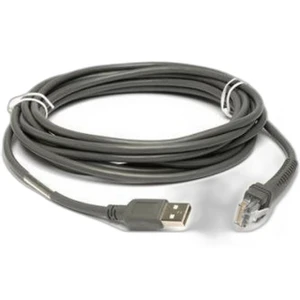
Zebra CBA-UF1-S07ZAR Shielded USB-to-RJ-45 Cable
The Zebra CBA-UF1-S07ZAR is a 6.6-foot shielded USB connectivity cable engineered for direct integration with Zebra barcode scanners and mobile data terminals. This wired cable assembly terminates in a USB Type A male connector on the host side and a 10-pin RJ-45 male connector on the device side, delivering both power and data across a single physical link. The shielded construction is critical in high-RF environments—warehouses with active Wi-Fi infrastructure, retail floors with multiple wireless access points, and logistics hubs where scan-station density runs high all benefit from the electromagnetic interference (EMI) rejection that shielding provides.
Key Features
- Shielded Construction: Foil and braid shielding minimize cross-talk and EMI ingress. In a warehouse with dense Wi-Fi coverage or multiple concurrent Bluetooth devices, unshielded cables introduce bit errors and dropped reads—shielding eliminates that noise floor problem.
- 6.6-Foot Length: Long enough for point-of-sale installations where the scanner sits away from the USB host (dock terminal, checkout stand, back-office workstation). Avoids the cost and clutter of additional hubs or repeaters.
- USB Type A to 10-Pin RJ-45 Configuration: Matches Zebra's proprietary RJ-45 connector pinout used across their mobile computer and fixed-mount scanner lines. Verify your specific Zebra model supports RJ-45 before ordering—some legacy or alternate SKUs use different terminations.
- Operating Temperature Range -30°C to 50°C (-22°F to 122°F): Suits unheated warehouse zones, cold-storage pick operations, and outdoor staging areas where temperature swings are common. Cable jacket and connector materials remain flexible and conductive across this span; outside this range, brittle failure or intermittent contact become risks.
- Integrated Power and Data: Single cable replaces separate power and USB data runs. Reduces installation labor and cable management overhead, especially valuable when retrofitting scanning infrastructure into existing furniture or conveyor frames.
Integration & Compatibility
The CBA-UF1-S07ZAR (often searched as CBA UF1 S07ZAR) integrates directly with Zebra mobile computers and barcode scanners that feature a 10-pin RJ-45 dock connector. Common compatible platforms include Zebra's MC series mobile terminals and fixed scanners in the LS and DS families, though exact compatibility is device-specific. Before deployment, cross-reference your Zebra device model against the Zebra product matrix or contact Zebra support to confirm RJ-45 pinout compatibility. Mismatched pinouts result in no power delivery or intermittent data loss.
For scanner integration projects, this cable is a foundation piece in a larger cabling architecture. Pair it with appropriately rated USB hubs if you need to daisy-chain multiple devices, and verify your host power supply can deliver sufficient current—Zebra mobile computers typically draw 1–3A during peak operation, so undersized USB ports or low-capacity power supplies will trigger shutdown or resets.
Frequently Asked Questions
Q: Does the CBA-UF1-S07ZAR work with all Zebra scanners and mobile computers?
A: No. The RJ-45 10-pin connector is specific to certain Zebra product lines. Verify your device model supports RJ-45 connectivity before purchase. Zebra's product documentation lists compatible models; if unsure, contact the manufacturer or your Zebra reseller.
Q: Can I use this cable outdoors in rain?
A: The cable itself tolerates wet conditions across its operating temperature range, but the USB Type A and RJ-45 connectors are not sealed or waterproofed. For sustained outdoor or splash-prone environments, use a weather-resistant connector housing or IP67-rated docking station rather than exposing bare connectors to moisture.
Q: What is the maximum current the cable can safely carry?
A: USB Type A (at the host end) supports up to 500mA on standard USB 2.0 ports, or up to 1.5A on USB 3.0 high-power ports. Check your host device specifications. Zebra mobile computers typically draw 1–3A, so confirm your USB power source is rated for the device's requirements.
Q: Is the cable compatible with non-Zebra scanners or terminals?
A: Very unlikely. The 10-pin RJ-45 pinout is proprietary to Zebra. Non-Zebra devices use different connectors (USB Type B, DB-9, or RJ-11). Do not attempt cross-brand use without explicit confirmation of pinout compatibility.
Q: Can I extend the cable length beyond 6.6 feet?
A: Chaining USB cables through passive hubs risks voltage drop and data signal degradation, especially over long runs. For distances beyond 6.6 feet, consider an active repeater or relocate your USB host closer to the scanning device.
Ted PerryPerspective based on aggregated IP Security Depot and affiliated engineering team experience.
The Zebra CBA-UF1-S07ZAR is a straightforward accessory that solves a specific integration pain point: connecting Zebra RJ-45 mobile computers and scanners to USB power and data on stationary hosts without resorting to docking stations. Its shielded design is the key differentiator—in a warehouse with active Wi-Fi, dense scanner deployments, or near conveyor motors, unshielded USB cables introduce cumulative bit errors that show up as dropped reads, timeout loops, or spontaneous disconnects. The -30°C to 50°C temperature tolerance matters more than it sounds if you're running scanning operations in climate-controlled distribution centers that undergo seasonal temperature swings or unheated trailer staging areas.
Technical Highlights:
- Shielded Foil and Braid Construction: Attenuates high-frequency RF noise by 20–40 dB depending on frequency band. Translates to fewer retries and faster scan-to-database throughput in noisy RF environments—measurable on high-volume pick operations where each failed read triggers a rescan penalty.
- 6.6-Foot Run: Eliminates the need for secondary USB hubs or extension cables for typical point-of-sale, dock, or back-office scan-station deployments. Each additional hub in the chain introduces latency and power distribution risk; a single direct run simplifies diagnostics and reduces failure points.
- 10-Pin RJ-45 Proprietary Pinout: Matches Zebra mobile computer and scanner docks only; cross-brand use will fail silently or cause power-supply shorts. Compatibility is binary—confirm the match before stock arrival or you'll have shelf inventory with no use case.
Deployment Considerations:
- Verify RJ-45 connector type on your target Zebra device before ordering. Zebra's product lines are fragmented across connector families (RJ-45, USB Type B, proprietary dock); a wrong cable purchase wastes 2–3 days of back-and-forth with suppliers or resellers.
- The bare connectors are not sealed against moisture or dust. In outdoor or high-humidity environments (cold-storage pick, shipping/receiving bays), invest in a weather-resistant dock or connector cap to protect against corrosion and intermittent shorts.
- USB power budgets matter. Zebra MC series mobile computers draw 1–3A depending on load (wireless active, barcode engine firing). Standard USB 2.0 ports deliver 500mA; you need either a dedicated USB 3.0 high-power port or an external USB power supply rated for your device. Undersized power triggers brownout resets during scan or wireless transmission—hard to diagnose without a USB power meter.
Deploy the CBA-UF1-S07ZAR when you're integrating a stationary Zebra mobile computer or scanner into a fixed scan station, dock terminal, or back-office workstation where a docking cradle is overkill. Pair it with a properly sized USB power supply and verify temperature and humidity limits. For mobile-only or frequent hot-swap scenarios, a docking cradle remains the better choice.