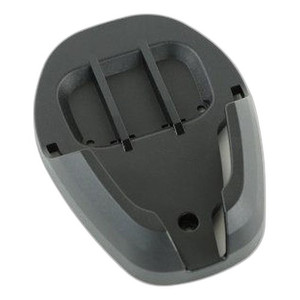
Zebra BRKT-RM0072-04 SP72 Riser Mount Bracket
Overview
The Zebra BRKT-RM0072-04 is a mounting bracket designed specifically to elevate and position the SP72-V scanner in fixed-mount or counter-top configurations. This accessory enables adjustable vertical and angular placement, addressing a core ergonomic challenge in point-of-sale and logistics environments: forcing operators to bend or reach awkwardly to scan items degrades throughput and creates repetitive strain. The riser mount solves this by allowing you to position the scanner at a natural working height and angle, reducing operator fatigue during 8+ hour shifts and improving scan consistency.
Key Features
- SP72-V Compatibility: Purpose-built for the Zebra SP72-V scanner family — no adapter plates or workarounds needed. Direct mounting ensures a stable, tool-free installation that integrates seamlessly into checkout lanes and warehouse scanning stations.
- Elevation and Angle Adjustment: Riser design lifts the scanner off the counter surface, allowing you to optimize the scan angle relative to merchandise or barcode presentation. This flexibility means one bracket configuration can serve multiple scanning workflows without repositioning hardware.
- Ergonomic Positioning: By raising the scanner to eye level or chest height, the bracket reduces neck and shoulder strain during high-volume scanning operations. Over a full shift, this translates directly into fewer operator errors and reduced fatigue-related throughput loss.
- Midnight Black Finish: Industrial-grade powder coat resists fingerprints and blends with standard POS terminal and warehouse equipment aesthetics. The finish holds up in humid retail and logistics environments without chipping or discoloration.
- Straightforward Installation: No firmware updates, no PoE configuration, no network skills required. Integrators can deploy the bracket during terminal setup or retrofit it into existing SP72-V installations in minutes. Mounting hardware is integrated into the design.
- Multi-Station Scalability: Identical design across checkout lanes or warehouse aisles means you maintain consistent operator ergonomics and scan positioning throughout the facility. Replacement or relocation is quick and non-disruptive.
Integration & Compatibility
The BRKT-RM0072-04 (often searched as BRKT RM0072 04) is a plug-in accessory — no additional power, network, or software dependencies. It works with existing SP72-V scanners without modification. Deploy it in conjunction with your Zebra scanning and mobile compute devices or pair it with a point-of-sale terminal system for complete checkout automation. For integrators managing multi-scanner deployments, consider pairing the riser mount with standardized cable management to keep counter surfaces clean and reduce trip hazards.
When to Choose a Different Approach
If your scanning operation requires full 360° rotation or motorized positioning, a articulating arm mount may be more suitable. If space is severely constrained (e.g., self-checkout kiosk with minimal overhang), evaluate a lower-profile stand or wall-mount variant within the Zebra mounting accessory family. For handheld or mobile scanning workflows, the riser mount does not apply — use a holster or vehicle mount instead.
Frequently Asked Questions
Q: Is the BRKT-RM0072-04 compatible with other Zebra scanner models?
A: The BRKT-RM0072-04 is designed specifically for the SP72-V scanner. Compatibility with other Zebra models (e.g., DS3678, LI3608) is not supported. Consult the scanner's documentation or your integrator to confirm mounting options for other devices.
Q: Can I adjust the scan angle after installation?
A: Yes. The riser design allows for angle adjustment to optimize barcode presentation and operator ergonomics. Adjustments do not require tools and can be made during setup or during operational reconfigurations.
Q: What's the maximum weight the bracket can support?
A: The bracket is rated for the SP72-V scanner weight and standard operating loads. Do not mount additional devices or attach unsupported weight to the bracket. Contact the manufacturer or your integrator if you need load-bearing verification.
Q: Does the bracket include mounting hardware?
A: Yes. Mounting hardware is integrated into the bracket design for straightforward counter-top or wall installation. No additional fasteners or plates are required for standard deployments.
Q: Is the Midnight Black finish durable in high-humidity environments?
A: The powder-coat finish is designed for retail and warehouse environments. In consistently wet or high-salt environments (e.g., outdoor kiosks or food processing), periodically wipe down the bracket to prevent residue buildup and maintain appearance.
Q: How long does installation typically take?
A: Installation is tool-free and takes 5–10 minutes for a single unit. Multi-station deployments benefit from batch installation, allowing integrators to mount brackets across all checkout lanes or warehouse stations in a single pass.
Ted PerryPerspective based on aggregated IP Security Depot and affiliated engineering team experience.
The BRKT-RM0072-04 is a straightforward but essential piece of the SP72-V deployment puzzle. Its value lies not in exotic features but in addressing a real operational friction point: poorly positioned scanners cost time and create injury risk. A riser mount that allows angle adjustment eliminates the need for operators to crane their necks or reach awkwardly — and that compounds across a 40-checkout facility operating 16 hours a day.
Technical Highlights:
- SP72-V Direct Mount: Purpose-built compatibility means zero adapter complexity. Install once, it stays stable across thousands of scans without drift or loosening.
- Adjustable Elevation and Angle: Allows positioning at natural eye or chest height, reducing per-scan operator effort. Measurably decreases fatigue during 8+ hour shifts in high-volume retail or logistics.
- Midnight Black Powder Coat: Industrial finish resists fingerprinting and moisture — important in humid warehouse and POS environments where equipment sits exposed to cleaning cycles and product dust.
Deployment Considerations:
- The BRKT-RM0072-04 assumes counter-top or fixed-mount use. If your workflow requires handheld scanning or frequent repositioning, a holster or articulating arm is more appropriate.
- Angle adjustment is manual and non-motorized. Once positioned, the bracket is stable, but reconfiguring multiple stations for a different workflow requires physical adjustment at each location — plan batch adjustments during downtime rather than piecemeal during operation.
Deploy the BRKT-RM0072-04 in high-volume retail or warehouse scanning stations where operator ergonomics directly impact throughput and injury prevention. It's not a feature-rich accessory, but it solves a concrete problem: giving your scanning team a properly positioned device reduces wrist strain, scan errors, and cycle time. Over a 24-month deployment across a 30-station checkout bank, that compounds into measurable labor productivity gains.