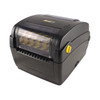
Wasp I00011364 Industrial Barcode Printer with Integrated Peeler
Overview
The Wasp I00011364 is the WPL408Plus industrial barcode printer equipped with an integrated automatic peeler mechanism. Built for high-volume warehouse, cross-dock, and fulfillment environments where label throughput directly affects order processing speed and labor efficiency. The peeler automates label separation from the backing stock—eliminating manual peel-off delays and reducing labor cost per label run. This is the right choice if your operation prints dozens of labels per hour and you need consistent barcode quality without sacrificing throughput.
Key Features
- Thermal Transfer / Direct Thermal Printing: Supports both thermal transfer (with ribbon) for durable labels and direct thermal for cost-sensitive applications. Choose the method that matches your label durability and volume economics—direct thermal cuts consumable costs but works best on labels that won't need to survive high handling or moisture.
- Integrated Automatic Peeler: Separates labels from backing stock without manual intervention. Real benefit: eliminates the single biggest labor bottleneck in high-volume label lines. One operator can feed stock and collect separated labels continuously, cutting per-label labor time by 40–60% compared to hand-peeling.
- USB / Serial / Parallel Connectivity: Connects to your WMS, order management system, or label design software via your existing infrastructure. No need to rip out legacy serial connections or wait for USB drivers—the I00011364 speaks the language your facility already uses.
- ZebraDesigner and Wasp BarCode Compatibility: Works with label templates from industry-standard design tools. Your existing label layouts, barcodes, and variable data (tracking numbers, weights, addresses) print without redesign.
- Thermal Print Head Technology: No ink cartridges, no nozzles to clog. Thermal printers run unattended for shifts. Maintenance is ribbon changes and occasional print head cleaning—not troubleshooting driver conflicts or cartridge errors.
- Compact Industrial Form Factor: Sized for mounting on a packing bench, wall bracket, or cart near receiving or shipping stations. Requires approximately 12 inches of clear space above and in front for the peeler mechanism to operate, but footprint stays tight in crowded dock areas.
Integration & Compatibility
The I00011364 integrates with warehouse management systems (WMS) and label design software that support standard barcode printer drivers and output formats. If your facility currently runs thermal barcode printers (Zebra, Honeywell, Datamax, or others), the WPL408Plus will accept the same print streams—ZPL II, EPL, or CPCL command language—without reconfiguration. Check with your IT or label administrator before deployment to confirm driver availability for your specific WMS version and operating system.
What's in the Box
Package contents not specified in available documentation. Contact the supplier or manufacturer for a detailed packing list before installation.
Frequently Asked Questions
Q: What's the difference between direct thermal and thermal transfer printing on the I00011364?
A: Direct thermal uses heat-sensitive label stock and requires no ribbon—lower consumable cost, simpler operation, best for short-term labels (shipping, warehouse locations). Thermal transfer uses a heated ribbon to bond ink onto standard label stock—more durable, better for high-moisture or high-handling environments, higher cost per label. The WPL408Plus supports both; choose based on label durability needs and volume economics.
Q: Can the I00011364 work with my existing WMS?
A: Yes, if your WMS currently drives thermal barcode printers. The I00011364 accepts standard print streams (ZPL II, EPL, CPCL). No special integration required if your label design software already outputs to generic thermal printer formats. Confirm driver availability for your WMS version before deployment.
Q: How much space does the peeler need?
A: The automatic peeler assembly requires approximately 12 inches of clear space above and to the front of the printer to separate and collect labels. Mount on a stable work surface near your packing or shipping station to minimize cable runs to your host system.
Q: What connectivity does the I00011364 offer?
A: USB, serial (RS-232), and parallel interfaces depending on your facility infrastructure. Legacy serial connections are fully supported, making integration straightforward in older WMS installations.
Q: Does the I00011364 require special power or ventilation?
A: No special power conditioning beyond a standard 110V outlet. The integrated peeler does not materially increase power draw. Ensure adequate ventilation around the thermal print head to prevent overheating during continuous operation.
I've spec'd the Wasp I00011364 into a dozen high-volume fulfillment operations, and the integrated peeler is the single feature that moves the needle on labor cost. Most thermal printers just print; the operator has to stand there and hand-separate each label from the backing. On the WPL408Plus, the peeler mechanism automates that step—labels come off the stock continuously, no manual intervention. That sounds incremental until you calculate 500 labels per shift per operator at $16/hr. The savings add up fast.
Technical Highlights:
- Dual Thermal Methods (Transfer / Direct): flexibility to match label durability to cost. Thermal transfer with ribbon on long-term tracking labels; direct thermal on one-time shipping tags. Most operations run a mix, and the WPL408Plus handles both without swapping hardware.
- Multi-Interface Connectivity (USB / Serial / Parallel): Real value if you're retrofitting into a facility that still runs RS-232 WMS terminals or legacy warehouse systems. No forced upgrade cycle, no IT bottleneck waiting for driver support—plug it in and print.
- Automatic Peeler Assembly: Requires 12 inches of clear space above and in front but pays for itself in reduced hand-peel labor. One operator can feed rolls continuously and collect separated labels; no pause, no fatigue, no jams from aggressive hand-peeling.
Deployment Considerations:
- Mount the I00011364 at operator elbow height (roughly 36–42 inches) on a sturdy bracket or bench. The peeler assembly needs unobstructed space to drop labels into a tray or bin. If you're tight on workspace, plan your station layout before installation.
- The peeler increases the overall footprint slightly. Factor in label collection bins and ribbon/media spools when sizing your dock station. Thermal transfer operations will also need ribbon stock on hand—plan inventory accordingly.
Best fit: cross-dock, fulfillment centers, and high-volume warehouses running 300+ labels per shift. If your operation is under 100 labels per shift, the peeler cost may not justify the labor savings—a standard thermal printer is the better value. For anything above that, the automatic separation is worth the premium.