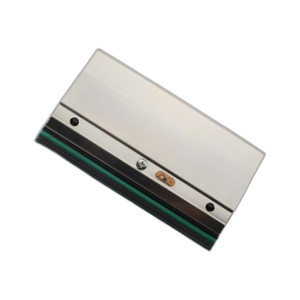
Wasp 633809003349 WPL206 Series Peel Off Module
Overview
The Wasp 633809003349 is a peel-off module designed exclusively for the WPL206 series label printer family. This accessory enables automatic label peeling and dispensing, eliminating manual label separation in high-volume printing environments. Deploy this module when you need to integrate label printing into barcode-driven warehouse workflows or retail systems where throughput matters — peel-off capability reduces label handling labor and minimizes jams from manual removal. The module features a factory-installed label peeler with an integrated sensor to fully automate the label removal process.
Key Features
- Integrated Sensor: The sensor detects label position and triggers automatic peeling at the right moment, eliminating timing guesswork and reducing operator intervention. This is critical in high-speed environments where manual peel timing creates bottlenecks and label tears.
- Factory-Installed Configuration: Ships pre-assembled and calibrated for the WPL206 printer — no field calibration or complex setup required. You mount it and it works, reducing deployment time in busy logistics centers.
- Automatic Label Removal: Once a label prints, the peeler separates it from the backing automatically, feeding it forward without human touch. In retail or parcel operations running 100+ labels per hour, this eliminates a dedicated label-handling worker per printer station.
- Labor Reduction: Removes the need for manual label peeling, which is repetitive, error-prone, and a bottleneck in high-throughput environments. Direct cost savings come from redeploying that labor to higher-value tasks.
- Jam Prevention: Automatic peeling eliminates torn labels and backing jams caused by uneven manual removal — a common source of downtime in retail point-of-sale or shipping label systems. Fewer jams mean fewer printer stoppages and fewer wasted labels.
- WPL206 Series Compatibility: This module works exclusively with Wasp WPL206 series printers. Verify your printer model matches the WPL206 family before ordering — this module is not backward-compatible with earlier Wasp printer generations or other brands' platforms.
Integration and Compatibility
The Wasp 633809003349 module integrates directly with the WPL206 series printer ecosystem. Before installation, confirm your printer is a WPL206 model and that your firmware version supports peel-off modules — some legacy versions may require a firmware update from Wasp support. Mount the peeler to the printer's front or side according to your facility layout and label workflow. Ensure adequate clearance in front of the peeling edge for labels to exit without obstruction. Check that your power supply and printer firmware support the module before installation. Consult the Wasp WPL206 printer manual for exact mounting torque, positioning requirements, and any necessary firmware configuration steps.
What's in the Box
Factory installed label peeler with sensor. Verify with your Wasp sales representative before ordering to confirm whether this unit ships pre-installed on a new printer or as a standalone retrofit module for an existing WPL206 unit.
Frequently Asked Questions
Q: Will the Wasp 633809003349 work with my older Wasp printer model?
A: No. The 633809003349 is designed exclusively for Wasp WPL206 series printers. It is not backward-compatible with earlier Wasp printer generations. Verify your printer model is WPL206 before ordering.
Q: Does the 633809003349 require a separate power supply?
A: The module draws power from the WPL206 printer itself — no additional power connection is required. Confirm your printer's power supply has sufficient capacity before installation; consult the WPL206 manual for power budget details.
Q: What happens if the integrated sensor fails?
A: If the sensor fails, the peeler will not function automatically. Contact Wasp support for sensor replacement or warranty service. The printer itself will continue to operate normally, though manual label peeling will be required as a workaround.
Q: Can I install the 633809003349 myself?
A: Yes, the module is designed for field installation on WPL206 printers. Mount it according to the WPL206 manual's specifications for torque and positioning. If you encounter issues, contact Wasp technical support for guidance.
Q: Will the peeler work with all label sizes supported by the WPL206?
A: The peeler handles the label sizes and media types supported by the WPL206 printer. Consult your WPL206 documentation for approved label dimensions and media specifications.
I look at the Wasp 633809003349 as a straightforward labor-shedding accessory — when you're running a high-volume label operation with the WPL206 printer family, the integrated sensor on this peel-off module pays for itself in saved operator time. The key detail is that it's factory-installed and calibrated; you're not troubleshooting sensor alignment in the field, which matters when your bottleneck is label throughput, not printer uptime.
Technical Highlights:
- Integrated Sensor with Automatic Trigger: The sensor detects label position and fires the peeler at the exact moment the label exits the print zone. This eliminates the timing variance that comes with manual peeling — no more torn labels or missed peels in high-speed batch runs.
- Factory Calibration: Ships pre-tuned for WPL206 media path and speed. You install it, mount it, and it works. No field sensor offset tweaking or firmware hunting — critical when you need the printer operational in days, not weeks.
- Power Integration: The module pulls power from the WPL206 itself; you're not adding another wall adapter or straining your printer's PSU budget. Verify your PSU headroom in the WPL206 manual before deployment.
Deployment Considerations:
- Clearance in front of the peel edge is non-negotiable — if you mount this in a tight cabinet or against a wall, the labels will pile up or jam. Measure twice, mount once.
- This module only works with WPL206 series printers. If you have a mix of older Wasp models in your facility, you cannot use the 633809003349 on them — verify model numbers before bulk ordering.
Position the 633809003349 in parcel shipping or retail point-of-sale environments where you're printing 100+ labels per shift per printer and labor cost is the real budget item. Manual peeling at that scale is the bottleneck, not the printer itself.