
Workstations & Terminals
Showing Results for Workstations & Terminals
-

PioneerPOS
SKU: Q12-HC4FNQ-52
PioneerPOS SL2 15" 29G 4GB 120SD W10LTSC2021 Msr - Q12-HC4FNQ-52
- Windows 10 LTSC eliminates forced OS updates, preventing surprise reboots mid-shift.
- Integrated MSR via USB reduces external hardware count and simplifies counter deployment.
- 120GB SSD with 2.9GHz CPU and 4GB RAM handles local transaction buffering without lag.
$3,919.34 $2,165.99 Save $1,753.35 -
PioneerPOS
SKU: KC8FCQ000535
PioneerPOS SL2 15" I3 8G 120SSD W10PRO 3TK USB Prt - KC8FCQ000535
- Intel Core i3 with 8GB RAM handles concurrent POS transactions without lag.
- 120GB SSD accelerates database reads for receipts, catalogs, and customer logs.
- Integrated 3-track MSR and USB printer port reduce peripheral wiring at deployment.
$3,732.99 -
PioneerPOS
SKU: NC8FCQ000035
PioneerPOS SL2 15" I5 8G 120SSD W10PRO USB Prnt - NC8FCQ000035
- All-in-one 15" display and CPU unit reduces cabling complexity for counter deployments.
- Intel Core i5 with 8 GB RAM handles concurrent POS, inventory, and CRM without lag.
- 120 GB SSD eliminates moving-part failure risk and accelerates application boot times.
$4,027.99 -
PioneerPOS
SKU: NC8GCQ000535
PioneerPOS SL2 15" I5 8GB 240SSD W10PRO USB Prt - NC8GCQ000535
- Intel Core i5 CPU with 8GB RAM ensures responsive transaction processing under sustained load.
- 240GB SSD eliminates mechanical-disk latency, reducing application startup and settlement delays.
- Windows 10 Pro enables Group Policy management and legacy POS platform compatibility enterprise-wide.
$4,297.99 -
PioneerPOS
SKU: KC8GCQ000035
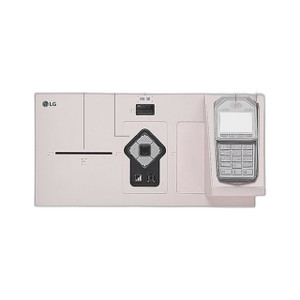
PioneerPOS SL2 I3 8G 240SSD W10P USB Prnt - KC8GCQ000035
- Intel Core i3 with 8GB RAM handles concurrent POS workloads without slowdown.
- 240GB SSD enables sub-30-second boot and eliminates mechanical drive failure risk.
- Windows 10 Pro includes BitLocker, domain join, and remote desktop out of the box.
$3,708.99 -
PioneerPOS
SKU: MH9-NCFFJF-54
Pioneerpos SL2 I5 16 120 Ltsb Audio HID Usb*2 Adx - MH9-Ncffjf-54
- Intel Core i5 with 16GB RAM supports concurrent POS, payment, and inventory workloads.
- 120GB SSD eliminates mechanical failure risk and delivers fast application boot times.
- Windows LTSB OS provides controlled update cycles critical for PCI-DSS compliance.
$4,059.99 -
PioneerPOS
SKU: 4GB-FATS07
PioneerPOS SR+EMV Encrypted:TSYS/FirstData - 4GB-FATS07
- Encrypts card data at point-of-swipe; raw PAN never reaches POS app or network.
- Supports TSYS and FirstData endpoints, enabling processor transitions without hardware swap.
- Handles both magnetic stripe and EMV chip cards in one internal module for full card coverage.
$556.25 $372.99 Save $183.26 -
PioneerPOS
SKU: 42-TPMIN01R20
PioneerPOS ST/CT TPM 1.2 adapter 20-pin - 42-TPMIN01R20
- TPM 1.2 compliant adapter maintains trusted platform authentication in POS deployments.
- 20-pin connector ensures direct compatibility with PioneerPOS ST and CT terminal platforms.
- OEM power supply adapter supports mixed-generation terminal upgrades without hardware conflicts.
$192.13 $191.99 Save $0.14 -
PioneerPOS
SKU: DM4FCQ000030
PioneerPOS ST2 I5 4G 120G W10P Vesa - DM4FCQ000030
- VESA-standard interface ensures broad compatibility with existing mount hardware.
- Engineered specifically for ST2 I5 4G 120G W10P terminals for a confirmed fit.
- Supports wall-mount and fixed configurations to optimize space and cable routing.
$2,451.99 -
PioneerPOS
SKU: DM4FKQ005030
PioneerPOS ST2 i5 4GB 120SSD W10 LTSC No mounting - DM4FKQ005030
- Intel Core i5 with 4 GB RAM supports 4–8 simultaneous 1080p IP camera streams.
- Windows 10 LTSC delivers a stable, predictable patch cycle for always-on deployments.
- Ships without mounting hardware, integrating into existing brackets or freestanding setups.
$2,873.99 -
PioneerPOS
SKU: DM4FCF000030
PioneerPOS ST2 Pcap I5 4G 120G W10P Vesa - DM4FCF000030
- VESA-standard pattern ensures broad compatibility with walls, desks, and stands.
- Engineered specifically for the ST2 Pcap I5 4G 120G W10P terminal.
- Factory-new condition with full US warranty simplifies procurement compliance.
$3,911.99 -
PioneerPOS
SKU: DM4FKFG00010
PioneerPOS ST2 PCAP i5 4G W10L SPK CAM - DM4FKFG00010
- Intel i5 with 4GB RAM handles POS, KDS, and self-checkout without external compute nodes.
- PCAP capacitive touchscreen resists fingerprints and moisture in food-service checkout lanes.
- Dual Ethernet + 4G connectivity keeps transactions online if primary wired link fails.
$3,690.99 -
PioneerPOS
SKU: CW4FJF010121
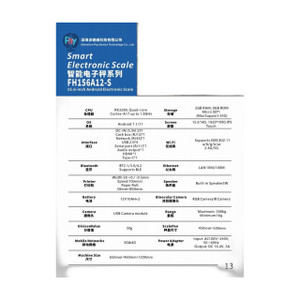
PioneerPOS ST3 15.6 22G 4G W10ENT Wifi Msr Hbase - CW4FJF010121
- 15.6-inch touchscreen consolidates display and input on a single counter unit.
- Windows 10 Enterprise ensures native compatibility with existing POS and payment software.
- Built-in MSR eliminates external card-reader peripherals, reducing cable clutter at the terminal.
$2,406.99 -
PioneerPOS
SKU: MH9-CWFGKF-P2
PioneerPOS ST3 15.6 Cel 16G 240G Ltsc Msr Vbase - MH9-CWFGKF-P2
- 16GB RAM supports concurrent POS, payment gateway, and reporting tasks without lag.
- 240GB SSD eliminates mechanical failure risk and cuts boot and application load times.
- Windows 10 LTSC preload reduces forced update disruptions for stable POS lifecycle management.
$2,286.99 -
PioneerPOS
SKU: MH9-DWFGKF-H2
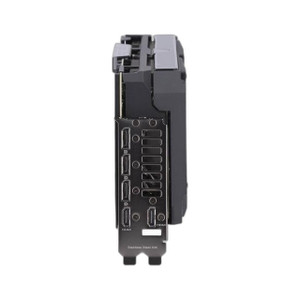
PioneerPOS ST3 15.6 I5 16G 240G Ltsc Msr Hbase - MH9-DWFGKF-H2
- Intel i5 with 16 GB RAM sustains concurrent POS, KDS, and inventory sync without lag.
- 240 GB SSD delivers fast boot and local transaction caching on Windows LTSC for stability.
- Integrated MSR eliminates a discrete card-reader device, reducing PCI audit surface area.
$2,290.99 -
PioneerPOS
SKU: MH9-DWFGKF-P2
PioneerPOS ST3 15.6 I5 16G 240G Ltsc Msr Vbase - MH9-DWFGKF-P2
- Intel Core i5 with 16GB RAM sustains concurrent POS and database ops without swap overhead.
- 240GB SSD eliminates mechanical failure risk, supporting reliable 24/7 retail deployment.
- Integrated MSR removes external card reader dependency, simplifying counter hardware footprint.
$3,249.99
Workstations & Terminals
Surveillance workstations and terminals provide the computing power required for live monitoring, playback, and video management software (VMS) operation. Designed for control rooms and security desks, these systems ensure smooth performance in high-camera-count environments.
Plan Your Deployment
- Camera count and simultaneous live view requirements
- VMS compatibility and hardware specifications
- GPU and decoding performance needs
- Monitor output configuration and multi-display setup
- Control room ergonomics and operator workflow planning
Workstations & Terminals — Engineering-Grade Video Recording & Storage for Commercial Deployments
This category covers 13 working models of workstations & terminals sourced manufacturer-direct or through channel-direct US distribution. Build the rest of your system around the architectural choices below — compatibility, environmental rating, and lifecycle decisions made here propagate through every downstream component you specify.
What to Look For
Channel count and supported resolution define the recorder's ceiling. A 16-channel NVR rated for 8MP per channel is a different product from a 16-channel rated for 2MP — the latter throttles your future camera upgrades. Read the per-channel and aggregate bitrate ceilings (often expressed in Mbps incoming/outgoing). A safe rule: target an NVR with at least 50% headroom on bitrate, and channel count one step above current need.
Storage architecture matters as much as raw capacity. Surveillance-grade drives (WD Purple, Seagate SkyHawk) are tuned for 24/7 write loads and a small concurrent read count; desktop drives fail in months under the same workload. RAID levels affect both fault tolerance and write performance — RAID 5 for general retention with one drive of redundancy, RAID 6 or 10 for larger arrays where two-drive failure isn't recoverable in RAID 5.
VMS choice locks you into a vendor ecosystem more than any camera decision will. Genetec, Milestone, Hanwha Wisenet WAVE, Avigilon, and Axis Camera Station differ on per-camera licensing cost, third-party integrations (access control, video analytics, identity), and analyst workflow. Demo the operator interface with the people who will actually use it before committing — analyst frustration drives more replacements than technical limits.
Plan for off-site or redundant storage. Single-site recorders fail or get stolen. Cloud-archive licensing, NAS replication, and multi-site federation become important the moment a chain customer asks for centralized investigation tools. Recorders that bury cloud-archive in a per-camera SaaS bundle drive long-term costs much higher than a one-time NAS expansion.
Key Specs in This Category
| Spec | Available Options |
|---|---|
| Resolution | 8MP, Thermal |
| Connectivity | Wired, Cellular |
| Power | AC/DC, PoE++ |
| Channels | 4 |
| Storage | SSD, microSD, HDD |
| Type | NVR, Controller |
Top Brands in This Category
Frequently Asked Questions
How many drives can fit in a typical NVR?
Compact desktop NVRs hold 1-2 drives — typically capping around 16TB usable. Mid-size rack-mount NVRs hold 4-8 drives, often 32-64TB usable in RAID 5/6. Enterprise NVRs and dedicated storage servers scale to 16+ drives with hot-swap and JBOD expansion. Match drive count to your retention math; running out of drive bays mid-project means a recorder replacement, not just a drive add.
Should I use surveillance-grade or enterprise drives?
Surveillance-grade drives (WD Purple, Seagate SkyHawk) are correct for most NVRs — they're tuned for many concurrent write streams from cameras with low read count. Enterprise drives (WD Gold, Seagate IronWolf Pro, Exos) are appropriate for high-channel-count systems with many concurrent investigator clients reading recorded video. Avoid desktop drives entirely; they're rated for 8x5 light duty and fail quickly in 24/7 NVR loads.
What's the difference between an NVR and a hybrid recorder?
An NVR records exclusively from IP cameras over Ethernet. A hybrid (or tribrid) recorder accepts both IP cameras and legacy analog/HD-over-coax cameras on dedicated BNC inputs, useful for migrations where you can't replace coax runs immediately. Hybrid units cost more per channel and add complexity; if you're starting fresh or fully replacing analog, a pure NVR is simpler and almost always cheaper per usable channel.
Can I expand storage on an existing NVR?
Most rack NVRs and storage servers accept storage expansion via empty drive bays, eSATA/SAS JBOD shelves, or iSCSI targets. Desktop NVRs with only 1-2 bays generally do not. Before buying, check the recorder's supported expansion architecture and the maximum raw and usable capacity — many sub-$2,000 NVRs cap below the 24TB threshold most projects need within three years.
Do I need a dedicated VMS workstation?
For a few cameras and one or two simultaneous operators, the NVR's built-in client interface is enough. For 32+ cameras, multiple investigator seats, video walls, or wall-of-monitors operations, a dedicated workstation (or thin client) running the VMS client is standard. The workstation needs adequate GPU decode capacity for the simultaneous stream count — H.265 decode acceleration is essential at scale.
Need help choosing? Talk to a Senior Specialist — direct line 877-277-7147 or request a quote.