Product images are provided for reference and may not represent the exact model, configuration, or included components.

No Bots, Just Experts

Questions about this product? Free pre-sales support from a senior specialist — product questions, compatibility checks, BOM quotes, price confirmation — typically answered within one business day. Need camera placement or system design work? Engineering time is $175 per hour (qty 1 = 1 hour). Hardware buyers get up to one hour ($175) credited back on their order.

Description

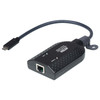
ATEN KA7183 USB-C Virtual Media KVM Adapter

Overview

The ATEN KA7183 is a USB-C virtual media KVM adapter designed for direct connection to a computer. It enables remote management capabilities, allowing you to control a server or workstation from a KVM over IP console. This adapter is suitable for rack-mount deployments where direct console access is required for maintenance or troubleshooting.

Compatibility

This adapter connects to a single computer via a USB Type-C male connector. It is intended for use with ATEN KVM over IP switches and extenders that support USB Type-C virtual media functionality. Ensure your KVM console and managed device are compatible with USB Type-C connectivity for full feature support.

Installation Notes

The KA7183 operates within a storage temperature range of -20°C to 60°C (-4°F to 140°F). It is designed for rack-mount integration, implying it will be installed within a server rack environment alongside other IT equipment. Power is supplied via the connected KVM console.

Specifications
Mount Type: Rack
Computer: 1 x USB Type C Male
Power: 1 (Orange)
Storage Temperature: -20–60°C
Q&A
Reviews
Have Questions?

ATEN Usb-c Virtual Media KVM Adapter - KA7183

$223.00
$179.99

RELATED PRODUCTS

System Design, Deployment & Technical Support

Support services and planning resources for commercial surveillance, access control, and infrastructure deployments.

Fixed scope • Fixed price

System Design Assistance

  • Get help validating product compatibility
  • Coverage requirements
  • Storage planning and deployment architecture before you buy.
Request Design Help

Deployment & Configuration Support

  • Access fixed-scope support for rollout planning
  • User setup guidance
  • Migration and system standardization across single-site or multi-site deployments
View Support Services

Guides, Tools & Calculators

  • PoE requirements
  • Storage retention
  • Camera selection and deployment methodology
Open Technical Resources