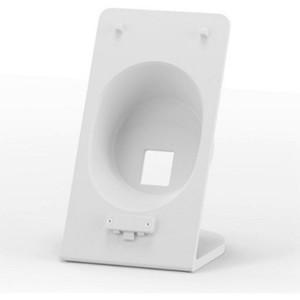
Ubiquiti UACC-CKG2-PLUS STAND Desktop Controller Stand
Overview
The UACC-CKG2-PLUS STAND is a purpose-built mounting accessory for the Ubiquiti Cloud Key Gen2 Plus controller. Constructed from aluminum alloy, it provides a stable desktop deployment option for organizations running Ubiquiti IP cameras, wireless, switching, and security gateway infrastructure. This stand is designed for integrators and IT teams that need clean, accessible controller placement in office, network operations center (NOC), or on-site installation environments — situations where rack mounting isn't practical but desktop space is limited.
Why This Stand Matters
The Cloud Key Gen2 Plus is a network appliance, not a typical camera. It sits at the center of your UniFi ecosystem, managing camera recordings, NVR functions, switching, WiFi, and access control integrations. Keeping it accessible, well-ventilated, and cable-friendly is not a luxury — it's a baseline operational requirement. A proper stand prevents the device from sitting loose on a shelf, eliminates cable stress, and makes status monitoring and maintenance straightforward.
Key Features
- Compact aluminum construction: 5.3 x 2.8 x 1.7 inches and 7.9 oz — small enough to fit on a standard desk or shelf without eating up valuable real estate, but rigid enough to hold the controller securely without vibration or tilt.
- UniFi ecosystem compatibility: Designed exclusively for the Cloud Key Gen2 Plus (UCK-G2-PLUS). Works within any UniFi deployment — camera, switching, WiFi, security, or mixed environments. No compromises on form factor or cable routing.
- Cable management access: The stand geometry maintains clear access to rear and side ports so you can run Ethernet, USB, power, and backup storage connections without kinks or pinches. Critical for long-term reliability.
- Stable platform for 24/7 operation: The stand prevents the controller from sliding or shifting during thermal cycling or vibration from nearby equipment — a real concern in busy NOC environments or equipment racks.
- Standalone or adjacent to rack deployment: Suitable for desktop-only setups or for positioning the Cloud Key next to (but not inside) a patch panel or switch cabinet, where cable runs are simpler to manage.
Integration & Compatibility
The UACC-CKG2-PLUS STAND works with the UCK-G2-PLUS controller only. If you're managing a mixed NVR and switching infrastructure through UniFi, this stand ensures your management appliance stays accessible and protected from accidental contact or cable strain. The stand does not support older Cloud Key Gen 1 models or competing third-party controllers.
Deployment Notes
This is not a rack mount or DIN-rail accessory. Choose this stand if your Cloud Key deployment is desktop-based or positioned on a shelf near (but outside) a rack. If your infrastructure is fully rack-mounted, consider a rack-mount tray or enclosure instead. The stand's small footprint makes it ideal for distributed deployments across multiple sites, where each location runs a local or remote Cloud Key instance.
Frequently Asked Questions
Q: Does the UACC-CKG2-PLUS STAND work with the original Cloud Key or Cloud Key Gen2?
A: No. This stand is designed specifically for the Cloud Key Gen2 Plus (UCK-G2-PLUS). The original Cloud Key and Cloud Key Gen2 have different form factors and are not compatible with this stand.
Q: Can I use this stand in a rack cabinet?
A: The UACC-CKG2-PLUS STAND is a desktop stand, not a rack-mount accessory. It's designed for shelf or desk placement. For rack environments, explore dedicated rack-mount trays or enclosures instead.
Q: Is the stand easy to install?
A: Yes. The stand is a passive aluminum mounting platform. Place the Cloud Key Gen2 Plus on the stand, verify it's level and stable, then connect cables. No tools or configuration required.
Q: What's the weight capacity of the stand?
A: The stand is engineered for the Cloud Key Gen2 Plus, which weighs approximately 15 oz. It provides ample structural margin for that appliance. Do not attempt to stack or attach additional equipment to the stand.
Q: Is ventilation affected by using a stand?
A: No. The stand's open aluminum frame maintains airflow around the Cloud Key Gen2 Plus. Ensure adequate ambient airflow in your installation space (normal office or NOC environment conditions are sufficient).
Ted PerryPerspective based on aggregated IP Security Depot and affiliated engineering team experience.
The UACC-CKG2-PLUS STAND is a small but often-overlooked detail in UniFi deployments. Controllers sitting loose on shelves pick up vibration, accumulate cable stress, and become harder to monitor in busy environments. A 5.3-inch aluminum stand doesn't sound significant until you're troubleshooting a Cloud Key Gen2 Plus that's been sliding around a desk for six months.
Technical Highlights:
- Compact footprint (5.3 x 2.8 x 1.7 inches): Fits on standard office shelves or NOC desks without monopolizing real estate. The small profile also makes it portable if you need to move the controller between sites.
- Aluminum alloy construction: Rigid enough to eliminate micro-vibration that can affect network performance over time, yet lightweight enough to move without effort. Aluminum also dissipates minor heat load away from the control device.
- Cable management geometry: The stand's open design keeps rear ports fully accessible. This matters in multi-cable deployments (Ethernet backup, USB storage, power, optional PoE injector) where cable pinches degrade performance.
Deployment Considerations:
- This stand is UCK-G2-PLUS only — verify your controller model before purchasing. Older Cloud Key variants and competing NVR appliances will not fit.
- If your architecture requires rack mounting, this stand won't work. Choose a rack-mount enclosure or tray instead. Desktop and rack placements are mutually exclusive for this product line.
Deploy this stand in any UniFi environment where the Cloud Key Gen2 Plus lives on a desk, shelf, or table. It's standard practice in distributed branch deployments and multi-site NOC operations where the controller sits adjacent to (not inside) network cabinets.