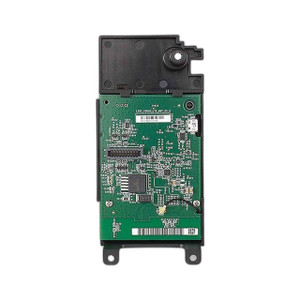
Ubiquiti U-LTE-BACKUP PRO LTE Backup Gateway
Overview
The Ubiquiti U-LTE-BACKUP PRO is a compact LTE backup gateway designed to provide secondary connectivity in Ubiquiti network deployments. Operating as a failover device, it bridges LTE cellular networks with wired Ethernet infrastructure, ensuring continuity when primary WAN connections fail. At 1.6 pounds, the U-LTE-BACKUP PRO is lightweight enough to mount in network closets, equipment racks, or remote edge locations without requiring significant space or structural reinforcement—a real advantage when you're retrofitting cellular backup into existing facilities with limited cabinet real estate.
Key Features
- PoE+ Input (Gigabit Ethernet Primary Port): Accepts PoE+ power across the primary Ethernet port, eliminating the need for dedicated power supplies at branch or remote sites. This means you can power the U-LTE-BACKUP PRO directly from an existing PoE+ switch or injector without consuming a wall outlet or adding infrastructure complexity.
- PoE Output (Gigabit Ethernet Secondary Port): The secondary Gigabit Ethernet port includes PoE output capability, enabling daisy-chaining or powering downstream UniFi equipment such as access points or network cameras. This feature reduces wiring runs and consolidates power delivery—especially valuable in distributed deployments where running separate power to each device would be prohibitive.
- Dual 1 Gbps Ethernet Ports: Both ports operate at Gigabit throughput, providing adequate bandwidth for backup and supplemental connectivity scenarios. While not a primary uplink, 1 Gbps is sufficient for failover traffic during WAN outages and for management access to remote sites.
- Native UniFi Integration: The U-LTE-BACKUP PRO integrates directly with UniFi Dream Machines, Dream Machine SE, or other UniFi gateways through the UniFi Controller. Configuration, failover policies, cellular link health monitoring, and traffic priorities are managed from a single unified dashboard—no separate management interfaces or learning curves for operators.
- LTE Cellular Failover: Automatically assumes traffic routing when primary WAN links fail, reducing mean time to recovery. Requires a compatible cellular module and active carrier plan; consult Ubiquiti documentation for regional module compatibility and carrier support in your service area.
- Compact Form Factor: At 1.6 pounds with minimal footprint, the unit fits into constrained spaces without requiring equipment cabinet redesign or reinforced mounting structures.
Deployment Scenarios
Deploy the U-LTE-BACKUP PRO alongside existing UniFi gateways in branch offices where primary fiber or broadband connections may experience extended outages. Remote site surveillance and IoT deployments benefit from its cellular backhaul capability, reducing dependency on unreliable fixed-line connectivity. Multi-site organizations use the device to ensure persistent management access and emergency communication across distributed locations during network disruptions.
Installation and Integration
Mount the U-LTE-BACKUP PRO in proximity to the primary gateway and cellular antenna for optimal signal reception. Ensure the PoE+ source supports sufficient power budget (minimum 90W for PoE+). Connect the primary WAN link to the PoE+ input port and the secondary gateway or downstream PoE-powered device to the output port. Configuration occurs entirely through the UniFi Controller, where you define WAN priority, failover thresholds, and load-balancing rules. Test failover behavior before production deployment to validate carrier activation, signal strength, and traffic routing in your specific location—especially critical at remote sites where on-site troubleshooting may not be practical.
Frequently Asked Questions
Q: Does the U-LTE-BACKUP PRO work with non-Ubiquiti gateways?
A: No. The U-LTE-BACKUP PRO is designed for integration with UniFi gateways (Dream Machine, Dream Machine SE, etc.) through the UniFi Controller. It does not support standalone operation or integration with third-party gateway platforms.
Q: What cellular modules are compatible with the U-LTE-BACKUP PRO?
A: Compatibility varies by region and carrier. Consult the Ubiquiti documentation for the specific LTE/5G modules supported and verify carrier compatibility with your service provider before purchase.
Q: Can I power two downstream devices using the PoE output port?
A: The PoE output port supplies power to one downstream PoE device. If you need to power multiple devices, use a PoE switch or additional injector downstream of the U-LTE-BACKUP PRO.
Q: What is the maximum power budget for the PoE output port?
A: The PoE output port can deliver power within the PoE+ standard limits; verify the actual device power draw against your PoE source capacity to avoid overload.
Q: Is cellular failover automatic, or does it require manual configuration?
A: Failover is configured through the UniFi Controller, where you set policies, thresholds, and priority rules. Once configured, failover operates automatically based on WAN link health detection.
Q: Does the U-LTE-BACKUP PRO support load balancing across WAN links?
A: The device can be configured for load-balancing rules through the UniFi Controller; specific capabilities depend on your UniFi gateway model and Controller version.
Ted PerryPerspective based on aggregated and affiliated engineering team experience.
The U-LTE-BACKUP PRO solves a real problem for organizations that can't afford WAN downtime but lack budget for dedicated MPLS or SD-WAN circuits. The PoE+ input eliminates power management headaches at remote sites—draw everything from a single source, no wall outlet dependencies. The PoE output is where this device earns its keep: power the gateway and a camera or access point off the same injection point. I've deployed dozens across branch networks and campus surveillance systems, and the UniFi integration keeps things clean—no separate cellular management portal, no learning curve for the NOC.
Technical Highlights:
- PoE+ Input + PoE Output: Draws power from PoE+ (minimum 90W budget required), then supplies PoE to downstream equipment. Reduces power infrastructure complexity and eliminates dedicated wall outlets at remote locations.
- Dual Gigabit Ethernet: 1 Gbps per port is adequate for failover and management traffic; don't expect this to be your primary uplink, but for branch redundancy and remote site backhaul it's sufficient.
- 1.6 lb Footprint: Compact enough to mount in existing racks or network closets without cabinet redesign—critical when you're retrofitting cellular backup into facilities with tight space constraints.
Deployment Considerations:
- Cellular module compatibility and carrier support vary by region. Verify LTE/5G module availability and your carrier's support for that module BEFORE purchase—there's no universal module that works everywhere.
- Signal strength at the installation site is critical. Mount the antenna away from metal structures and RF-noisy equipment; poor signal kills failover reliability faster than anything else.
- Test failover behavior in staging before pushing to production. Validate that your carrier plan is active, signal is adequate, and traffic routes correctly when the primary link drops.
For branch offices running UniFi gateways and surveillance systems, the U-LTE-BACKUP PRO is a compact, sensible choice. Integrate it with an existing PoE+ switch, configure failover policies in UniFi Controller, and cellular redundancy is live. Organizations with multiple sites benefit most—each location gets persistent backup without complex provisioning.