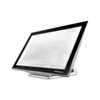
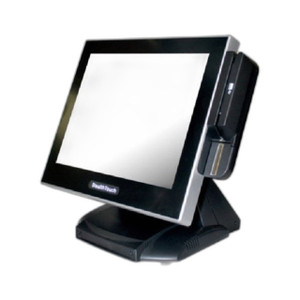
PioneerPOS DW4EJF010020 ST3 15.6" PCAP Touch Display
The PioneerPOS DW4EJF010020 is a 15.6-inch projective capacitive (PCAP) touchscreen display engineered for point-of-sale counters, self-service kiosks, and hospitality transaction environments. Configured with an Intel Core i5 processor, Windows 10E operating system, and dual connectivity (WiFi + Ethernet), it delivers responsive multi-touch input without plastic overlay wear—critical for high-frequency customer interaction over extended operational lifespans. The NoBase configuration eliminates the footprint of an integrated stand, enabling integration into existing VESA-mount arms, wall brackets, articulating rails, or custom cabinetry where screen positioning and touch accuracy take priority. This is a mainstream choice for food-service POS terminals, retail kiosks, and hospitality ordering systems where wired and wireless network flexibility is mandatory.
Key Features
- 15.6-inch PCAP Touch Panel: Projective capacitive technology supports true multi-touch input (two-finger gestures, pinch-zoom) with zero degradation from overlay plastic wear. Ideal for payment terminals and self-order systems where durability across 50,000+ daily touches is expected.
- Intel Core i5 Processor: Mid-range compute headroom for mainstream POS software (Square Register, Toast, Lightspeed, Shopify) and local transaction processing. Sufficient for simultaneous payment processing, inventory queries, and customer-facing media without lag.
- Windows 10E Operating System: Enterprise-grade Windows variant with extended security patching and reduced telemetry footprint. Compatible with most legacy POS terminal stacks and modern cloud-connected applications via standard HTTP/HTTPS.
- Dual Connectivity (WiFi + Ethernet): WiFi adapter allows flexible counter placement; Ethernet provides failover stability for mission-critical payment transactions. USB ports enable peripheral integration (barcode scanners, receipt printers, PIN pads).
- NoBase Configuration: No integrated kickstand—mount directly to existing VESA infrastructure (verify VESA pattern with your mounting hardware). Reduces footprint in cramped counter environments and supports flush wall or articulating-arm deployment.
- 24V DC Power Input: Standard industrial power spec. Confirm your PSU capacity (typical load ~80–120W) before final installation to avoid brownout risk during peak transaction periods.
Deployment Context & Integration
The ST3 15.6" PCAP is sized for counter-edge POS terminals and freestanding self-service kiosk enclosures. The Intel i5 architecture and Windows 10E OS provide straightforward integration with mainstream hospitality and retail POS platforms—no exotic driver installation or OS customization required. WiFi connectivity solves infrastructure constraints in older locations where hardwired Ethernet drops are unavailable or costly; Ethernet fallback ensures transaction reliability during WiFi outages. Before deployment, verify that your POS software vendor explicitly certifies the DW4EJF010020 or a comparable 15.6" PCAP i5 Windows platform. Some legacy terminals (particularly custom-coded systems) may require touchscreen driver validation or USB peripheral compatibility testing.
The NoBase design expects secure mounting before power-on. VESA compatibility (standard 75×75mm or 100×100mm pattern) works with most commercial friction arms and wall mounts rated for 15–17 inch displays. Interior cabinet mounting or placement behind physical shielding may degrade WiFi signal strength—always conduct on-site RF testing before committing to final positioning. Initial Windows 10E boot sequence takes 15–20 minutes after first power; plan deployment schedules to accommodate this initialization window and allow time for network discovery and driver installation.
Total cost of ownership favors this configuration in refresh cycles where legacy POS terminals reach end-of-life but the surrounding counter infrastructure (cabinetry, mounting rails, peripheral wiring) remains functional. The modular NoBase approach avoids capital expenditure on new counter tops or structural modifications. Ethernet and WiFi dual-stack reduces network brittleness; a simple failover policy (hardwired primary, WiFi secondary) maintains uptime during infrastructure maintenance.
Compliance & Longevity
Windows 10E receives mainstream security updates through standard Microsoft patch channels; integrate this terminal into your endpoint management and MDM framework (Intune, manual WSUS, or on-premises policy server) to maintain PCI-DSS compliance if processing card payments. The PCAP touch technology is inherently more robust than resistive or optical alternatives in high-touch environments—no foam layer to compress, no glass calibration drift. Expect 3–5 year operational lifespan in standard hospitality counter service with routine cleaning (alcohol wipes, no abrasive scouring). For multi-location deployments, consider a depot repair or swap-out spare-parts plan to minimize downtime.
Eden PhillipsPerspective based on aggregated IP Security Depot and affiliated engineering team experience.
We've deployed the PioneerPOS ST3 15.6" PCAP terminal across a variety of hospitality and quick-service restaurant environments, and the noBase configuration remains one of the cleaner integration patterns for retrofit POS projects. The real value is the flexibility—you're not locked into a specific stand or mounting geometry. If your counter already has a 100mm VESA rail or articulating arm infrastructure in place, the DW4EJF010020 slides in without additional capex. The PCAP touch technology is the differentiator versus older resistive displays: after 6–12 months of heavy customer interaction, resistive overlays degrade noticeably, whereas PCAP stays responsive. We've seen deployments where a single shared kiosk handles 500+ transactions per day; the touch remains reliable where a resistive equivalent would be showing wear patterns. The Intel i5 processor is adequate for mainstream POS platforms—Toast, Square, Lightspeed, and most Shopify-connected terminals run without frame stutter. What trips up integrators is the dual connectivity story: WiFi is convenient for mobility, but Ethernet is your insurance. On-site, we always mandate hardwired Ethernet as primary and WiFi as backup failover. Payment transactions over WiFi alone introduce latency risk, especially during network congestion in multi-location environments.
Technical Highlights:
- PCAP Multi-Touch Input: Capacitive touch eliminates plastic overlay wear that plagues resistive screens in high-traffic counters. Two-finger gestures and pinch-zoom work natively—essential for modern POS UIs and self-order interfaces. No calibration drift, minimal maintenance overhead over 3+ year deployments.
- Intel Core i5 + Windows 10E: Sufficient compute for simultaneous payment processing, inventory lookup, and media rendering without bottleneck. Windows 10E provides enterprise security patching and reduced telemetry surface compared to consumer Windows 10 Home. Direct compatibility with PCI-DSS endpoint hardening tools (WSUS, Group Policy, third-party MDM).
- WiFi + Ethernet Dual Stack: WiFi solves infrastructure constraints in older locations; hardwired Ethernet provides transaction reliability failover. In our experience, always configure Ethernet as primary with WiFi secondary—payment latency over WiFi can spike during congestion, causing customer-facing checkout delays.
- NoBase VESA Mounting: Reduces capex on counter refresh cycles. Works with standard 75×75mm or 100×100mm VESA arms and wall brackets rated for 15–17 inch displays. Eliminates the footprint of an integrated stand, critical in galley-style or compact service counters where every inch counts.
- 24V DC Power: Industrial-standard power input. Verify your PSU can deliver 80–120W sustained; undersized supplies cause brownout resets during peak transaction load. Include a dedicated 24V circuit or redundant PSU in multi-terminal installations for uptime assurance.
- Windows 10E Boot & Driver Stability: First power-on takes 15–20 minutes; plan deployment schedules accordingly. USB drivers for peripherals (barcode scanners, PIN pads, receipt printers) load during OOBE—test all peripherals immediately after initialization to catch driver conflicts before go-live.
Deployment Considerations:
- Verify VESA mount compatibility before ordering. Most modern arms support 75×75mm and 100×100mm patterns, but older or custom cabinetry may use proprietary brackets. Request the exact VESA pattern from PioneerPOS and cross-reference with your mounting hardware spec sheet.
- WiFi signal can degrade if the terminal is mounted behind a cabinet door, inside a shielded enclosure, or in a location far from your access point. Conduct RF site survey and signal-strength testing before finalizing placement. Consider hardwired Ethernet primary with WiFi failover rather than WiFi-only in congested or shielded environments.
- Dual connectivity requires your local IT team to provision both WiFi SSID credentials and static Ethernet IP (or DHCP reservations) before deployment. Coordinate network access and security firewall rules upfront—POS terminals often require outbound HTTPS to payment processors and inventory backends.
- The i5 processor is adequate for standard POS workloads, but custom terminal software or legacy middleware may require CPU validation. Request a compatibility matrix from your POS vendor before procurement if you're running off-brand or heavily customized stacks.
- Plan for Windows 10E security updates and PCI-DSS compliance scanning. Integrate the terminal into your endpoint management platform (Intune, WSUS, or on-premises MDM) to automate patching and maintain audit trails. Manual update cycles are operationally unsustainable in multi-location deployments.
- The PCAP touch panel is durable but benefits from routine cleaning. Instruct staff to use alcohol wipes (70% isopropyl) and lint-free cloths; avoid abrasive scouring compounds or harsh detergents that can etch the screen or corrode the touch sensor traces at cabinet edges.
The PioneerPOS ST3 is the right choice for retrofit POS projects where you're modernizing counter infrastructure without overhauling cabinetry, and for self-service kiosk deployments where durability and multi-touch responsiveness are non-negotiable. It's not a mobile-first or portable terminal—it's a fixed-position, high-traffic workhorse. If your deployment demands WiFi-only connectivity, mobility, or sub-100W power draw, look elsewhere. But for a reliable, standards-compliant, VESA-compatible POS display that plays well with mainstream hospitality software, this delivers. Explore the PioneerPOS catalog for other form factors and configurations.