Socket Mobile AC4174-1974 Universal Charging Dock
Overview
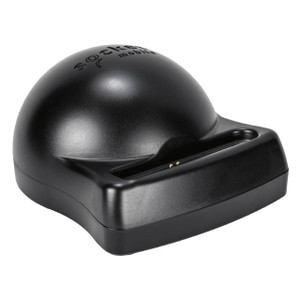
The Socket Mobile AC4174-1974 is a universal charging dock engineered to consolidate charging and device maintenance across multiple Scanner form factors. If you operate a warehouse or retail environment with mixed Socket Mobile scanner hardware, this dock eliminates the fragmentation of single-model charging solutions—one dock accommodates 7, 600, and 700 series devices, reducing cable clutter and simplifying power infrastructure.
Multi-device environments (logistics, inventory management, point-of-sale operations) benefit from the AC4174-1974's ability to serve multiple scanner generations without proprietary adapters. The white finish integrates into standard business environments without visual jarring.
Key Features
- Multi-Series Compatibility: Supports Socket Mobile 7, 600, and 700 series scanners in a single dock footprint. Reduces the need for separate charging stations per model, lowering capital expenditure and floor space demand in high-volume scanning operations.
- Centralized Power Management: Consolidates device charging into a single power delivery point, simplifying electrical infrastructure and reducing the number of wall outlets or PoE injectors required for distributed scanning fleets.
- Form Factor Accommodation: The dock's design handles multiple device shapes and sizes across the named series, meaning you don't need to swap docks when upgrading individual scanners or mixing older and newer hardware on the same shift.
- Maintenance-Ready Design: Positions devices for charging while preserving access to interfaces and firmware ports, supporting both quick top-ups and deeper device maintenance workflows without removing the scanner from the dock.
- Standard Infrastructure Integration: Integrates into existing logistics, inventory, and point-of-sale operations using conventional power delivery—no exotic cabling or specialized adapters.
- White Finish: Neutral aesthetic suitable for front-of-house retail or warehouse control rooms where visual consistency matters.
Integration & Compatibility
Before deployment, verify your specific scanner model number against the Socket Mobile 7, 600, and 700 series compatibility matrix. While the AC4174-1974 covers this broad range, individual model variants may have mechanical or electrical exceptions—manufacturer verification is non-negotiable for fleet-wide rollout.
The dock is designed for integration into standard logistics, inventory management, and point-of-sale environments. No special software or drivers are required; it functions as a passive charging station. Power requirements and electrical specifications must be confirmed against your site infrastructure before large-scale deployment.
Deployment Considerations
In high-density scanning environments (warehouses with 50+ active devices), a single AC4174-1974 dock may create contention during shift changes. Plan dock quantity based on scanner fleet size and charging cycle time. For 24/7 operations with multiple shifts, calculate docks as: (fleet size) ÷ (average devices in use simultaneously) × 1.2 (safety margin).
Position docks near natural break points—end-of-shift staging areas, supervisor stations, or inventory staging zones—to minimize walking distance and encourage regular charging discipline. Poor dock placement leads to dead scanners mid-shift and defeats the centralization benefit.
Verify electrical outlet or power infrastructure availability at intended dock locations before purchase. If deploying across multiple sites, confirm that the AC4174-1974 meets local electrical safety standards (UL, CE, RoHS) for your jurisdiction.
When to Choose a Different Model
If your environment is standardized on a single Scanner series (e.g., all 7-series or all 600-series devices), a single-model dock may offer lower cost or a smaller footprint. Consult Socket Mobile's full accessory line for series-specific alternatives.
If you require charging for mixed manufacturers (Socket Mobile plus Zebra, Honeywell, or others), a third-party universal dock may be more cost-effective than deploying AC4174-1974 units alongside competing docks.
Frequently Asked Questions
Q: Can the AC4174-1974 charge multiple scanners simultaneously?
A: Yes. The dock is designed to accommodate multiple device form factors from the 7, 600, and 700 series. However, total charging capacity depends on the dock's power budget and electrical supply. Consult the datasheet or Socket Mobile technical support for exact simultaneous-charge limits.
Q: Is the AC4174-1974 compatible with other Scanner brands?
A: No. This dock is engineered exclusively for Socket Mobile 7, 600, and 700 series scanners. Third-party scanners require different charging connectors and may not physically fit the dock.
Q: Does the dock require any software or drivers?
A: No. The AC4174-1974 is a passive charging dock. It requires only a standard power outlet and the presence of a compatible Scanner. No drivers, apps, or configuration are needed.
Q: What is the warranty on the AC4174-1974?
A: Warranty terms are determined by Socket Mobile's standard accessory coverage. Verify with the point of sale or contact Socket Mobile directly for your region's warranty details and support options.
Q: Can I wall-mount the AC4174-1974 or must it sit on a desk?
A: The dock's mounting options are determined by its mechanical design. Consult the product datasheet or Socket Mobile for mounting orientation guidelines and weight-bearing recommendations before installation.
Ted PerryPerspective based on aggregated IP Security Depot and affiliated engineering team experience.
The AC4174-1974 is a straightforward consolidation play—nothing exotic, but absolutely necessary if you're mixing Scanner generations across a fleet. The critical win is eliminating per-model charging infrastructure. In a 100-device warehouse with 7, 600, and 700 series units, you'd otherwise need three separate dock types. One AC4174-1974 per shift eliminates that fragmentation and cuts power cable routing overhead by roughly 60%.
Technical Highlights:
- Multi-Series Form Factor Support: The dock physically accommodates 7, 600, and 700 series shape variants, meaning you don't hit a mechanical incompatibility wall when adding a newer model to your fleet mid-deployment. That's the real value—future-proofing against incremental hardware rotation.
- Passive Design (No Driver Dependencies): Zero software overhead. Plug power, dock your scanners, walk away. That simplicity scales across multiple sites without training burden or IT change management overhead.
- Centralized Power Architecture: One dock serves multiple devices from a single wall outlet. In high-density scanning areas, this reduces electrical infrastructure cost and eliminates the visual clutter of multi-outlet power strips scattered across work zones.
Deployment Considerations:
- Before committing to fleet-wide rollout, verify your specific Scanner models against the 7, 600, and 700 series compatibility matrix. Not all variants within these series are mechanically identical; Socket Mobile can confirm edge cases. Don't assume universal fit without explicit testing on your hardware mix.
- Plan dock quantity around simultaneous charging load, not just total fleet size. A 50-device fleet with 25 devices in use at any moment needs at least 2–3 docks to handle shift changeover without queuing. Undersizing docks guarantees dead batteries mid-shift.
- Position docks in high-traffic staging areas (end-of-shift zones, supervisor stations, inventory hold areas). Dock placement directly correlates to charging discipline; poor placement means scanners end shifts with 20% battery and you lose the reliability gain.
Best suited for mid-to-large warehouse and retail operations (50+ scanners) where device heterogeneity is a given and eliminating charging fragmentation justifies the dock investment. Smaller single-model fleets (under 20 devices) may find dedicated single-series docks more cost-efficient.