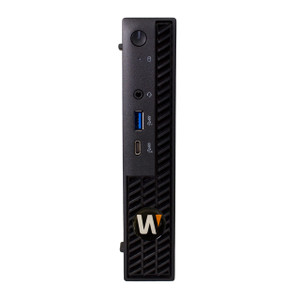
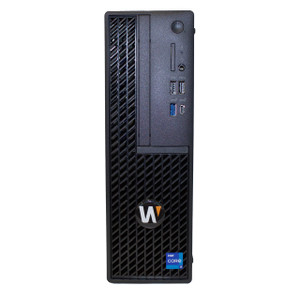
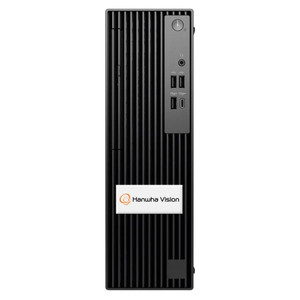
Hanwha WWT-P-5405W WAVE Client Workstation
The WWT-P-5405W is a purpose-built client workstation for security operations centers and surveillance command environments where space is constrained but monitoring capability cannot be. Pre-loaded with Wisenet WAVE client software and Windows 11 IoT Enterprise LTSC 2024, this compact tower measures just 3.74" W × 11.53" D × 11.95" H — fitting standard desk footprints while delivering quad-monitor video output for wall-mounted display configurations. For integrators deploying multi-stream SOCs in corporate facilities or enterprise security control rooms, the WWT-P-5405W bridges consumer-scale form factor with professional surveillance demands.
Key Features
- Quad Monitor Video Output via Nvidia A400 GPU: Four independent mini-DisplayPort outputs let you drive four separate displays for comprehensive video wall setups without daisy-chaining or loss of signal quality. Critical when operators need eyes on multiple camera feeds and system interfaces simultaneously.
- Intel Core Ultra 5 Processor with 16GB RAM: Ensures responsive multitasking across multiple video streams and Wisenet WAVE interface demands without lag or stutter during real-time incident response.
- 512GB M.2 SSD with Windows 11 IoT Enterprise LTSC 2024: Rapid boot times and application loads reduce dead time after power events. LTSC (Long-Term Servicing Channel) eliminates forced feature updates — a real advantage in 24/7 SOCs where unscheduled reboots create operational risk.
- Dual Network Connectivity — 1GbE + 2.5GbE: Native RJ45 Gigabit NIC plus a second 2.5GbE PCIe NIC enables network segmentation of surveillance traffic from general IT infrastructure, improving security isolation and reducing congestion on shared switches.
- Comprehensive USB Expansion: 10 total USB ports including USB 3.2 Gen2 and Gen2×2 Type-C connectors support peripheral diversity — USB keyboards, mice, external storage, biometric readers, or alarm panels without daisy-chain complexity or hub power draw.
- 360W 80 Plus Platinum Power Supply: Efficient PSU reduces power loss to heat and minimizes cooling load in tight desk environments. 80 Plus Platinum efficiency means lower electricity cost in 24/7 operations and less thermal stress on nearby equipment.
- Inclusive Package: Wisenet WAVE client pre-installed, USB keyboard and mouse included — reduces setup time and unboxing-to-deployment friction for integrators.
Integration & Compatibility
The WWT-P-5405W ships pre-configured for Wisenet WAVE deployments. Its quad mini-DisplayPort architecture supports independent monitor addressing, eliminating the need for DisplayPort daisy-chaining and the latency or driver complications that sometimes follow. Windows 11 IoT Enterprise LTSC 2024 provides long-term stability without the feature update churn of Windows 11 Pro or Home editions — a substantial operational benefit in mission-critical SOCs where unscheduled reboots or driver updates can disrupt incident response.
The dual network configuration supports VLAN segmentation for surveillance cameras onto the 2.5GbE interface while keeping management and general IT on the 1GbE port, simplifying network access policies and reducing the risk of surveillance traffic bleeding into sensitive IT networks.
Physical & Environmental Specifications
The compact tower footprint (3.74" × 11.53" × 11.95") and 13.47 lb weight make the WWT-P-5405W suitable for vertical desk mounting or shallow equipment racks. Operating temperature range of 41°F to 113°F (5°C to 45°C) covers most controlled indoor SOC environments; humidity tolerance of 20–85% non-condensing is typical for climate-controlled facilities. If your SOC is in an uncontrolled or outdoor shelter environment, confirm your facility's ambient profile matches these ranges before installation.
The 3.5mm universal audio jack supports audio input from surveillance feeds or external alert systems, useful in SOCs where verbal confirmation or system chimes enhance situational awareness.
When to Choose a Different Model
If you need more than four video outputs or require higher-resolution graphics acceleration for CAD, 3D modeling, or other GPU-intensive workloads beyond video client operation, consider a higher-performance workstation in the Hanwha professional computing line. If your SOC infrastructure runs a non-Wisenet VMS platform (Milestone, Genetec, Axis Companion, etc.), verify WAVE client compatibility with your chosen platform or consult your integrator — the WWT-P-5405W is purpose-built for Wisenet WAVE and may require additional software licensing for multi-VMS deployments.
Frequently Asked Questions
Q: Can I upgrade the RAM or storage on the WWT-P-5405W after purchase?
A: The WWT-P-5405W ships with 16GB RAM and 512GB M.2 SSD. Refer to Hanwha's service documentation or your integrator for internal upgrade paths; some compact form factor workstations have limited user-accessible components. Contact technical support before attempting internal modifications.
Q: What VMS platforms does the WWT-P-5405W support beyond Wisenet WAVE?
A: The unit is pre-configured and certified for Wisenet WAVE deployments. Compatibility with third-party VMS platforms (Milestone XProtect, Genetec Security Center, Axis Companion) depends on your chosen software's client application availability and Windows 11 IoT Enterprise LTSC 2024 support. Confirm with your VMS vendor before deployment.
Q: Is the WWT-P-5405W suitable for outdoor or non-climate-controlled SOC locations?
A: The WWT-P-5405W is rated for 41°F to 113°F (5°C to 45°C) operating temperature and 20–85% non-condensing humidity — typical of indoor, climate-controlled environments. If your SOC is located in an uncontrolled shelter, outdoor facility, or high-humidity area, confirm ambient conditions before installation. Extended temperature or humidity exposure beyond spec may void warranty or reduce component lifespan.
Q: How many monitors can I connect, and what refresh rates are supported?
A: The Nvidia A400 GPU provides four independent mini-DisplayPort outputs, supporting up to four separate displays. Refresh rates and resolution support depend on the connected monitor specifications and display drivers. Confirm your monitor list with Hanwha or your integrator for optimal video wall configuration.
Q: Does the WWT-P-5405W include any cybersecurity features or firmware update mechanisms?
A: The unit ships with Windows 11 IoT Enterprise LTSC 2024, which includes standard Windows security features (Windows Defender, Secure Boot, TPM support). For Wisenet WAVE ecosystem security updates and patches, follow Hanwha's firmware release cycles. Refer to Hanwha security advisories and your integrator's maintenance schedule for ongoing compliance and patch management.
Q: What is the warranty period for the WWT-P-5405W?
A: Warranty details depend on your purchase channel and region. Contact your specialty retailer or Hanwha directly for specific warranty terms, coverage, and support options.
Ted PerryPerspective based on aggregated IP Security Depot and affiliated engineering team experience.
The WWT-P-5405W represents disciplined engineering for a specific problem: how do you build a quad-monitor SOC workstation in a footprint that doesn't dominate a desk? Hanwha has solved this by pairing an Intel Core Ultra 5 processor with an Nvidia A400 GPU and Windows 11 IoT Enterprise LTSC 2024 — a combination that trades some raw compute headroom for operational stability and thermal efficiency. For integrators deploying compact SOCs in corporate facilities, the WWT-P-5405W (often searched as WWT P 5405W) closes a real gap between consumer-grade desktops and 2U+ professional workstations.
Technical Highlights:
- Quad Mini-DisplayPort GPU Output: The Nvidia A400 drives four independent streams without daisy-chaining — no signal degradation across a video wall. Each display connects directly, simplifying driver management and reducing latency in multi-stream monitoring.
- Dual Network Configuration (1GbE + 2.5GbE): This dual-NIC setup isn't redundancy theater — it's network segmentation. Route surveillance traffic over the 2.5GbE interface and keep your SOC management and alerts on 1GbE, isolating broadcast storms and reducing lateral attack surface.
- Windows 11 IoT Enterprise LTSC 2024: LTSC eliminates feature updates for 10 years post-release. In a 24/7 SOC where unscheduled reboots cost incident response time, this is a real operational win compared to Windows 11 Pro's forced semi-annual updates.
- 360W 80 Plus Platinum Efficiency: Platinum-rated PSUs waste roughly 5–8% of input power versus standard (80 Plus Bronze) at 10–12%. Over 24/7 operation across multiple units, this density adds up in electrical budget and heat dissipation.
Deployment Considerations:
- The 16GB RAM is baseline for multi-stream WAVE client operation — sufficient for 4–8 simultaneous video streams at 1080p, but tight if your SOC also runs secondary applications (GIS mapping, threat intelligence dashboards, etc.). Confirm workload before field deployment.
- Mini-DisplayPort to DisplayPort/HDMI adapters are standard, but cheap adapters sometimes introduce timing skew on larger video walls. Budget for certified adapters and test your monitor chain before going live.
- The 512GB SSD is OS + application storage only; it is not a recording volume. Do not mistake this for edge storage capability — your cameras and NVR handle archival.
The WWT-P-5405W is the right fit for enterprise SOCs running Wisenet WAVE where desk real estate is premium and 24/7 stability matters more than maximum raw performance. If you need higher-resolution graphics, more RAM, or multi-VMS platform support, escalate to a larger workstation. For compact Wisenet-focused command centers, this unit delivers solid engineering with minimal waste.