Product images are provided for reference and may not represent the exact model, configuration, or included components.

No Bots, Just Experts

Questions about this product? Free pre-sales support from a senior specialist — product questions, compatibility checks, BOM quotes, price confirmation — typically answered within one business day. Need camera placement or system design work? Engineering time is $175 per hour (qty 1 = 1 hour). Hardware buyers get up to one hour ($175) credited back on their order.

Description

ATEN KA7140 Serial KVM Adapter Cable

Overview

The ATEN KA7140 is a serial KVM adapter cable designed to bridge the gap between serial devices and ATEN's KVM over IP switches. This adapter facilitates the connection of serial-based equipment, such as servers with serial consoles or industrial control systems, to a KVM infrastructure. Its primary function is to translate serial communication signals into a format compatible with the RJ-45 interface used by KVM switches, enabling remote management and control of serial ports. The black plastic construction ensures durability for standard rack-mount deployments.

Compatibility

This adapter is specifically designed for use with ATEN KVM over IP switches that utilize an RJ-45 connector for remote console access. It is compatible with ATEN's line of KVM console modules requiring serial connectivity. The KA7140 provides female DB-9 and female RJ-45 connectors, enabling direct connection to serial ports on target devices and standard Cat5e/Cat6 cabling for KVM switch integration.

Installation Notes

The KA7140 requires a Mini USB Type B port for power, drawing power from the connected KVM switch or an external source if necessary. Operating within a storage temperature range of -20°C to 60°C (-4°F to 140°F), it is suitable for typical controlled IT environments. The adapter's dimensions are 43 x 90 x 22 mm (1.69 x 3.54 x 0.87 inches), allowing for compact integration within server racks or behind equipment.

Specifications
Mount Type: Rack
Power: 1 x Mini USB Type B Female (Black)
Storage Temperature: -20–60°C
Product colour: Black
Connector 1: DB-9
Connector 2: RJ-45
Connector gender: Female/Female
Material: Plastic
Weight: 72 g
Dimensions (WxDxH: 43 x 90 x 22 mm
Q&A
Reviews
Have Questions?

ATEN Serial KVM Adapter Cable (cpu Module) - KA7140

$136.00
$135.99

RELATED PRODUCTS

Save $0.01
ATEN USB Virtual Media KVM Adapter Cable With Smart Card Reader (cpu Module)
Add to Cart The item has been added

ATEN KA7177

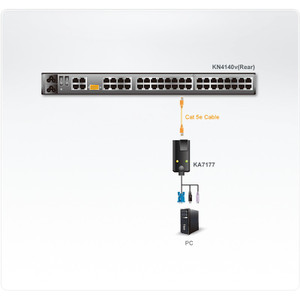
ATEN USB Virtual Media KVM Adapter Cable with Smart Card Reader (cpu Module) - KA7177

USB Virtual Media KVM adapter cable designed to bridge the gap between your controlled computers and a KVM switch, enabling remote management

    In stock · Ships same business day Free shipping over $499
    $182.00 $181.99 Save $0.01
    The item has been added Add to quote
    $182.00 $181.99 Save $0.01
    Save $0.01 Add to cart Add to quote
    Save $0.01
    ATEN HDMI USB Virtual Media KVM Adapter Cable With Smart Card Reader (cpu Module)
    Add to Cart The item has been added

    ATEN KA7168

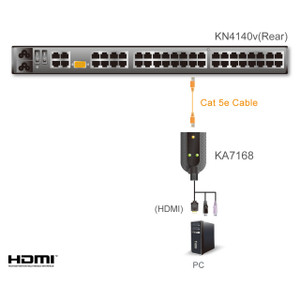
    ATEN HDMI USB Virtual Media KVM Adapter Cable with Smart Card Reader (cpu Module) - KA7168

    Specialized adapter designed to extend KVM functionality over longer distances, specifically bridging HDMI video and USB data, including smart card

      In stock · Ships same business day Free shipping over $499
      $199.00 $198.99 Save $0.01
      The item has been added Add to quote
      $199.00 $198.99 Save $0.01
      Save $0.01 Add to cart Add to quote

      System Design, Deployment & Technical Support

      Support services and planning resources for commercial surveillance, access control, and infrastructure deployments.

      Fixed scope • Fixed price

      System Design Assistance

      • Get help validating product compatibility
      • Coverage requirements
      • Storage planning and deployment architecture before you buy.
      Request Design Help

      Deployment & Configuration Support

      • Access fixed-scope support for rollout planning
      • User setup guidance
      • Migration and system standardization across single-site or multi-site deployments
      View Support Services

      Guides, Tools & Calculators

      • PoE requirements
      • Storage retention
      • Camera selection and deployment methodology
      Open Technical Resources