
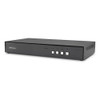

Startech Secure 2-Port Kvm Switch HDMI Or - CK4-HP102C
In stock · Ships same business day
Free shipping over $499
$672.99


Manufacturer-verified compatible cameras, recorders, mounts, accessories, and licenses for this product. Adjust quantities and add the entire bundle to your cart in one click.
Questions about this product? Free pre-sales support from a senior specialist — product questions, compatibility checks, BOM quotes, price confirmation — typically answered within one business day. Need camera placement or system design work? Engineering time is $175 per hour (qty 1 = 1 hour). Hardware buyers get up to one hour ($175) credited back on their order.
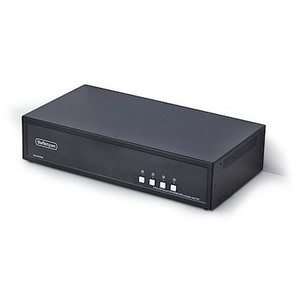
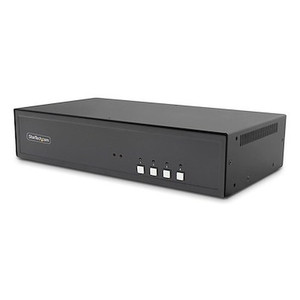
The StarTech CK4-HP104C is a four-port secure KVM switch built to NIAP Protection Profile 4.0 — the current federal standard for desktop KVM devices handling classified or sensitive compartmented information. It supports both HDMI and DisplayPort video outputs at the console, drives a single monitor at 4K 60Hz, and handles up to four connected hosts simultaneously, with each port maintaining hardware-enforced isolation between them. If you're deploying workstations in government, defense, intelligence, or any regulated environment where cross-domain contamination is a real concern, the CK4-HP104C is engineered to that specific threat model — not just a standard KVM with a certification sticker.
At 4.2 lb and 12.6 in × 6.7 in × 1.7 in, this is a desktop-footprint unit in a metal enclosure, color black. Rated for 0°C to 40°C operating and -20°C to 60°C storage, it fits standard conditioned office and data center environments without special accommodation.
The CK4-HP104C (often searched as CK4 HP104C) connects to any host workstation with available DisplayPort or HDMI video and USB 2.0 Type-B ports — which covers virtually every modern workstation platform. The console interface accepts a standard USB keyboard and mouse, plus a third USB 2.0 device such as a CAC/PIV smart card reader, biometric token, or encrypted storage device — peripheral types that appear consistently in government and defense operator setups.
Because NIAP PP 4.0 enforces strict hardware-level isolation, this switch does not support USB device emulation, hub pass-through, or clipboard sharing between hosts. That is by design — any of those features would violate the isolation requirements the certification demands. Buyers coming from commercial KVMs expecting file transfer or clipboard functionality between hosts should understand that this unit deliberately prevents those operations.
Audio routing follows the active video channel; there is no independent audio switching. Each host gets its own dedicated 3.5mm stereo connection that switches with the video selection, keeping audio and video state synchronized.
Q: What does NIAP Protection Profile 4.0 certification mean for the CK4-HP104C?
A: NIAP PP 4.0 is a Common Criteria-based government security evaluation standard specifically for desktop KVM switches. It requires hardware-enforced isolation between ports — meaning data cannot cross between connected hosts through the switch. The CK4-HP104C has been evaluated and certified to that standard, making it eligible for use in environments where classified or sensitive data is processed across multiple security domains.
Q: Can the CK4-HP104C share files or clipboard content between connected computers?
A: No. NIAP PP 4.0 certification explicitly prohibits cross-domain data transfer through the switch. There is no clipboard sharing, USB device pass-through, or file transfer capability between hosts. This is a security requirement, not a missing feature — these functions are blocked by design to maintain isolation.
Q: Does the CK4-HP104C support dual monitors?
A: No. The CK4-HP104C supports a single monitor at the console. It provides both an HDMI and a DisplayPort output at the console so you can use whichever interface your monitor requires, but it does not extend across two displays.
Q: What is the maximum video resolution supported?
A: The CK4-HP104C supports 4K at 60Hz, delivering the full resolution of current-generation monitors without downscaling.
Q: What is the maximum cable length between the KVM and connected hosts?
A: StarTech specifies a maximum cable length of 19.7 ft (6 m) between the KVM and connected host machines.
Q: What is the warranty on the CK4-HP104C?
A: The CK4-HP104C carries a 3-year manufacturer warranty.

The CK4-HP104C is one of the few desktop KVM switches you can actually deploy in a SCIF or multi-domain workstation setup without a waiver conversation — NIAP PP 4.0 is the current evaluated assurance level, and this unit carries it. What that certification enforces matters operationally: hardware-level port isolation means the switch itself cannot be a lateral movement vector between a classified host and an unclassified one, which is the core threat the PP 4.0 evaluation targets.
Technical Highlights:
Deployment Considerations:
The CK4-HP104C is the right fit for intelligence analyst workstations, defense contractor multi-classification desktops, or any operator position where NIAP PP 4.0 is listed as a procurement requirement rather than a nice-to-have. It is not the right pick for a standard corporate IT environment where USB sharing and clipboard pass-through are part of the daily workflow.

Manufacturer-verified compatible cameras, recorders, mounts, accessories, and licenses for this product. Adjust quantities and add the entire bundle to your cart in one click.

Looking for more StarTech products? Shop the full StarTech catalog →
Support services and planning resources for commercial surveillance, access control, and infrastructure deployments.
Fixed scope • Fixed price