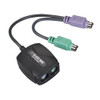
Black Box AC247A PS/2 Keyboard and Mouse Emulator
Overview
The Black Box AC247A is a passive PS/2 keyboard and mouse emulator designed to maintain system connectivity when physical PS/2 ports are unavailable or when using KVM switches that do not properly emulate PS/2 devices. This device ensures your computer recognizes a keyboard and mouse are connected, preventing boot-up errors or operational issues in environments where direct PS/2 connections are not feasible. It's particularly useful for servers or specialized workstations that may lack native PS/2 ports but require PS/2 emulation for compatibility with certain KVM hardware. The AC247A provides a straightforward solution for maintaining essential peripheral communication.
Compatibility
This emulator is designed to work with any computer system that requires PS/2 keyboard and mouse emulation. It is compatible with KVM switches that do not offer robust PS/2 emulation, ensuring that the connected computer receives the necessary signals. It functions as a pass-through device, allowing standard USB keyboards and mice to be recognized as PS/2 devices by the host system. It is not specific to any particular brand of KVM switch or computer, focusing solely on the PS/2 emulation protocol.
Installation Notes
Connect the AC247A to the PS/2 keyboard and PS/2 mouse ports on your KVM switch or directly to the computer's PS/2 ports if available. Then, connect your USB keyboard and USB mouse to the corresponding USB ports on the AC247A. This device requires no drivers or software installation. Ensure the computer is powered off before connecting or disconnecting peripherals to avoid potential signal conflicts.
What's in the Box
- 1x AC247A PS/2 Keyboard and Mouse Emulator