Product images are provided for reference and may not represent the exact model, configuration, or included components.

No Bots, Just Experts

Questions about this product? Free pre-sales support from a senior specialist — product questions, compatibility checks, BOM quotes, price confirmation — typically answered within one business day. Need camera placement or system design work? Engineering time is $175 per hour (qty 1 = 1 hour). Hardware buyers get up to one hour ($175) credited back on their order.

Description

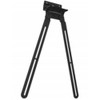
HP Inc 875L9AA Poly Studio X52/V52 VESA Mount

Overview

The HP Inc 875L9AA is a VESA-compliant mounting bracket designed to securely attach the Poly Studio X52 or Poly Studio V52 all-in-one video bars to compatible displays or mounting systems. This mount ensures a stable, professional installation in conference rooms, huddle spaces, or executive offices, positioning the video bar optimally for camera and microphone performance during video calls.

Compatibility

This VESA mount is specifically designed for the following HP Poly devices: Poly Studio X52 All-In-One Video Bar and Poly Studio V52 USB Video Bar. It supports standard VESA mounting patterns, allowing integration with a wide range of displays, monitor arms, and wall mounts that adhere to VESA specifications.

Installation Notes

Installation requires basic tools to attach the bracket to the video bar and then to the VESA-compatible display or mount. Ensure the chosen display or mount can support the weight of the Poly Studio unit. Refer to the specific display or mount manufacturer's instructions for VESA attachment procedures.

What's in the Box

  • 1x Poly Studio X52/V52 VESA Mount

Specifications
Overview: POLY STUDIO X52 VESA MOUNT
Q&A
Reviews

HP Inc Poly Studio X52 Vesa Mount - 875L9AA

$274.00
$239.99

RELATED PRODUCTS

System Design, Deployment & Technical Support

Support services and planning resources for commercial surveillance, access control, and infrastructure deployments.

Fixed scope • Fixed price

System Design Assistance

  • Get help validating product compatibility
  • Coverage requirements
  • Storage planning and deployment architecture before you buy.
Request Design Help

Deployment & Configuration Support

  • Access fixed-scope support for rollout planning
  • User setup guidance
  • Migration and system standardization across single-site or multi-site deployments
View Support Services

Guides, Tools & Calculators

  • PoE requirements
  • Storage retention
  • Camera selection and deployment methodology
Open Technical Resources