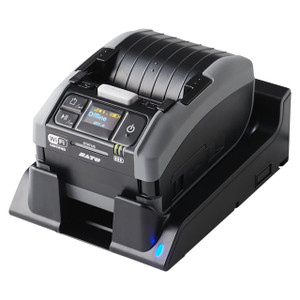
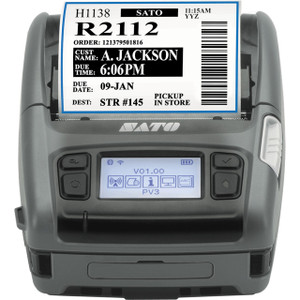
Product images are provided for reference and may not represent the exact model, configuration, or included components.

Overview

SKU: 59-WT2B7-001
Condition: New
Availability: Special Order · Usually Ships in 2-3 Weeks
Write a Review 1% OFF

Sato Module Media Holder - 59-WT2B7-001

Sato 59-WT2B7-001 Module Media Holder When you're running label printing operations across warehouses, retail environments, or manufacturing floors, …

$22.30 $21.99 SAVE $0
Special Order
Ships in 2-3 Weeks

Quantity:

Adding to cart… The item has been added
Compatibility guidance available for your deployment
Senior specialists for pre and post-sales support
Authorized sourcing and documentation support
Shipping and lead-time confirmation before install

Laura Bennett, IPSD Senior Specialist

Talk to Laura

200+ hrs training • U.S - based

Senior Specialist • 877-277-7147

Sato Module Media Holder - 59-WT2B7-001

$22.30
$21.99

Overview

SKU: 59-WT2B7-001
Condition: New
Availability: Special Order · Usually Ships in 2-3 Weeks

No Bots, Just Experts

Questions about this product? Free pre-sales support from a senior specialist — product questions, compatibility checks, BOM quotes, price confirmation — typically answered within one business day. Need camera placement or system design work? Engineering time is $175 per hour (qty 1 = 1 hour). Hardware buyers get up to one hour ($175) credited back on their order.

Description

Sato 59-WT2B7-001 Module Media Holder

When you're running label printing operations across warehouses, retail environments, or manufacturing floors, keeping media accessible at the point of deployment matters. The Sato 59-WT2B7-001 Module Media Holder provides a dedicated mounting solution for storing label rolls, ribbons, or supplies directly where your mobile printing workflows demand them—eliminating trips back to supply closets and reducing downtime during high-volume labeling runs.

Key Features

  • Purpose-built holster design for secure media storage at deployment points
  • Compatible with Sato mobile and modular printing systems
  • Keeps label stock and ribbons protected from dust and environmental exposure
  • Quick-access configuration reduces media changeover time during operations
  • Robust construction maintains media integrity during transport and storage
  • Modular mounting allows integration into existing workflow setups

Mobile printing environments—whether in distribution centers, field service operations, or retail backrooms—introduce constant challenges around consumable management. Technicians and operators waste productive time searching for media or returning to central supply areas when rolls run out. This media holder addresses that workflow gap by creating a dedicated storage point that travels with the equipment or mounts at strategic locations throughout the facility. The holster design protects media from the dust, moisture, and handling damage that plague loose storage methods while maintaining quick access when changeovers are needed.

For integrators deploying Sato printing solutions across multi-site operations, standardizing on this type of accessory creates consistency in how field teams manage consumables. The modular design allows mounting on carts, workstations, or vehicle installations depending on deployment requirements. When you're specifying complete mobile printing systems, including proper media management components from the start prevents the improvised solutions that lead to damaged stock and workflow interruptions down the line.

Specifications
Brand: Sato
MPN: 59-WT2B7-001
Type: Holster
Q&A
Reviews
Have Questions?

RELATED PRODUCTS

System Design, Deployment & Technical Support

Support services and planning resources for commercial surveillance, access control, and infrastructure deployments.

Fixed scope • Fixed price

System Design Assistance

  • Get help validating product compatibility
  • Coverage requirements
  • Storage planning and deployment architecture before you buy.
Request Design Help

Deployment & Configuration Support

  • Access fixed-scope support for rollout planning
  • User setup guidance
  • Migration and system standardization across single-site or multi-site deployments
View Support Services

Guides, Tools & Calculators

  • PoE requirements
  • Storage retention
  • Camera selection and deployment methodology
Open Technical Resources