Lenovo 30GS00JDUS ThinkStation P3 Tower Workstation
Overview
The Lenovo ThinkStation P3 Tower (30GS00JDUS) is a commercial-grade tower workstation built around Intel's 24-core Core i9-14900K vPro processor and the NVIDIA RTX A1000 8GB GPU — a configuration sized for compute-intensive professional workloads including graphics-intensive applications, multi-stream video analysis, and demanding enterprise software environments. At 9 lb and in a standard tower form factor, it fits under a desk or on a rack shelf without requiring a rackmount chassis conversion. Windows 11 Pro 64-bit ships pre-loaded, so deployment into an enterprise Active Directory environment is straightforward out of the box.
Key Features
- Intel Core i9-14900K vPro, 24 Cores / 32 Threads: The i9-14900K runs P-cores up to 5.6 GHz boost and E-cores up to 4.40 GHz, with 36MB of combined cache. In practice, that 32-thread count means you can run a heavy VMS decode workload, a live analytics engine, and remote management tools concurrently without core contention. vPro adds hardware-assisted remote management (AMT) — useful for IT teams managing workstations across distributed sites without physical access.
- 32GB DDR5-4400 (1 x 32GB DIMM, 4 Slots Available): DDR5 at 4400 MHz delivers roughly double the theoretical bandwidth of DDR4-3200, which matters when the GPU and CPU are competing for memory throughput during concurrent video decode and analytics. With three open DIMM slots and a maximum supported capacity of 128GB, there is headroom to scale memory as workloads grow — add a second 32GB stick to gain dual-channel bandwidth without replacing the existing module.
- 1TB PCIe Gen4 M.2 2280 NVMe SSD (TLC, Opal): Gen4 NVMe sequential reads typically land in the 6–7 GB/s range — fast enough that large video clip exports, database queries, and OS overhead don't queue behind storage I/O. The Opal self-encrypting drive capability means you can enforce hardware-level full-disk encryption via a TCG Opal management tool without the CPU overhead of software encryption.
- NVIDIA RTX A1000 8GB GPU: The RTX A1000 is a professional-class GPU — not a consumer GeForce card — which matters for applications requiring certified drivers (Autodesk, PTC Creo, certain VMS platforms). 8GB of GDDR6 on a 128-bit bus is sufficient for multi-monitor setups (up to 4 displays) and GPU-accelerated video analytics, though large-scale 3D rendering or deep learning training at scale would exhaust VRAM quickly. If your primary use case involves GPU compute rather than display output, evaluate whether a higher-VRAM card is warranted before ordering.
- Intel AX211 Wi-Fi 6E + Bluetooth 5.3 (vPro): The AX211 supports 2.4 GHz, 5 GHz, and 6 GHz bands — the 6 GHz band is less congested in dense office environments and supports wider channels for higher throughput. Bluetooth 5.3 covers peripherals. For security-sensitive deployments where wireless is a concern, the wired Ethernet port remains the primary network interface; Wi-Fi can be disabled in BIOS or via vPro policy.
- 1100W Power Supply: The 1100W PSU is substantially oversized for the base configuration — the i9-14900K has a 125W TDP base (up to 253W PL2) and the RTX A1000 draws roughly 50W under load. The headroom exists to accommodate GPU upgrades or additional storage without hitting power limits, which is relevant if this unit is intended as a platform for future expansion rather than a fixed workstation.
- 3-Year Premier Next Business Day On-Site Warranty: Premier NBD means a technician comes on-site by the next business day after a failure is confirmed — not depot return shipping. For production environments where downtime is measured in lost hours, this service tier avoids the multi-day turnaround of mail-in support. Verify coverage territory before deploying at remote or international sites.
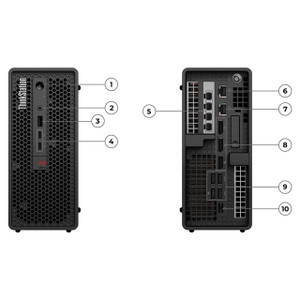
- PCIe / USB / Ethernet Expansion: The tower form factor provides PCIe expansion slots for adding capture cards, additional GPUs, or specialized interface cards. Combined with USB and Ethernet, it integrates into existing enterprise network infrastructure via standard protocols without requiring proprietary adapters.
Integration & Compatibility
The 30GS00JDUS ships with Windows 11 Pro 64-bit, which supports domain join, Group Policy, BitLocker, and Hyper-V. vPro enables out-of-band management via Intel AMT, compatible with tools like Microsoft Endpoint Configuration Manager and Intel EMA. The workstation accessory ecosystem — including additional RAM, storage, and GPU upgrade paths — follows standard ThinkStation P3 Tower compatibility matrices published by Lenovo. DDR5 SO-DIMMs are not compatible; this platform requires full-size DDR5 UDIMMs. For enterprise networking integration, the onboard Ethernet is Intel-based and supports standard 802.1X authentication, VLAN tagging, and Wake-on-LAN. The RTX A1000 supports up to four simultaneous displays via DisplayPort and/or HDMI outputs, making it viable as a multi-monitor analyst workstation without an additional display card.
Frequently Asked Questions
Q: How much RAM can the Lenovo ThinkStation P3 Tower 30GS00JDUS support, and can I upgrade it?
A: The 30GS00JDUS ships with 1 x 32GB DDR5-4400 UDIMM. The board has 4 DIMM slots and supports a maximum of 128GB total. You can add up to three additional DDR5 UDIMMs — adding a matching 32GB stick in a second slot will also enable dual-channel mode for improved memory bandwidth.
Q: What is the warranty on the 30GS00JDUS?
A: The 30GS00JDUS includes a 3-Year Premier Next Business Day On-Site warranty. This means a technician dispatched to your location the next business day after a hardware failure is confirmed — not a depot or mail-in service arrangement.
Q: Does the 30GS00JDUS support hardware-level drive encryption?
A: Yes. The included 1TB M.2 NVMe SSD is a TCG Opal self-encrypting drive. Full-disk encryption can be enforced at the hardware level using a compatible Opal management tool, without consuming CPU cycles for software-based encryption like BitLocker software mode.
Q: What GPU does the 30GS00JDUS include, and is it upgradeable?
A: It ships with an NVIDIA RTX A1000 8GB professional GPU. The 1100W power supply and tower PCIe slots provide significant headroom for GPU upgrades. Verify slot type and physical clearance in the ThinkStation P3 Tower chassis before selecting a higher-TDP card.
Q: Can the 30GS00JDUS be managed remotely by IT without the OS running?
A: Yes. The Intel Core i9-14900K is the vPro-enabled variant, and the system includes Intel AX211 vPro wireless. Intel AMT (Active Management Technology) allows out-of-band remote management — power cycling, BIOS access, remote KVM — independent of the OS state, provided the system is connected to power and a network.
Q: What operating system ships with the 30GS00JDUS?
A: Windows 11 Pro 64-bit English is pre-installed. It supports domain join, Group Policy, BitLocker, Hyper-V, and other enterprise features out of the box.
The 30GS00JDUS is the configuration I'd reach for when a deployment needs a dedicated professional workstation that can handle simultaneous multi-stream video decode and GPU-accelerated analytics without constant resource contention. The 24-core i9-14900K running 32 threads at up to 5.6 GHz boost, paired with 32GB of DDR5-4400, gives you the headroom to run a VMS server process, a real-time analytics engine, and a full desktop environment concurrently — without the performance ceiling you hit on workstations with 8 or 12 cores.
Technical Highlights:
- 32-Thread CPU with 36MB Cache: The i9-14900K's hybrid core architecture (8 P-cores + 16 E-cores) is well-suited for mixed workloads where some threads are latency-sensitive (VMS decode) and others are throughput-bound (background analytics or indexing). The 36MB combined cache reduces main memory round-trips on frequently accessed data structures.
- PCIe Gen4 NVMe SSD with Opal Encryption: Gen4 NVMe eliminates storage as a bottleneck in video export, database-backed VMS logging, and large-file transfers. The Opal SED capability is particularly relevant for deployments subject to data-at-rest compliance requirements — hardware encryption adds zero CPU overhead and survives OS reinstalls.
- 1100W PSU with RTX A1000 Baseline: The current load on that 1100W supply is modest — the i9-14900K and RTX A1000 together draw well under 400W under sustained load. That leaves 700W+ of headroom, which means this chassis can absorb a significant GPU upgrade (RTX A4000, A4500) without a PSU swap — relevant if GPU compute requirements grow after initial deployment.
Deployment Considerations:
- The single 32GB DIMM ships in single-channel mode. If memory bandwidth is a constraint for your workload (GPU-CPU shared tasks, high-frequency database queries), installing a second matching 32GB DDR5 UDIMM in the paired slot immediately doubles effective bandwidth — budget for it at procurement time rather than retrofitting later.
- The RTX A1000 is a professional GPU with ISV-certified drivers, but its 8GB VRAM ceiling will limit use cases involving large AI model inference or multi-stream 4K+ GPU decode at scale. Validate VRAM requirements against your specific VMS or analytics platform before finalizing the order.
This configuration is a strong fit for a physical security operations center workstation — running a 16-64 camera VMS client with simultaneous GPU-accelerated motion analytics, while a second operator runs forensic video export in the background. The vPro / AMT capability also makes it serviceable remotely by an IT team without dispatching on-site staff for every BIOS-level issue.