Image coming soon
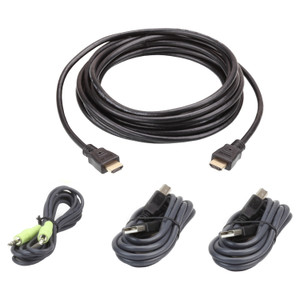
Product images are provided for reference and may not represent the exact model, configuration, or included components.

Overview

SKU: 2L5302P
UPC: 672792151071
Condition: New
Write a Review 0% OFF

ATEN Keyboard / Video / Mouse / Audio Cable - 15 PIN Sphd;Mini-phone 3.5 MM - Male - 2L5302P

ATEN 2L5302P KVM Audio Combo CableOverviewThe ATEN 2L5302P is a 6-foot (1.8 m) KVM combo cable that consolidates keyboard, video, mouse, and audio sig…

$43.00 $42.99 SAVE $0
Ships same business day
In stock

Quantity:

Adding to cart… The item has been added
Compatibility guidance available for your deployment
Senior specialists for pre and post-sales support
Authorized sourcing and documentation support
Shipping and lead-time confirmation before install

Laura Bennett, IPSD Senior Specialist

Talk to Laura

200+ hrs training • U.S - based

Senior Specialist • 877-277-7147

ATEN Keyboard / Video / Mouse / Audio Cable - 15 PIN Sphd;Mini-phone 3.5 MM - Male - 2L5302P

$43.00
$42.99

Overview

SKU: 2L5302P
UPC: 672792151071
Condition: New

No Bots, Just Experts

Questions about this product? Free pre-sales support from a senior specialist — product questions, compatibility checks, BOM quotes, price confirmation — typically answered within one business day. Need camera placement or system design work? Engineering time is $175 per hour (qty 1 = 1 hour). Hardware buyers get up to one hour ($175) credited back on their order.

Description

ATEN 2L5302P KVM Audio Combo Cable

Overview

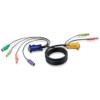
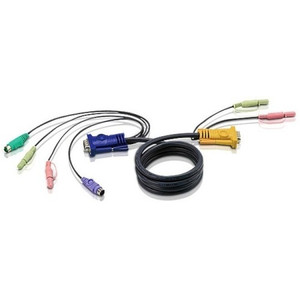
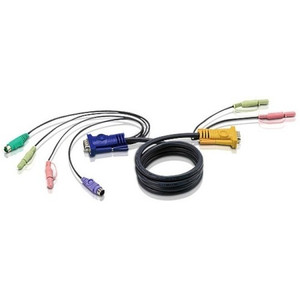
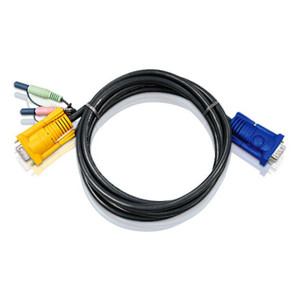
The ATEN 2L5302P is a 6-foot (1.8 m) KVM combo cable that consolidates keyboard, video, mouse, and audio signals into a single managed run between a workstation or AV source and an ATEN KVM console. The cable terminates at the console end with a single SPHD-15 male connector — ATEN's proprietary 15-pin high-density connector used on their KVM switches — and fans out at the PC or source end into a HDB-15 (HD-15) VGA male for video, two 6-pin mini-DIN male connectors for PS/2 keyboard and mouse, plus two 3.5 mm audio plugs for microphone and speaker. The 2L5302P is the cable you need when your KVM switch requires PS/2 peripherals and analog VGA — not a USB or DisplayPort run.

Compatibility

Designed for ATEN KVM switches that use the SPHD-15 console port with integrated PS/2 and audio support. Compatible families include ATEN CS-series and ACS-series KVM switches specifying the SPHD-15 port standard and PS/2 peripheral input — such as the CS1308, CS1316, and CS138 series. Verify your switch model's console port type (SPHD-15) and peripheral interface (PS/2) before ordering: switches requiring USB HID or DVI/HDMI video use a different cable family. The HDB-15 video connector is VGA only — not compatible with digital video outputs.

Installation Notes

Route the 1.8 m cable with enough slack at both ends to avoid strain on the SPHD-15 connector, which carries multiple signal pairs in a compact housing. The PS/2 mini-DIN connectors are keyed — match the color coding (purple for keyboard, green for mouse) to the corresponding ports on the PC. Audio plugs follow standard 3.5 mm TRS pinout; connect microphone-in and speaker-out to the matching jacks on the source machine.

Specifications
Connector 1 Keyboard: 2 x 6-pin mini-DIN male
Connector 1 Monitor: 1 x HDB-15 male
Connector 1 Microphone Speaker: 2 x Audio plug
Connector 2 Console: 1 x SPHD-15 male
Connector 2 Microphone Speaker: 2 x Audio plug
Length: 6.0' / 1.8 m
Q&A
Reviews
Have Questions?

RELATED PRODUCTS

System Design, Deployment & Technical Support

Support services and planning resources for commercial surveillance, access control, and infrastructure deployments.

Fixed scope • Fixed price

System Design Assistance

  • Get help validating product compatibility
  • Coverage requirements
  • Storage planning and deployment architecture before you buy.
Request Design Help

Deployment & Configuration Support

  • Access fixed-scope support for rollout planning
  • User setup guidance
  • Migration and system standardization across single-site or multi-site deployments
View Support Services

Guides, Tools & Calculators

  • PoE requirements
  • Storage retention
  • Camera selection and deployment methodology
Open Technical Resources