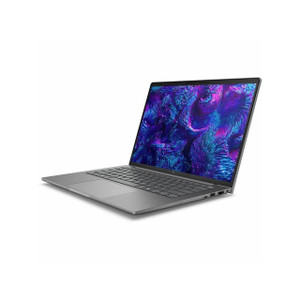
HP Inc C3BE2UT#ABA ZBook X 16 G1i Mobile Workstation
The HP ZBook X 16 G1i (C3BE2UT#ABA) is a 16-inch mobile workstation built around Intel's 15th-generation Core Ultra 7 265H processor — a strong pick for security integrators, VMS administrators, and field engineers who need genuine workstation-class compute on the road without hauling a desktop replacement. The 16:10 WUXGA panel and 6.95 lb chassis position it squarely in the "portable but capable" tier rather than the ultra-light category, which means the thermal headroom to actually sustain multi-core loads during camera provisioning sessions, forensic video review, or real-time analytics configuration.
Overview
HP's ZBook X line targets professionals who run demanding software — VMS platforms, CAD, simulation, or video processing — and need that workload to move with them between job sites, NOCs, and client briefings. The G1i designation indicates Intel graphics integrated into the Core Ultra die (Intel Arc graphics), supplemented by discrete graphics (DSC noted in the distribution description), giving the machine a dual-path GPU architecture: lighter tasks stay on the efficient Arc iGPU, while heavier rendering or compute offloads to the discrete unit. That matters for anyone running live multi-stream video decode or AI-assisted analytics clients at the edge.
Key Features
- Intel Core Ultra 7 265H (15th Gen): 16 cores and 16 threads clocked from 1.70 GHz base to 5.30 GHz boost. In practice, the high core count sustains parallel workloads — decoding 32+ camera streams in a software VMS client, running multiple remote desktop sessions simultaneously, or compiling large access-control configuration exports — without the thermal throttling that plagues thinner ultrabooks.
- 16" WUXGA (1920×1200) 16:10 Anti-Glare Display: The extra vertical real estate of the 16:10 aspect ratio (versus the more common 16:9) is genuinely useful for anyone working in dashboard-heavy applications — more rows visible in VMS camera grids, longer code or log views without scrolling. The 300-nit brightness and anti-glare treatment keep the screen usable in bright warehouses or outdoor site trailers without a privacy shade.
- 32GB RAM: Enough headroom to run a local VMS client, a browser-based management console, remote desktop, and a video conferencing tool simultaneously without paging to disk. For workstation-class tools like Milestone XProtect or Genetec Security Center running locally, 32GB is the practical minimum to avoid swap thrash on larger deployments.
- 1TB Storage: Sufficient for local video evidence exports, project files, and a full software stack without immediately offloading to external drives. Field engineers pulling clip exports from NVRs for incident review will appreciate not managing a secondary drive on-site.
- Dual GPU Architecture (Intel Arc iGPU + Discrete): The integrated Intel Arc GPU handles everyday compute efficiently — extending battery life during travel — while the discrete unit (DSC) engages for heavier tasks like rendering analytics overlays or GPU-accelerated video transcoding. This matters if you run AI-based video analytics clients locally rather than server-side.
- Built-in Webcam: Included for remote collaboration, client video calls, and virtual project reviews — no USB dongle required, which matters when every port is occupied by a camera, NVR, or access control device during integration work.
- 60Hz Refresh Rate: Appropriate for professional workstation use. Video forensics and VMS work don't require the high refresh rates of gaming displays — the panel spec prioritizes color accuracy and readability over motion smoothness.
Integration and Compatibility
As a standard x86 Windows workstation, the C3BE2UT#ABA is compatible with the full range of enterprise security and VMS software: Milestone XProtect, Genetec Security Center, Axis Camera Station, Hanwha Wisenet WAVE, and similar platforms all run natively. The Core Ultra 7 265H's Intel Arc GPU supports hardware-accelerated video decode for H.264 and H.265 streams, reducing CPU load during live multi-camera monitoring sessions — a practical benefit when you're simultaneously reviewing footage and configuring camera parameters. For network video recorder commissioning or IP camera configuration, the 16" display provides enough screen space to split a live camera feed alongside a browser-based configuration interface without constant window toggling. The platform also supports enterprise manageability features standard to HP commercial products, including compatibility with HP Manageability Integration Kit for SCCM/MECM environments — relevant for IT teams deploying this machine across multiple technician workstations.
For field teams running access control integration work, the machine's USB and Thunderbolt connectivity (standard to the ZBook X line) supports direct connection to reader programming tools, door controller configuration interfaces, and credential enrollment readers without a docking station. Pair with a PoE switch for camera bring-up on a portable bench setup.
Frequently Asked Questions
Q: What processor does the C3BE2UT#ABA ship with?
A: The C3BE2UT#ABA ships with an Intel Core Ultra 7 265H — a 15th-generation processor with 16 cores, 16 threads, a 1.70 GHz base clock, and a 5.30 GHz boost clock.
Q: How much RAM and storage does the HP ZBook X 16 G1i C3BE2UT#ABA include?
A: It ships with 32GB of RAM and a 1TB storage drive, as configured in the SmartBuy specification.
Q: What is the display resolution and size on the C3BE2UT#ABA?
A: The display is a 16-inch WUXGA panel at 1920×1200 resolution (16:10 aspect ratio), with a 300-nit brightness rating, anti-glare treatment, and a 60Hz refresh rate.
Q: What does the SmartBuy designation mean for the C3BE2UT#ABA?
A: HP SmartBuy SKUs are pre-configured commercial configurations optimized for business procurement — fixed specs, available through commercial channels, and typically offered at volume pricing without custom-build lead times.
Q: How much does the HP ZBook X 16 G1i C3BE2UT#ABA weigh?
A: It weighs 6.95 lb (approximately 3.15 kg), consistent with a 16-inch mobile workstation rather than an ultrabook.
Q: Does the C3BE2UT#ABA include a webcam?
A: Yes, the C3BE2UT#ABA includes a built-in webcam as part of the standard configuration.
The C3BE2UT#ABA is the machine I'd spec for a senior integration engineer who moves between project sites and needs a VMS client, configuration browser, and remote access tools running simultaneously without compromise. The Core Ultra 7 265H's 5.30 GHz boost and 16-thread architecture means you're not babysitting a spinning progress bar when pulling large video exports or running multi-stream decode locally — that's the spec that separates a workstation from a business laptop in practice.
Technical Highlights:
- Core Ultra 7 265H (16 cores / 5.30 GHz boost): Sustained parallel performance for VMS workloads, remote desktop sessions, and analytics client software — the core count matters more than clock speed when you're juggling multiple concurrent processes on a job site.
- 1920×1200 16:10 WUXGA Display: The extra vertical pixels relative to a standard 16:9 panel are immediately useful in camera grid views and configuration interfaces — you see more without scrolling, which adds up across a long commissioning day.
- 32GB RAM + 1TB Storage: Enough to run a full enterprise VMS client locally alongside a browser, remote desktop, and video conferencing without paging. The 1TB drive accommodates evidence clip exports from NVRs without immediately reaching for an external drive.
Deployment Considerations:
- At 6.95 lb and 19.90 inches wide, this isn't a machine for commuters — it's sized for technicians who set it up on a table or in a vehicle and work from there. Plan for a bag that fits a 16-inch chassis.
- The SmartBuy fixed configuration means you get exactly what's specced here — 32GB RAM, 1TB storage, Core Ultra 7 265H. If a project requires more RAM headroom (64GB+) for server-side VMS workloads, evaluate whether a configurable ZBook variant or an upgradeability path fits your procurement cycle.
Best fit for security integration firms deploying technicians across multiple simultaneous projects who need a machine that handles the full stack — VMS, access control software, video forensics — without a workstation left behind at the office.