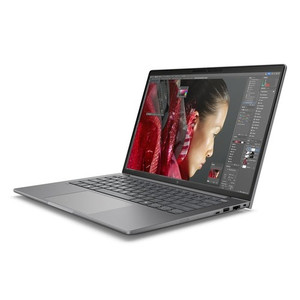
HP Inc BX7U5UT#ABA 16-Inch Mobile Workstation
Overview
The HP ZBook 8 G1i (BX7U5UT#ABA) is a 16-inch mobile workstation built around Intel's 15th-generation Core Ultra 7 265H processor — a platform aimed squarely at engineers, architects, security integrators, and IT architects who need sustained computational performance in a portable form factor. At 7.25 lb and dimensioned at 19.90 × 11.90 × 2.70 inches, this is a desk-replacement class machine: not the lightest option on the market, but sized to accommodate a full-width 16:10 display and the thermal headroom that sustained workloads demand. If you're running HP Inc workstations across your engineering or field deployment teams, the ZBook 8 G1i represents HP's current-generation mobile workstation line for professional compute.
Key Features
- Intel Core Ultra 7 265H (15th Gen, up to 5.30 GHz, 16 cores/16 threads): The 265H's hybrid architecture delivers up to 5.30 GHz boost across 16 cores — practical for parallelized tasks like rendering surveillance VMS layouts, running video analytics software locally, or compiling configuration scripts. Sixteen threads mean the processor won't bottleneck under multi-application workloads typical in field commissioning or security operations center environments.
- 16" WUXGA (1920×1200) UWVA Anti-Glare 300-nit 60Hz Display: The 16:10 aspect ratio gives you roughly 11% more vertical screen space than a standard 16:9 panel at the same diagonal — a real productivity gain when reviewing long configuration files, VMS timelines, or multi-row spreadsheets. The 300-nit brightness with anti-glare coating makes the panel usable in mixed lighting environments, including glass-walled offices or field sites with ambient light interference. UWVA (Ultra Wide Viewing Angle) means color and contrast hold at off-axis angles, relevant when presenting schematics to a client across a desk.
- 32GB RAM: 32GB gives you the headroom to run a VMS client, browser-based management consoles, a virtual machine, and local analysis tools simultaneously without memory pressure forcing page swaps to disk — the kind of multi-process workload common during system commissioning or integration testing. For most professional workstation use cases, 32GB is the practical minimum; for AI inferencing or heavy simulation, it's the floor, not the ceiling.
- 1TB Solid-State Storage: A 1TB SSD accommodates large project repositories, recorded video clips for evidence review, software packages, and OS overhead without requiring external drives in the field. SSD access times also mean application launches and file operations don't become workflow bottlenecks during client-site visits or extended deployment sessions.
- Discrete GPU (DSC): The inclusion of discrete graphics — referenced as DSC in the product record — means the ZBook 8 G1i is provisioned for display-intensive or GPU-accelerated tasks beyond what integrated graphics handle. This matters for VMS platforms that offload video decoding to the GPU, or for CAD and rendering workflows common in physical security design.
- 7.25 lb / 19.90 × 11.90 × 2.70" Form Factor: At this weight class, the ZBook 8 G1i is a carry-to-the-job-site machine, not a carry-all-day machine. Plan for a dedicated bag slot. The trade-off is a full-sized display and keyboard — ergonomically correct for extended on-site configuration sessions that would fatigue on a 14-inch ultrabook. Pair it with a quality carry case rated for this footprint.
Integration and Compatibility
As a mobile workstation in HP's ZBook line, the BX7U5UT#ABA is positioned for professional software environments — VMS platforms, CAD applications, engineering tools, and enterprise IT management suites. The Core Ultra 7 265H supports Intel's vPro ecosystem features where applicable to the platform configuration, relevant for IT departments managing fleets of workstations remotely. Discrete graphics support GPU-accelerated codec handling, useful in video surveillance integration work where software VMS clients decode multiple simultaneous HD streams. For integrators standardizing on HP workstation platforms, this model slots into HP's current 15th-generation refresh cycle. Verify driver and application compatibility with your specific VMS or engineering software vendor against the Core Ultra 7 265H platform before deployment at scale.
Frequently Asked Questions
Q: What processor does the HP BX7U5UT#ABA use, and what are the clock speeds?
A: The BX7U5UT#ABA is equipped with an Intel Core Ultra 7 265H (15th Generation), running at a base frequency of 1.70 GHz with boost up to 5.30 GHz across 16 cores and 16 threads.
Q: What is the display resolution and size on the ZBook 8 G1i BX7U5UT#ABA?
A: The display is a 16-inch WUXGA panel with a native resolution of 1920×1200 (16:10 aspect ratio), featuring UWVA technology, anti-glare coating, 300-nit brightness, and a 60Hz refresh rate.
Q: How much RAM and storage does the BX7U5UT#ABA ship with?
A: It ships with 32GB of RAM and a 1TB solid-state drive as configured.
Q: Does the HP ZBook 8 G1i BX7U5UT#ABA include discrete graphics?
A: Yes, the BX7U5UT#ABA includes a discrete GPU (referenced as DSC in the product specification), in addition to the integrated graphics within the Intel Core Ultra 7 265H processor.
Q: What is the weight and physical size of the BX7U5UT#ABA?
A: The unit weighs 7.25 lb and measures approximately 19.90 inches wide × 11.90 inches deep × 2.70 inches tall — a full desk-replacement form factor.
Q: Is the HP ZBook 8 G1i BX7U5UT#ABA appropriate for running VMS software on-site?
A: The combination of the Core Ultra 7 265H (16 cores, up to 5.30 GHz), 32GB RAM, 1TB SSD, and discrete GPU makes it well-suited for running enterprise VMS clients, decoding multiple HD streams simultaneously, and handling other compute-intensive security integration tasks in the field. Confirm GPU-accelerated decoding compatibility with your specific VMS platform.
When I look at the BX7U5UT#ABA for field deployment work, the spec that stands out first is the Core Ultra 7 265H hitting 5.30 GHz boost across 16 cores — that's not a machine that's going to lag when you're simultaneously running a VMS client, pulling a live config session, and cross-referencing a large access control database on-site. This is the class of workstation that earns its keep during multi-day commissioning jobs where you can't afford to wait on the hardware.
Technical Highlights:
- 16:10 WUXGA Display (1920×1200): The extra vertical resolution versus a standard 1080p 16:9 panel is not cosmetic — on a VMS timeline or a multi-zone access control map, that additional height keeps more context visible without scrolling, which genuinely speeds up review work.
- 32GB RAM + 1TB SSD: 32GB is where you stop thinking about memory management during a live commissioning session. The SSD keeps application load times and file I/O from becoming the bottleneck when swapping between tools. This combination handles concurrent workloads without compromise for most integration workflows.
- Discrete GPU: Hardware GPU decoding changes the calculus on how many simultaneous live streams a VMS client can handle on a single machine. On a CPU-only workstation, stream count and resolution are the first things that suffer under load. A discrete GPU removes that ceiling for most practical on-site monitoring scenarios.
Deployment Considerations:
- At 7.25 lb and nearly 20 inches wide, this machine is purpose-built for desk or workbench use during extended sessions — factor bag weight and transport logistics into deployment planning, especially for technicians moving between multiple job sites in a single day.
- The evidence confirms discrete graphics but does not specify the GPU model or VRAM — verify GPU SKU details with HP's configurator or official spec sheet before committing to GPU-dependent workflows at scale, particularly if your VMS platform has specific GPU driver requirements.
The BX7U5UT#ABA is the right call for security integrators and IT architects who need a single machine that handles enterprise VMS operation, documentation, remote access, and system configuration simultaneously — particularly in permanent NOC or security operations center environments where the 16-inch 16:10 display and sustained 16-core performance justify the form factor.