HP Inc A1NX6UT#ABA Z2 G9 Tower Workstation
Overview
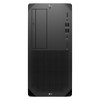
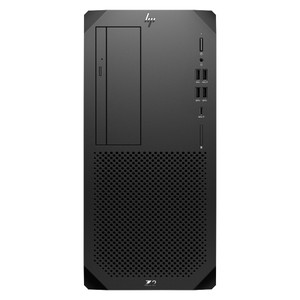
The HP Z2 G9 Tower workstation (A1NX6UT#ABA) is a commercial-grade desktop built around Intel's Core i5-14500 processor, 16GB of DDR5 memory, and a 512GB SSD. It targets enterprise environments, technical workstations, and security operations centers where a compact tower footprint needs to handle demanding compute workloads without the compromises of a consumer-grade system. Browse the full HP Inc catalog to compare the Z2 G9 line against other HP workstation families.
The tower form factor at 11.70 x 19.10 x 20.10 inches gives system builders room for internal expansion — drive bays, PCIe slots, and RAM slots — that small-form-factor and mini-PC alternatives simply cannot match. At 20.10 lbs, this is a bench-sitting or rack-adjacent unit, not a portable; plan your install location accordingly.
Key Features
- Intel Core i5-14500 (14th Gen): The i5-14500 is a 14-core (6P + 8E) processor with a boost clock of 5.0 GHz. For security workstation use cases — running a VMS client alongside analytics dashboards, or handling concurrent video decode streams — the hybrid core architecture lets background tasks run on efficiency cores without stealing cycles from foreground decode. This is a meaningful upgrade over 12th-gen i5 platforms in sustained multi-stream workloads.
- 16GB DDR5 System Memory: DDR5 delivers higher memory bandwidth than DDR4, which matters when the system is simultaneously buffering live camera streams, running motion search, and responding to operator input. 16GB is workable for mid-scale VMS deployments (8–16 camera streams depending on resolution), though larger installations should verify VMS vendor RAM recommendations — most enterprise VMS platforms call for 32GB+ in high-channel configurations.
- 512GB SSD Primary Storage: A 512GB SSD handles the OS, VMS server or client software, and application caching without the latency penalty of spinning disk. Video archive storage for a VMS server role should live on separate high-capacity drives — the 512GB boot drive is correctly scoped as a system volume, not a retention volume. See our network video recorder category if you need purpose-built storage appliances.
- Tower Form Factor — Expansion Room: Unlike small-form-factor workstations, the Z2 G9 Tower supports discrete GPU installation, additional PCIe cards (capture cards, additional NIC, hardware acceleration cards), and drive expansion. If your deployment needs a dedicated GPU for AI-accelerated analytics or multi-monitor operator stations, the tower chassis accommodates it — the compact chassis equivalents do not.
- Commercial-Grade Build (UNSPSC 43211515): Classified under commercial computing hardware (UNSPSC 43211515), the Z2 G9 is sourced through commercial channels, not consumer retail. This matters for procurement, support agreements, and lifecycle management in enterprise and government environments.
- DDR5 Platform for Longevity: DDR5 is the current-generation memory standard. Specifying a DDR5 platform today extends useful life — when you add memory at the 18- or 36-month mark, you're buying into an in-production standard rather than hunting for legacy DDR4 modules at a premium.
Integration and Compatibility
The A1NX6UT#ABA is a standard x86 tower workstation running on Intel's 14th Gen platform. It is compatible with any Windows or Linux-based VMS platform, including Milestone XProtect, Genetec Security Center, Avigilon Control Center, and Hanwha Wisenet WAVE, subject to meeting each vendor's specific CPU and RAM requirements. For VMS server deployments at the 16–32 camera scale, pair it with a dedicated PoE network switch to handle camera-side power and aggregation separately from the workstation's LAN port. For larger channel counts or 24/7 unattended recording roles, evaluate whether a purpose-built NVR or a higher-spec workstation (i7/i9 or Xeon-class) better fits the load profile.
Manufactured in Mexico (Country of Origin: MX), this unit is sourced through US commercial distribution channels. Confirm TAA and NDAA Section 889 compliance requirements directly with your procurement team, as these designations depend on contract vehicle and end-use context — the evidence available does not assert those certifications for this specific SKU.
Frequently Asked Questions
Q: What processor does the A1NX6UT#ABA include?
A: The A1NX6UT#ABA ships with an Intel Core i5-14500, a 14th Gen hybrid-architecture processor with 14 cores (6 performance + 8 efficiency) and a boost clock of up to 5.0 GHz.
Q: Is 16GB of RAM enough for a VMS server workstation?
A: 16GB DDR5 is sufficient for light-to-mid-range VMS client or small server deployments (typically 8–16 cameras at moderate resolution). Larger channel counts or enterprise VMS server roles generally require 32GB or more — check your VMS vendor's hardware sizing guide for the specific channel count you're running.
Q: Can I add a GPU or additional storage to the Z2 G9 Tower?
A: Yes. The tower form factor supports PCIe expansion, making it possible to install a discrete GPU for AI analytics acceleration, multi-monitor output, or additional storage controllers. The 512GB SSD is the boot/OS volume; video archive storage should be added separately via internal drives or a NAS/SAN depending on retention requirements.
Q: Is the A1NX6UT#ABA NDAA Section 889 compliant?
A: The available evidence does not include an NDAA Section 889 compliance assertion for this specific SKU. Verify directly with HP Inc or your procurement office before specifying for federal or government-adjacent contracts.
Q: What is the country of origin for this unit?
A: Country of origin is Mexico (MX), per the manufacturer's distribution data.
Q: What VMS platforms work with the Z2 G9 Tower?
A: As a standard x86 Windows workstation, the Z2 G9 Tower is hardware-compatible with any major VMS platform — Milestone XProtect, Genetec Security Center, Avigilon Control Center, Hanwha Wisenet WAVE, and others. Confirm minimum CPU and RAM requirements with your chosen VMS vendor for your specific channel count and retention configuration.
The A1NX6UT#ABA is a well-scoped entry point into the Z2 G9 Tower line — the i5-14500 with its 14-core hybrid layout handles concurrent workstation tasks cleanly, and the DDR5 memory platform gives you a forward-compatible base when you're budgeting for a 3–5 year workstation lifecycle. That said, 16GB is the floor for serious VMS work, not the ceiling, and buyers should factor a RAM upgrade into the total cost of ownership for any multi-stream recording or analytics role.
Technical Highlights:
- Intel Core i5-14500 (14-core hybrid): The 6P + 8E core split keeps background services (indexing, health monitoring, OS tasks) off the performance cores — useful in always-on security workstation roles where you can't afford latency spikes on the operator interface.
- DDR5 Memory Platform: Higher bandwidth than DDR4 benefits simultaneous video decode; more importantly, DDR5 modules will remain in production for the workstation's useful life — no end-of-life memory sourcing headaches at the 3-year upgrade mark.
- 512GB SSD Boot Volume: Fast storage for OS and VMS software load times. At 512GB this is correctly sized as a system volume — plan dedicated high-capacity drives or a NAS for camera footage retention from day one.
Deployment Considerations:
- At 20.10 lbs and 19.10 inches tall, the Z2 G9 Tower needs a dedicated desk or floor space — confirm physical clearance in the security operations room or head-end rack area before ordering. This is not a rack-mount unit without an optional conversion kit.
- The evidence does not confirm TAA compliance or NDAA Section 889 status for this SKU. If the end-use contract requires either designation, get written confirmation from HP Inc before procurement — don't assume based on the commercial channel source alone.
The Z2 G9 Tower in this configuration is a strong fit for a mid-size physical security operations center workstation — running a VMS client, operator interface, and analytics dashboard concurrently — where the operator station needs genuine expandability (GPU for multi-monitor, extra NIC, PCIe capture card) that a mini-PC or SFF simply can't support.