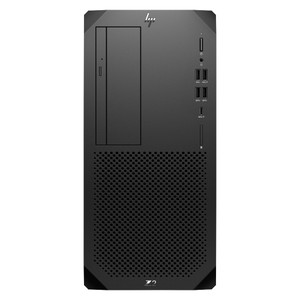
HP Inc 87G40UP#ABA HP Z2 G9 Tower Workstation
Overview
The HP Z2 G9 Tower workstation (87G40UP#ABA) is HP's entry-level professional workstation in tower form factor, configured here with an Intel Core i9-12900 processor, 32GB of RAM, and a 1TB primary drive. It targets commercial and enterprise environments — VMS server deployments, CAD/CAM stations, video surveillance recording and analytics workloads, and IT infrastructure builds — where a certified-component, ISV-validated platform matters more than consumer PC pricing. This is a purpose-built workstation shipped with U.S./English localization, sourced factory-new through distribution.
The Z2 G9 Tower sits at the base of HP Inc's workstation lineup, sharing the Z-series engineering DNA (ISV certifications, BIOS-level manageability, commercial support lifecycle) while using standard desktop components rather than Xeon or Threadripper class CPUs. That positioning makes it the right pick when you need workstation-grade reliability and software certification without full professional-GPU or dual-socket requirements.
Key Features
- Intel Core i9-12900 (12th Gen, Alder Lake): The i9-12900 brings a hybrid P-core/E-core architecture — 8 Performance cores + 8 Efficiency cores, 24 threads total. For VMS and NVR workloads, that thread count supports simultaneous decoding of high-channel H.265 streams without saturating the CPU, leaving headroom for analytics or operator UI. For engineering workloads, the P-cores sustain high single-thread clock speeds for simulation and rendering tasks.
- 32GB RAM: 32GB is the practical minimum for a multi-application workstation running a VMS client, analytics engine, and OS simultaneously. It avoids the swap-to-disk bottleneck that degrades live playback and export performance on 16GB systems. Expandable on the Z2 G9 platform, so you're not locked in if workload grows.
- 1TB Primary Storage: The 1TB drive provides the OS, application, and working-data footprint. For surveillance deployments, primary recording storage is typically supplemented by dedicated RAID or NAS — the 1TB covers the system partition and active application cache without competing with video retention. Pair with a dedicated NAS or external storage array for long-term footage retention.
- Tower Form Factor: The Z2 G9 tower chassis provides accessible internal expansion bays, PCIe slots for capture cards, GPU upgrades, or additional NIC/storage controllers. Tower placement in a server room, control room, or under-desk rack gives you physical access without pulling a rack unit — relevant for sites where integrators need to add or swap hardware post-deployment.
- Commercial-Grade Platform: HP's Z-series workstations carry ISV certifications from major software vendors (Autodesk, Adobe, VMS platforms). That matters for warranty support and software vendor escalation — if a certified configuration hits a driver or OS issue, the vendor support chain is cleaner than with consumer hardware. The Z2 G9 also ships with HP's commercial BIOS feature set, including remote management compatibility.
- Factory-New, U.S. English Localization: The #ABA suffix confirms U.S. English localization — keyboard, OS language, power supply spec, and regional certifications are U.S.-market configured. Manufactured in Mexico (country of origin: MX), distributed through U.S. commercial channels. No grey-market, no parallel imports.
Integration & Compatibility
The 87G40UP#ABA runs standard x86-64 Windows or Linux, making it compatible with the full range of enterprise video management software platforms — Milestone XProtect, Genetec Security Center, Avigilon Control Center, Hanwha Wave, and others — without driver workarounds. The i9-12900's integrated Intel UHD Graphics 770 supports multi-monitor output for operator workstations; add a discrete GPU if you need more display heads or GPU-accelerated analytics decoding. PCIe expansion allows integration of serial capture cards, fiber NICs, or dedicated video acceleration cards depending on your VMS channel count and analytics load. For enterprise IT environments, the Z2 G9 platform integrates with HP Manageability Integration Kit (MIK) for SCCM/MECM deployment, HP Sure Start for BIOS integrity, and standard IPMI/BMC remote management tools.
Frequently Asked Questions
Q: What processor does the 87G40UP#ABA include?
A: The 87G40UP#ABA ships with an Intel Core i9-12900 (12th Gen Alder Lake), a 16-core (8P+8E), 24-thread processor suited for high-thread-count workloads including multi-stream VMS decoding and engineering applications.
Q: How much RAM does the HP Z2 G9 Tower 87G40UP#ABA include, and is it expandable?
A: It ships with 32GB of RAM. The Z2 G9 Tower platform supports memory expansion beyond the shipped configuration via available DIMM slots, though the specific maximum depends on the board configuration. Confirm the slot count and maximum supported capacity with HP's configuration documentation before purchasing additional modules.
Q: What is the storage capacity in the 87G40UP#ABA?
A: The system includes a 1TB primary drive. This covers the OS and application footprint. For surveillance or data-intensive workloads requiring larger storage pools, supplemental internal drives or external/NAS storage is recommended.
Q: Is the 87G40UP#ABA U.S. market compatible?
A: Yes. The #ABA suffix designates U.S. English localization — this unit is configured for the U.S. market with appropriate power supply spec, English OS/keyboard, and regional certifications. Country of origin is Mexico.
Q: What VMS platforms are compatible with the HP Z2 G9 Tower?
A: The Z2 G9 Tower runs standard x86-64 Windows and Linux, making it compatible with all major VMS platforms including Milestone XProtect, Genetec Security Center, Avigilon Control Center, and Hanwha Wave. Check each VMS vendor's certified hardware list for the specific OS and driver configuration required.
Q: Does the 87G40UP#ABA come with a warranty?
A: HP commercial workstations typically include a manufacturer warranty; consult the HP warranty terms for the Z2 G9 series and this specific SKU for duration and service level details. Warranty documentation ships with the unit.
I spec the 87G40UP#ABA most often for VMS server and operator workstation builds where the integrator needs a platform that ISVs will actually stand behind — the i9-12900's 24-thread configuration handles simultaneous H.265 decode across 30–60 camera channels without the CPU becoming the bottleneck, and HP's Z-series commercial BIOS feature set means IT can manage it the same way they manage the rest of the workstation fleet.
Technical Highlights:
- i9-12900 Hybrid Architecture: 8 Performance cores handle compute-intensive tasks (video decode, analytics); 8 Efficiency cores absorb background OS and application threads — the split keeps latency-sensitive workloads from competing with maintenance tasks at the OS scheduler level.
- 32GB RAM Starting Point: Running a VMS server, analytics engine, and operator display simultaneously on 16GB forces swap activity that degrades real-time playback. 32GB gives you working headroom; expand to 64GB+ if you're running GPU-accelerated deep learning analytics on the same box.
- Tower Expandability: The Z2 G9 tower chassis accepts PCIe expansion cards — relevant when you need to add a dedicated video capture card, second NIC for isolated camera network segmentation, or a GPU upgrade for analytics acceleration post-deployment without replacing the whole unit.
Deployment Considerations:
- The 1TB primary drive is sized for OS + application, not for video retention. Plan your storage architecture — whether that's internal SATA bays, a dedicated NAS, or direct-attached RAID — before deployment, not after the drives fill up three months in.
- The integrated Intel UHD 770 GPU handles 2–4 monitor outputs for an operator workstation but is not suitable for GPU-accelerated deep learning inference at scale. If your VMS analytics engine requires CUDA or OpenCL acceleration, budget for a discrete GPU in a PCIe slot.
This unit is the right call for a mid-size physical security operations center where the integrator needs a platform ISVs certify against, IT can remote-manage via standard tools, and the end-user can expand over a 4–5 year lifecycle without a full hardware swap.