Honeywell LTE-L57A AT&T 4G LTE Communicator for LYNX Touch
Overview
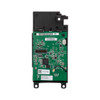
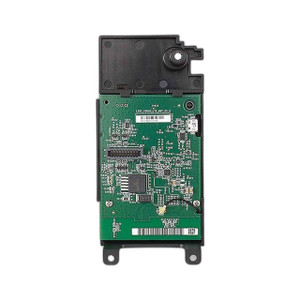
The Honeywell LTE-L57A is a cellular communicator module that adds AT&T 4G LTE connectivity to LYNX Touch alarm panels without external hardware. It installs internally via a bridge connector board and draws power directly from the LYNX panel—no separate power supply or external enclosure needed. This compact form factor (4.75" x 2.5") keeps the panel appearance clean and integrates seamlessly into residential and light commercial installations where cellular backup is required. The LTE-L57A supports Contact ID reporting format with 256-bit AES encryption, meeting standard alarm monitoring requirements.
Key Features
- Multi-band LTE coverage: Operates on AT&T 4G LTE bands 12, 13, 5, 4, and 2. This multi-band approach ensures broader geographic coverage—different regions rely on different LTE bands, so redundancy across five bands reduces dead zones compared to single-band modules.
- Internal antenna design: The module includes an integrated antenna mounted inside the LYNX panel enclosure. Benefit: cleaner installation without external antennas or external communicator boxes. Trade-off: signal strength depends entirely on panel location; if the panel sits in a basement or metal-lined space, signal may degrade. Pre-deployment site survey is critical.
- 5V direct panel power: Draws 5V directly from the LYNX Touch panel with standby current of 30 mA and maximum transmit current of 490 mA. This keeps power draw low enough that the panel's existing power supply typically handles the load without upgrades, reducing installation complexity and cost.
- 256-bit AES encryption: All alarm data transmitted over LTE is encrypted end-to-end. Standard requirement for alarm monitoring but worth confirming with your central station—ensure they support the encryption scheme the LTE-L57A uses.
- Contact ID reporting: Supports the industry-standard Contact ID format for alarm event transmission. Compatible with virtually all professional monitoring centers without special configuration.
- Firmware-dependent compatibility: Requires LYNX Touch firmware version 9.00.201 or newer. This is not backward-compatible with older firmware; upgrading the panel firmware is mandatory before the module will function. Check the panel's current firmware before ordering—a mismatch will result in non-functional hardware on-site.
Supported Panel Models
The LTE-L57A is designed for Honeywell LYNX Touch platforms: L5200, L5210, and L7000 panels running firmware 9.00.201 or later. Verify your panel model and firmware version before purchase. If your panel is older or running legacy firmware, a firmware upgrade may be available from Honeywell, but this requires careful planning in active alarm systems.
Integration and Deployment Context
This module replaces legacy 3G and CDMA communicators that are being sunset by carriers. If you're upgrading from an older communicator in an existing LYNX Touch installation, the LTE-L57A is the direct replacement path. Installation involves opening the panel enclosure, locating the internal bridge connector, and seating the LTE-L57A module—a straightforward 15–30 minute task for technicians familiar with LYNX Touch internals. No external wiring or PoE infrastructure is required, making it simpler than external cellular communicators used on other panel lines.
Frequently Asked Questions
Q: Does the LTE-L57A work with panels running firmware older than 9.00.201?
A: No. The LTE-L57A requires LYNX Touch firmware 9.00.201 or newer. Older firmware versions will not recognize or support the module. Firmware must be upgraded before the module can be installed.
Q: Can I use the LTE-L57A with a Verizon or T-Mobile network instead of AT&T?
A: No. The LTE-L57A is carrier-locked to AT&T and will not function on other carriers' networks. If you require a different carrier, contact Honeywell to explore alternative communicator modules designed for your target network.
Q: What happens if cellular signal is poor at my panel location?
A: The internal antenna cannot be repositioned or upgraded. If signal is marginal or blocked (basement, metal enclosures, dense walls), alarm transmission may fail or be unreliable. A site survey before installation is essential—test AT&T 4G LTE signal strength at the panel's exact location. If signal is inadequate, consider relocating the panel or deploying an external cellular communicator with a better antenna on a different panel platform.
Q: Is a separate power supply required?
A: No. The LTE-L57A draws 5V and power directly from the LYNX Touch panel. Maximum transmit current is 490 mA, which is within the panel's standard power budget. No external power supply or additional wiring is needed.
Q: Can the LTE-L57A be installed in an L5200 panel that currently uses a legacy 3G communicator?
A: Yes, provided the panel firmware is 9.00.201 or newer. Remove the old 3G module, connect the LTE-L57A to the internal bridge connector, and configure the panel for LTE connectivity. The module is designed as a direct replacement for legacy communicators in LYNX Touch panels.
Q: What encryption standard does the LTE-L57A use for alarm data?
A: The module uses 256-bit AES encryption for all transmitted alarm events. Confirm with your central station that they support AES-encrypted Contact ID messages before deployment.
Ted PerryPerspective based on aggregated IPSD and affiliated engineering team experience.
The LTE-L57A is the correct module for any LYNX Touch panel that needs AT&T cellular communication. I always verify the firmware version before ordering because the LTE-L57A requires a specific minimum firmware that older L5200 panels may not have. Order the module only after confirming firmware 9.00.201 or newer is installed.
Technical Highlights:
- Internal installation: Mounts inside the LYNX Touch panel via bridge connector for a clean, self-contained installation. No external enclosure or antenna mounting required—keeps the panel appearance uncluttered.
- Multi-band LTE (bands 12, 13, 5, 4, 2): Supports five AT&T LTE bands for broad geographic coverage. Different regions prioritize different bands; five-band support ensures redundancy and reduces dead zones compared to single-band modules.
- 5V internal power draw (490 mA max transmit): Draws power directly from the LYNX panel without a separate power supply. Standby current of only 30 mA keeps overall panel power consumption low and simplifies installation.
Deployment Considerations:
- Verify the LYNX Touch firmware version is 9.00.201 or newer before ordering. Firmware mismatch is the most common cause of module installation failure. If the panel is running older firmware, plan a firmware upgrade as a prerequisite.
- Test cellular signal strength from the panel location before committing. The internal antenna cannot be repositioned like an external communicator. Basement installations, metal-lined enclosures, or signal-challenged locations may experience marginal or unreliable transmission. A pre-deployment RF survey is highly recommended.
- Confirm that your central station accepts AES-256 encrypted Contact ID messages. Not all older monitoring facilities support this encryption standard—compatibility must be verified with your service provider before installation.
For installations where the panel is in a basement or signal-challenged location, consider the VISTA platform with an external LTE-IA communicator and its repositionable, external antenna. That architecture provides better signal flexibility if on-site RF conditions are questionable.