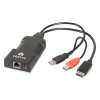
Vertiv HMX6150T-HDMI HDMI USB 2.0 Audio Zero U KVM Transmitter
Overview
The Vertiv HMX6150T-HDMI is a Zero U form-factor KVM-over-IP transmitter designed for the Vertiv Avocent HMX extender ecosystem. As the transmitter (TX) half of an HMX extender pair, it sits at the source workstation or server — capturing HDMI video, USB 2.0 peripheral data, and audio — and sends those signals across a standard IP network to a paired HMX receiver at the user's desk. The Zero U chassis mounts directly behind a rack-mounted server or on the back of a workstation without consuming a rack unit, keeping cable runs clean in dense compute environments.
The HMX6150T-HDMI is part of the broader Vertiv Avocent HMX product line, which spans multiple transmitter and receiver variants covering DisplayPort, VGA, and HDMI video interfaces. Selecting the correct transmitter requires matching the video interface at the source host (HDMI in this case) and pairing with a compatible HMX receiver on the IP network.
Key Features
- HDMI Video Interface: Captures the HDMI output directly from the source host — no active conversion or external adapter required at the transmitter end, which eliminates a potential failure point in the signal chain.
- USB 2.0 Support: Extends USB 2.0 peripherals — keyboard, mouse, and compatible USB devices — from the receiver end back to the host, allowing full remote desktop interaction over the IP link without a local operator present at the server.
- Audio Extension: Carries audio alongside video and USB data on the same IP connection, supporting deployments where operators need audio feedback from the host system at their remote workstation.
- Zero U Form Factor: The chassis requires no dedicated rack unit, mounting directly to the rear of the host system. This matters in fully-loaded racks where even 1U of extender hardware creates contention with compute or storage equipment.
- IP Network Transport: Signals travel over standard Ethernet infrastructure rather than proprietary cabling, meaning you can leverage existing managed network switches and extend reach across campus or data center segments without pulling dedicated KVM cabling.
- HMX Ecosystem Integration: Pairs with compatible HMX receivers within the Vertiv Avocent HMX platform, supporting centralized management and connection switching through HMX management software where deployed in multi-user, multi-host environments.
Integration and Compatibility
The HMX6150T-HDMI is designed for use within the Vertiv Avocent HMX extender platform. Compatibility depends on pairing with a supported HMX receiver variant — the HMX product family includes DisplayPort-based and HDMI-based receivers, so confirm the receiver model supports HDMI source signal before ordering. For environments running KVM switching infrastructure, verify whether the HMX management software version in your deployment supports this transmitter SKU, as firmware compatibility across HMX generations should be confirmed against Vertiv's current firmware matrix before installation.
Firmware updates for HMX platform components — including transmitters in this family — are distributed via Vertiv's support portal. The HMX6150T-HDMI (often searched as HMX6150T HDMI) should be kept current with paired receiver firmware to avoid protocol mismatches that can cause dropped connections or reduced feature availability.
Frequently Asked Questions
Q: What is the HMX6150T-HDMI and what role does it play in an HMX deployment?
A: The HMX6150T-HDMI is the transmitter unit in a Vertiv Avocent HMX KVM-over-IP extender pair. It connects to the HDMI video output and USB ports of a source host and transmits those signals over an IP network to a paired HMX receiver at the user's workstation.
Q: What receiver must be paired with the HMX6150T-HDMI?
A: The HMX6150T-HDMI requires a compatible HMX receiver that supports HDMI signal input from the transmitter. Confirm receiver model compatibility with Vertiv's current HMX compatibility matrix before ordering, as the HMX family includes both DisplayPort and HDMI receiver variants.
Q: Does the HMX6150T-HDMI require proprietary cabling between transmitter and receiver?
A: No. The HMX platform transmits signals over standard IP Ethernet infrastructure, so existing managed switches and network cabling can carry the signal between transmitter and receiver without dedicated proprietary runs.
Q: Where does the HMX6150T-HDMI physically mount?
A: The Zero U form factor allows the unit to mount directly to the rear of a rack-mounted server or workstation without consuming a rack unit, keeping installations tidy in space-constrained racks.
Q: How are firmware updates handled for the HMX6150T-HDMI?
A: Firmware updates for the HMX transmitter and receiver family are distributed through Vertiv's support portal. Keeping transmitter and receiver firmware versions synchronized is important to avoid compatibility issues across the IP link.
The HMX6150T-HDMI's Zero U form factor is the detail I always mention first to integrators spec'ing this into dense rack environments — it physically attaches behind the host without taking a rack unit, which in a fully populated 42U cabinet can be the difference between a clean installation and a forced redesign of your compute/storage layout.
Technical Highlights:
- HDMI Interface: Direct HDMI capture at the transmitter eliminates any signal conversion at the source — one fewer active component that can introduce latency or compatibility issues with the host's GPU output.
- USB 2.0 Extension: Full USB 2.0 peripheral support across the IP link means keyboard, mouse, and compatible USB devices operate transparently at the receiver end — no local operator needed at the rack.
- IP Transport: Standard Ethernet carriage means the signal path reuses existing switch infrastructure rather than requiring dedicated extender cabling, which simplifies both the initial install and any future topology changes.
Deployment Considerations:
- Before ordering, confirm that the HMX receiver on the other end of your IP link explicitly supports HDMI signal from the HMX6150T-HDMI transmitter — the HMX family spans DisplayPort and VGA variants, and mismatched pairs will not interoperate.
- Keep transmitter and receiver firmware versions in sync; Vertiv distributes updates through their support portal and version mismatches across an IP KVM link are a common source of intermittent disconnects that are difficult to diagnose at the switch or cable level.
The HMX6150T-HDMI is the right specification for data center or server room builds where HDMI is the host video interface, rack density rules out any 1U extender hardware, and the network infrastructure is already in place to carry KVM-over-IP traffic without additional switching investment.