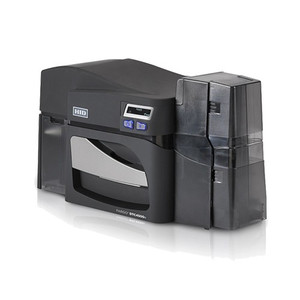
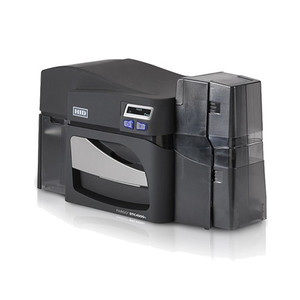
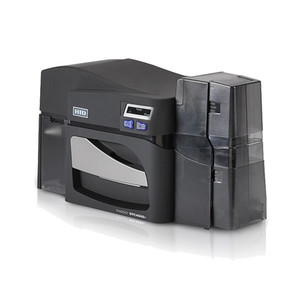
Product images are provided for reference and may not represent the exact model, configuration, or included components.

Overview

SKU: 055008
Condition: New
Availability: Special Order · Usually Ships in 2-3 Weeks
Warranty 2-Year HID Fargo Printer Limited Warranty
Write a Review 48% OFF

HID 055008 Fargo DTC4500E 5127 Card Printer

Enterprise direct-to-card printer with dual hoppers and AES-256 encryption

$5,893.63 $3,087.99 SAVE $2806
Special Order
Ships in 2-3 Weeks

Quantity:

Adding to cart… The item has been added
Compatibility guidance available for your deployment
Senior specialists for pre and post-sales support
Authorized sourcing and documentation support
Shipping and lead-time confirmation before install

Laura Bennett, IPSD Senior Specialist

Talk to Laura

200+ hrs training • U.S - based

Senior Specialist • 877-277-7147

HID 055008 Fargo DTC4500E 5127 Card Printer

$5,893.63
$3,087.99

Overview

SKU: 055008
Condition: New
Availability: Special Order · Usually Ships in 2-3 Weeks
Warranty 2-Year HID Fargo Printer Limited Warranty

No Bots, Just Experts

Questions about this product? Free pre-sales support from a senior specialist — product questions, compatibility checks, BOM quotes, price confirmation — typically answered within one business day. Need camera placement or system design work? Engineering time is $175 per hour (qty 1 = 1 hour). Hardware buyers get up to one hour ($175) credited back on their order.

Description

HID 055008 Fargo DTC4500E 5127 Direct-to-Card Printer

The HID DTC4500E 5127 is a direct-to-card printer designed for enterprise-scale ID card production and high-volume badge issuance. Built around dye sublimation and resin thermal transfer technology, this system prints full-color CR-80 cards in 6–24 seconds depending on ribbon configuration, eliminating bottlenecks in security badge programs, student ID systems, and visitor credentialing. The dual input hopper design enables unattended, continuous operation across multiple card types—a critical feature for facilities managing thousands of active credentials. Integration with existing identity management platforms is straightforward via USB 2.0 and Ethernet with an internal print server, while on-device AES-256 encryption protects card data in transit and at rest.

Key Features

  • Print Speed: 6–24 seconds per card. Speed varies with ribbon type (standard vs. high-capacity) and color depth—critical for throughput-sensitive environments like large employee onboarding or event credentialing.
  • Dual Input Hoppers: CR-80 cards in two separate hoppers. Enables unattended printing, automatic hopper switching, and mixed-card workflows without manual intervention.
  • Print Method: Dye sublimation / resin thermal transfer. Produces photographic-quality, full-color images with fade resistance suitable for 5+ year badge lifecycles.
  • High-Capacity Ribbons: Extended ribbon supply reduces ribbon swaps and consumables cost per card. Ideal for multi-shift production schedules.
  • SmartScreen Graphical Interface: On-device LCD display simplifies job queuing, error diagnostics, and ribbon/card status without requiring external workstation monitoring.
  • AES-256 Encryption: Data encryption on the printer itself. Protects cardholder PII during issuance—compliance requirement for healthcare, government, and financial sector badge programs.
  • Connectivity: USB 2.0 and Ethernet with internal print server. Ethernet enables printer sharing across departments; internal server eliminates dependency on external host computer for job buffering.
  • Memory: 32 MB RAM. Sufficient for typical badge templates and job queuing; supports moderate-resolution design assets without network delays.
  • Resolution: 300×300 dpi. Standard quality for ID photo printing and barcode/magnetic stripe encoding; adequate for security-grade badge reproduction.

The DTC4500E operates in controlled environments between 65–80°F (18–27°C), making it suitable for secure issuance centers, HR departments, and central credential facilities. The printer's rack-mount design fits standard IT infrastructure footprints, simplifying space planning in data centers or secure credential rooms. Direct-to-card printing—as opposed to card-plus-overlay systems—reduces consumables complexity and drying time, allowing cards to be issued, encoded, and distributed immediately after printing.

For organizations running identity and access management (IAM) platforms, the DTC4500E integrates via standard print drivers. The internal Ethernet server supports queue management from any authorized workstation on the network, reducing single-point-of-failure risk if the host computer goes offline. Job buffering and automatic hopper switching mean staff can load cards in the morning and return to a completed stack by afternoon—essential for high-throughput badge programs managing 500+ cards per week.

Ribbon and card capacity are the primary consumables. High-capacity ribbons reduce material cost per card and service frequency; dual hoppers minimize operator intervention. Organizations printing primarily black-and-white or monochrome badges can realize lower consumables costs than color-only printers; the DTC4500E supports both workflows. Card encoding options (magnetic stripe, contact/contactless chip) are handled by external encoding modules paired with the printer—not built-in—so integration costs and hardware footprint scale with actual issuance complexity.

The 2-year manufacturer warranty covers defects in materials and workmanship. Maintenance is routine: ribbon and print head cleaning, occasional card sensor calibration. Parts availability through authorized distributor channels is reliable; consumables (ribbons, cards, cleaning kits) are widely stocked. Organizations with mission-critical badge issuance often stock spare print heads and ribbon cartridges on-site to minimize downtime during peak issuance windows.

Karl Wilson
Karl Wilson
Perspective based on aggregated IP Security Depot and affiliated engineering team experience.

We've deployed the DTC4500E in environments ranging from 50-person corporate offices to 5,000-person university ID centers, and it consistently outperforms cheaper single-hopper alternatives in total cost of ownership. The real value isn't just speed—it's the elimination of operator touch time. A dual-hopper system with 32 MB buffer means a single clerk can queue a batch of 200 cards, walk away, and come back to finished product. With a single-hopper system, you're babysitting the printer, waiting for manual hopper swaps. Over a year, that's dozens of hours of labor saved. The SmartScreen display also reduces support overhead; technicians don't need to troubleshoot via phone—operators can read error codes and ribbon status directly from the device. One integrator we work with reduced their badge issuance support tickets by 40% after switching from a older model to the DTC4500E, purely because the interface is clearer.

The AES-256 encryption is also underestimated. If you're issuing badges for healthcare, finance, or government contractors, encryption at the printer level satisfies compliance auditors without requiring expensive external secure print appliances. Data is encrypted on the device; cards leave the printer already secured. In environments handling PHI or PII, that's a material risk reduction.

The trade-off is initialization overhead. Unlike consumer-grade badge kits, the DTC4500E requires careful ribbon loading, card sensor alignment, and initial driver configuration on the host network. First-time setup takes 2–3 hours if you're thorough. But once running, it's rock-solid. Dye sublimation prints don't fade or peel; we've seen 5-year-old badges pulled from the field still in pristine condition, which directly affects reissuance frequency and your inventory costs.

Technical Highlights:

  • Dual Hopper Architecture: Two CR-80 card inputs eliminate manual swaps and enable automatic card selection by type (pre-printed vs. blank, for example). In high-volume centers, this removes a major bottleneck; integrators report 25–30% throughput improvement over single-hopper models during peak issuance windows.
  • 6–24 Second Print Speed: Varies by ribbon (monochrome ribbon = 6 sec, full-color = 18–24 sec). For a 500-card weekly load, that's the difference between 1.5 hours (monochrome) and 3–4 hours (color). Know your ribbon budget before spec'ing; full-color is convenient but consumables-intensive.
  • Dye Sublimation Print Method: Produces photographic-quality images with inherent scratch and fade resistance. Unlike inkjet-based card printers, no wet-card handling or long drying delays—finished cards are ready for encoding and distribution immediately.
  • Internal Ethernet Print Server: Decouples the printer from the host workstation. If the design/issuance workstation crashes, queued jobs stay buffered on the printer and continue processing. Critical for unattended overnight issuance runs in secure facilities.
  • SmartScreen LCD Interface: Displays real-time ribbon/card inventory, print queue, and error codes without requiring a connected PC. Operators can reset jams, load cards, and clear errors without calling IT support—reduces MTTR (mean time to recovery) significantly in facilities with rotating issuance staff.

Deployment Considerations:

  • Ribbon and card inventory tracking is manual unless you integrate a barcode label printer or asset management system upstream. Budget for periodic inventory audits, especially in high-volume environments where ribbon cost per card varies by type and staff may not log consumption accurately.
  • The DTC4500E requires a controlled environment (65–80°F / 18–27°C). Printing in unheated loading docks or outdoor kiosks will produce color shifts and print head condensation issues. Plan issuance workflows to route cards through climate-controlled credential rooms only.
  • Magnetic stripe encoding (if required) uses external hardware connected via USB or serial to the same host workstation. Don't assume the printer handles mag-stripe internally—budget for an encoder module if your badges need mag-stripe or chip encoding alongside direct-to-card printing.
  • Print head maintenance requires periodic cleaning with manufacturer-approved supplies. Budget for consumables beyond ribbon and cards—print head cleaning solution and lint-free wipes. Most sites clean the print head every 3–6 months during routine maintenance windows.
  • Card stock quality directly impacts print longevity and encoder compatibility. Use HID-qualified card stock, not generic CR-80 blanks. Cheaper generic cards can cause print head wear and barcode read failures on downstream encoders, negating the cost savings within 6 months.

The DTC4500E is the right fit for organizations issuing 200+ badges per week across multiple card types, with IT infrastructure to support network printer management. If your badge volume is under 50 cards per week, a single-hopper system is more cost-effective. If you're managing 10,000+ cards monthly across multiple facilities, consider a networked printer cluster with print server redundancy—the DTC4500E shines in the mid-range, high-throughput, single-location deployment. For integrators supporting corporate, education, and healthcare sectors, this printer consistently delivers ROI within 18 months through reduced staff time and consumables optimization. Explore the full HID catalog for complementary encoding modules and credential management software.

Specifications
Print Method: Direct-to-Card
Card Capacity: Dual input hoppers
Card Size: CR-80
Features: High-capacity ribbons, SmartScreen interface, AES-256 encryption
Warranty: 2-year
Resolution: 300x300
Ir Lowlight: 850nm
Mount Type: Rack
Print Method: Dye sublimation / resin thermal transfer
Print Speed: 6-24 sec/card
Memory: 32 MB RAM
Interface: USB 2.0, Ethernet with internal print server
Operating Temp: 65° to 80° F / 18° to 27° C
Display: User-friendly, SmartScreen graphical display
Power Watts: 55W
Q&A
Reviews
Have Questions?

RELATED PRODUCTS

System Design, Deployment & Technical Support

Support services and planning resources for commercial surveillance, access control, and infrastructure deployments.

Fixed scope • Fixed price

System Design Assistance

  • Get help validating product compatibility
  • Coverage requirements
  • Storage planning and deployment architecture before you buy.
Request Design Help

Deployment & Configuration Support

  • Access fixed-scope support for rollout planning
  • User setup guidance
  • Migration and system standardization across single-site or multi-site deployments
View Support Services

Guides, Tools & Calculators

  • PoE requirements
  • Storage retention
  • Camera selection and deployment methodology
Open Technical Resources