Image coming soon
Product images are provided for reference and may not represent the exact model, configuration, or included components.

Overview

SKU: SP-X20-TRAY
UPC: 885022004560
Condition: New
Write a Review 0% OFF

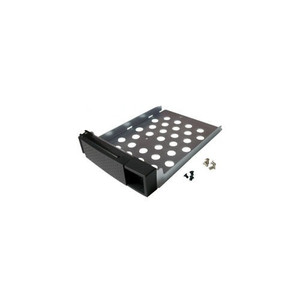
QNAP HDD Tray - Plastic - White - FOR USE With - SP-X20-TRAY

QNAP SP-X20-TRAY HDD Tray for 2.5" and 3.5" DrivesOverviewThe SP-X20-TRAY is a factory-replacement plastic HDD tray for QNAP NAS enclosures that accep…

$15.00 $14.99 SAVE $0
Ships same business day
In stock

Quantity:

Adding to cart… The item has been added
Compatibility guidance available for your deployment
Senior specialists for pre and post-sales support
Authorized sourcing and documentation support
Shipping and lead-time confirmation before install

Laura Bennett, IPSD Senior Specialist

Talk to Laura

200+ hrs training • U.S - based

Senior Specialist • 877-277-7147

QNAP HDD Tray - Plastic - White - FOR USE With - SP-X20-TRAY

$15.00
$14.99

Overview

SKU: SP-X20-TRAY
UPC: 885022004560
Condition: New

No Bots, Just Experts

Questions about this product? Free pre-sales support from a senior specialist — product questions, compatibility checks, BOM quotes, price confirmation — typically answered within one business day. Need camera placement or system design work? Engineering time is $175 per hour (qty 1 = 1 hour). Hardware buyers get up to one hour ($175) credited back on their order.

Description

QNAP SP-X20-TRAY HDD Tray for 2.5" and 3.5" Drives

Overview

The SP-X20-TRAY is a factory-replacement plastic HDD tray for QNAP NAS enclosures that accept the X20-series tray format. It supports both 2.5-inch and 3.5-inch drives in a single tray body — useful when you're mixing SSDs and spinning disks across bays in the same unit without purchasing separate tray SKUs for each drive size. White plastic construction matches the original tray color on compatible QNAP enclosures.

Compatibility

The SP-X20-TRAY fits the following QNAP NAS series:

  • TS-120 / TS-220 — 1-bay and 2-bay desktop enclosures
  • TS-x31 / TS-x31+ — includes TS-131, TS-231, TS-431, and their Plus variants
  • TS-251 — 2-bay desktop NAS
  • TS-451 — 4-bay desktop NAS

If your enclosure is not in this list, verify the tray format against your unit's hardware guide before ordering — QNAP uses multiple tray formats across its QNAP NAS and storage lineup and cross-format trays are not interchangeable. This tray is not compatible with rackmount or enterprise-chassis QNAP models that use a different tray locking mechanism.

Installation Notes

Drive installation follows standard QNAP tray procedure: seat the drive in the tray, secure with the provided drive screws for your drive's form factor (2.5" drives mount from the bottom, 3.5" drives use side rails), then slide the loaded tray into the bay until it clicks. No tools are required for tray insertion or removal on supported enclosures. Confirm the bay is powered off or the NAS supports hot-swap before inserting a loaded tray — check your specific model's documentation, as hot-swap capability varies across the NAS storage models in this compatibility list. For 2.5" SSDs, use the four bottom-mount screw holes; do not attempt to use side-rail positions intended for 3.5" drives.

Specifications
Drive Size: 2.5" or 3.5"
Material: Plastic
Color: White
Compatibility: TS-120/220/251/451/X31
Brand: QNAP
MPN: SP-X20-TRAY
Type: Equipment Cabinet
Q&A
Reviews
Have Questions?

RELATED PRODUCTS

System Design, Deployment & Technical Support

Support services and planning resources for commercial surveillance, access control, and infrastructure deployments.

Fixed scope • Fixed price

System Design Assistance

  • Get help validating product compatibility
  • Coverage requirements
  • Storage planning and deployment architecture before you buy.
Request Design Help

Deployment & Configuration Support

  • Access fixed-scope support for rollout planning
  • User setup guidance
  • Migration and system standardization across single-site or multi-site deployments
View Support Services

Guides, Tools & Calculators

  • PoE requirements
  • Storage retention
  • Camera selection and deployment methodology
Open Technical Resources