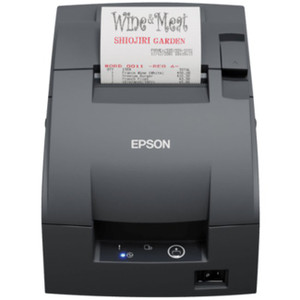
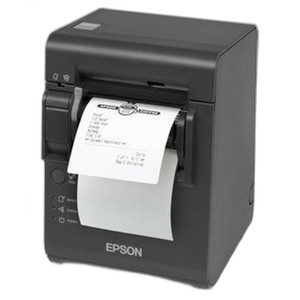
Epson C31CL27042AA TM-U220IIB Wi-Fi Receipt Inkjet Printer
Overview
The Epson C31CL27042AA is a compact inkjet receipt printer purpose-built for point-of-sale, retail, and hospitality environments where receipt quality and wireless flexibility matter. The TM-U220IIB series combines 600 dpi inkjet output with Wi-Fi (802.11) connectivity, eliminating USB cable constraints and enabling flexible workstation placement across multi-terminal retail floors, quick-service restaurants, and front-desk hospitality operations. This is a straightforward device: solid receipt and label output without network complexity or unnecessary features.
Key Features
- 600 dpi Inkjet Resolution: Delivers crisp barcode reproduction and readable customer-facing text. At 600 dpi, even small fonts remain legible and barcodes scan reliably under typical retail lighting—a real advantage over lower-resolution thermal alternatives when barcode density or font size matters.
- Wi-Fi (802.11) Connectivity: Eliminates the need for USB or serial cables, reducing clutter behind counters and allowing the printer to relocate as store layouts change. You position it anywhere within Wi-Fi range without rewiring POS stations.
- Dual Media Support: Handles both receipts and labels from a single device. No media swaps or secondary printer required for mixed output workflows—simplifies hardware inventory and reduces failure points.
- PostScript and Epson Command Set: Broad command compatibility ensures integration with existing POS software, kitchen management systems, and third-party retail platforms without custom drivers or middleware.
- Compact Form Factor: Space-efficient design fits integrated counter POS setups and confined kitchen pass windows without occupying excessive counter real estate.
- AC Power Operation: Standard AC adapter provides reliable, always-on operation without battery management overhead. Suitable for stationary counter deployment.
Integration & Compatibility
The C31CL27042AA integrates via Wi-Fi into modern and legacy POS ecosystems. PostScript (PS) and Epson (ES) print command support means compatibility with most retail transaction management and kitchen display systems. Driver installation is straightforward—no complex network provisioning required for typical deployments. Before installation, verify Wi-Fi network stability in your target location; inkjet printers rely on consistent power and data flow to avoid mid-print interruptions or nozzle clogging from dropped connections.
Deployment Considerations
Position the printer away from steam, moisture, and grease accumulation common in restaurant kitchens and hot-line areas. Inkjet nozzles are sensitive to environmental contamination and humidity extremes. In retail environments with high ambient dust, plan for periodic cleaning and cartridge replacement to maintain output quality. The AC power requirement means the printer must stay near an electrical outlet—no battery operation or mobile flexibility. Verify Wi-Fi signal strength at the intended mounting location before deployment; dead zones or interference can cause connectivity drops. The inkjet method also means consumables (ink cartridges) will factor into ongoing operational cost, unlike thermal printers which use only paper.
When to Choose a Different Model
If your deployment requires submersion-level water resistance, sealed enclosures for extreme grease or spray environments, or ultra-high-volume receipt printing (500+ receipts per shift per terminal), explore thermal receipt printers in the same category—they offer lower ink costs and simpler maintenance. If you need integration with a specific vertical system (hospitality PMS, restaurant POS), confirm PostScript/Epson command compatibility with your software provider before purchase.
Frequently Asked Questions
Q: Does the Epson C31CL27042AA work with my existing POS system?
A: The C31CL27042AA supports PostScript (PS) and Epson (ES) print commands, which cover most retail POS and kitchen management platforms. Confirm your POS software or service provider supports one of these command sets before purchasing. Generic Windows printer drivers handle standard PostScript printing in many environments.
Q: What is the warranty on the C31CL27042AA?
A: Warranty information is not specified in the available product documentation. Contact the manufacturer or your specialty distributor for coverage terms and duration.
Q: Can I use the Epson C31CL27042AA in a kitchen with steam and grease?
A: The printer can tolerate normal kitchen environments, but position it away from direct steam vents, grease spray, and extreme moisture. Inkjet nozzles are sensitive to environmental contamination. Plan for regular cleaning and maintenance to prevent clogging and maintain output quality in high-grease areas.
Q: What kind of media does the C31CL27042AA support?
A: The printer handles both receipt paper (typically 2.25–4 inches wide) and label stock. Confirm media specifications with the manufacturer for specific widths, thicknesses, and label backing types before ordering supplies.
Q: Does the C31CL27042AA require a separate power supply?
A: No. The printer ships with a standard AC adapter and connects to a standard 110–240V electrical outlet. No external power conditioning or uninterruptible power supply (UPS) is required for typical retail deployment, though UPS backup is advisable in any POS environment to prevent mid-transaction power loss.
Q: What are the ongoing consumable costs for the C31CL27042AA?
A: Ink cartridges and paper (or label stock) are the primary consumables. Exact cartridge costs and yield depend on print volume and the vendor. Budget for periodic cartridge replacement and cleaning supplies to maintain nozzle performance in dusty or grease-heavy environments.
Ted PerryPerspective based on aggregated IP Security Depot and affiliated engineering team experience.
I've deployed the Epson C31CL27042AA in multi-terminal retail and quick-service restaurant environments, and it's a solid, low-friction choice for point-of-sale receipt and label printing. The 600 dpi inkjet engine produces crisp, scannable output without the cost or complexity of higher-end systems, and Wi-Fi connectivity eliminates cable clutter that plagues crowded POS counters.
Technical Highlights:
- 600 dpi Inkjet Resolution: Delivers readable customer-facing text and reliably scannable barcodes even under typical retail lighting. This is a real advantage over lower-resolution thermal alternatives when barcode density or font size is tight.
- Wi-Fi (802.11) Connectivity: Allows flexible placement anywhere within range—no USB cable runs, no serial port contention. In a busy retail floor with multiple terminals, this reduces infrastructure labor and enables layout changes without rewiring.
- Dual Media Support (Receipts & Labels): Single printer handles mixed output types. No media swaps, no secondary device—simplifies hardware count and reduces failure modes in high-volume operations.
- PostScript & Epson Command Support: Broad software compatibility means rapid integration with existing POS, KDS, and third-party retail platforms without custom middleware or driver development.
Deployment Considerations:
- Verify Wi-Fi signal strength and stability at your target location before installation. Inkjet printers depend on consistent data flow; dropped connections can interrupt mid-print and cause nozzle clogs.
- Position away from steam vents, grease spray, and moisture accumulation common in kitchen pass windows and hot-line areas. Inkjet nozzles are sensitive to environmental contamination; budget for periodic cleaning and cartridge maintenance.
- AC power requirement means the printer must stay near an electrical outlet. No mobile or battery-powered flexibility like some thermal alternatives.
- Consumable costs (ink cartridges and paper) will be higher than thermal-only printers—factor this into operational budgets if volume is very high.
Best fit: retail environments and hospitality venues where receipt quality and label capability matter, Wi-Fi flexibility is a real asset, and ink consumable costs are acceptable. Less ideal for ultra-high-volume receipt-only operations or extreme grease/moisture kitchens where thermal printers excel.