


Product images are provided for reference and may not represent the exact model, configuration, or included
components.
Overview
SKU:
C31CD38A9711
Condition:
New
Availability:
Usually Ships Same Business Day
Warranty
1-Year Limited Warranty

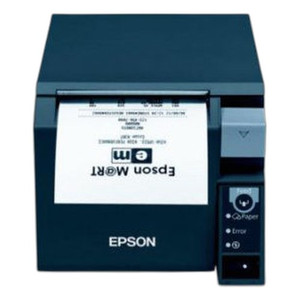
Epson C31CD38A9711 T70II Receipt Printer
Epson C31CD38A9711 Receipt PrinterThe Epson C31CD38A9711 is a compact receipt printer designed for point-of-sale environments, retail locations, and h…
Epson C31CD38A9711 T70II Receipt Printer
$393.99
Your recommended setup
Review items below — quantities update pricing automatically.
Item
Qty
Status
Price
Optional Add-Ons recommended
Services optional
Bundle Summary
Bundle Subtotal:
$0.00
Optional Add-Ons:
$0.00
Services:
$0.00
Total:
$0.00
Overview
SKU:
C31CD38A9711
Condition:
New
Availability:
Usually Ships Same Business Day
Warranty
1-Year Limited Warranty
Description

Epson C31CD38A9711 Receipt Printer
The Epson C31CD38A9711 is a compact receipt printer designed for point-of-sale environments, retail locations, and hospitality venues. This inkjet-based device delivers reliable performance for high-volume receipt and label printing, with dual connectivity options to integrate seamlessly into existing POS systems.
Overview
The C31CD38A9711 combines accessible price point with proven reliability in receipt printing. The T70II design prioritizes ease of installation and operation in fast-paced environments where uptime and print quality matter. Equipped with both USB and serial connectivity, this model accommodates legacy and modern POS systems without requiring additional interface hardware. The 600 dpi resolution ensures crisp, readable receipts and labels with clear text and barcode reproduction.
Key Features
- Inkjet Print Method: Produces receipts and labels without thermal paper constraints; compatible with standard roll stock
- 600 DPI Resolution: Sharp print quality suitable for barcodes, promotional graphics, and transaction details
- Dual Interface Connectivity: USB and serial (RS-232) ports support both contemporary and legacy POS terminals
- Media Versatility: Handles labels and receipts on compatible roll media
- Compact Footprint: Space-efficient design for counter-top installation in retail and service environments
- AC Power Supply Included: Standard 110-120V operation; power cable and adapter supplied
Integration & Compatibility
The Epson C31CD38A9711 connects via standard USB or DB-9 serial interface, making it compatible with most POS platforms including legacy DOS-based systems and modern Windows/Linux terminals. No proprietary drivers are required for basic operation; standard receipt printer drivers support the device. The dual-port design eliminates the need for external interface converters, reducing installation complexity and support overhead.
Package Contents
The C31CD38A9711 ships with power supply, AC power cable, and quick-start setup guide. USB and serial cables are not included; verify port configuration requirements before ordering interconnect cables.
Jerry Tildsen
I've specified the Epson C31CD38A9711 in several retail deployments over the past 18 months. This printer fills a specific niche: organizations replacing aging dot-matrix thermal printers who want cleaner output without moving to label-specific hardware. The inkjet approach means you're not locked into thermal paper stock, which can be advantageous for multi-location chains managing inventory.
Technical Highlights:
- Connectivity Flexibility: USB and serial ports on one device eliminate the need to stock multiple SKUs for legacy and modern terminals—a real operational simplification in mixed-environment deployments
- 600 DPI Output: At this resolution, barcodes scan reliably and promotional content prints with acceptable clarity for receipt applications
Deployment Considerations:
- Inkjet supplies (ink cartridges) have different refresh cycles than thermal paper; factor consumable management into your support model—cartridge inventory visibility is more critical than with thermal-only devices
- Ink drying time is negligible in most environments, but high-humidity locations (food service kitchens, car washes) may need testing before full rollout
For retailers standardizing on dual-interface POS hardware or managing a transition away from thermal-only solutions, the C31CD38A9711 delivers straightforward performance at accessible cost. Don't assume it's a direct thermal printer replacement without testing media compatibility in your environment first.
Specifications
Product Type:
Receipt Printer
Connectivity:
USB; Serial
Print Method:
Inkjet
media_type:
Labels; Receipts
Print Resolution:
600 dpi
Have Questions?
Ask an Expert.
RELATED PRODUCTS


System Design, Deployment & Technical Support
Support services and planning resources for commercial surveillance, access control, and infrastructure deployments.
Fixed scope • Fixed price
System Design Assistance
- Get help validating product compatibility
- Coverage requirements
- Storage planning and deployment architecture before you buy.
Deployment & Configuration Support
- Access fixed-scope support for rollout planning
- User setup guidance
- Migration and system standardization across single-site or multi-site deployments
Guides, Tools & Calculators
- PoE requirements
- Storage retention
- Camera selection and deployment methodology