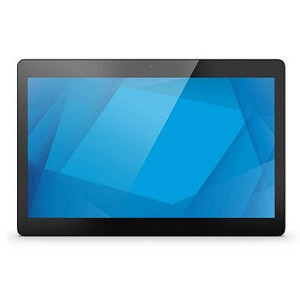
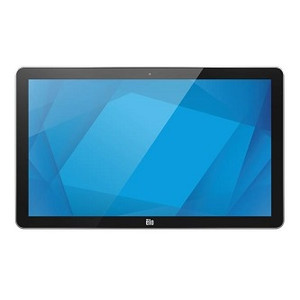
ELO Touch E390647 Android 10 Touchscreen Display
Overview
The ELO Touch E390647 is a 10.1-inch touchscreen display running Android 10 with Google Mobile Services (GMS). Built around a Rockchip 3399 processor with 4GB RAM and 32GB flash storage, this unit delivers responsive touch interaction and local processing capability for point-of-service, kiosk, and interactive display applications. The model supports Wi-Fi, Ethernet, and Bluetooth 5.0 connectivity, making it suitable for networked deployments where you need both wireless flexibility and wired reliability.
Key Features
- 10.1-inch 1280×800 Display: The 1280×800 resolution (WXGA) provides adequate screen real estate for menu-driven interfaces and content display without the power overhead of higher resolutions. Ideal for stationary kiosks and point-of-sale terminals where battery life is not a constraint.
- Projected Capacitive 10-Point Touch: Multi-touch support means you can deploy gestures (pinch, rotate, swipe) if your application software supports them. Capacitive sensing is more responsive than resistive alternatives and requires no stylus, reducing wear and support overhead.
- Rockchip 3399 Processor with 4GB RAM: Adequate for Android 10 baseline operation and light to moderate application workloads. This is not a high-performance processor — it handles menu navigation, video playback, and simple data entry smoothly, but demanding graphics or machine-learning workloads will show constraints.
- 32GB Internal Flash Storage: Sufficient for the Android OS, apps, and cached data on most deployments. For applications requiring large local databases or media libraries, consider external USB or networked storage integration.
- Wi-Fi and Ethernet Connectivity: Dual connectivity options mean you can deploy E390647 units either on wireless networks (where wired infrastructure is absent) or hardwired to Ethernet (for guaranteed availability in mission-critical kiosks). Ethernet also simplifies centralized management and remote content updates.
- Bluetooth 5.0: Enables pairing with wireless peripherals — barcode scanners, payment terminals, printers, and input devices — reducing cable clutter on the mounting surface.
- 5MP Camera: Integrated camera supports video conferencing, document scanning (via third-party apps), or user identification workflows. Not suitable for high-resolution imaging; clarity degrades in low-light environments without external lighting.
- EloView Compatibility: EloView is ELO Touch's management platform, allowing you to remotely configure, monitor, and deploy apps across fleets of E390647 units. This simplifies multi-unit deployments and reduces on-site support burden.
- Android 10 with Google Mobile Services: Full access to Google Play Store and standard Android ecosystem applications. GMS inclusion means push notifications, Google authentication, and cloud integration work out of the box without sideloading or custom builds.
Integration & Deployment Context
The E390647 works in retail, hospitality, healthcare, and warehouse automation environments where a fixed touchscreen terminal handles transactions, wayfinding, or data collection. Its Ethernet and Wi-Fi dual-connectivity approach supports both legacy network environments and modern wireless-first deployments. The Rockchip processor is sufficient for Android apps at moderate scale, but you'll want to test performance with your specific software stack before large rollouts. EloView management reduces the operational cost of managing multiple units across distributed locations.
When to Choose a Different Model
If your application requires significantly higher screen resolution, faster processing, or enhanced graphics performance, consider higher-tier variants in the ELO Touch I-Series 4 family. If you need outdoor sunlight-readable capability or extreme temperature tolerance, this model is not rated for those environments. If your deployment is mobile or battery-powered, this fixed-mains unit is not appropriate — you would need a portable handheld variant from the same manufacturer.
Frequently Asked Questions
Q: Does the E390647 support remote management?
A: Yes, the E390647 is EloView compatible, allowing centralized provisioning, app deployment, and monitoring across multiple units.
Q: Can I extend storage beyond 32GB?
A: The E390647 has 32GB internal flash. For additional storage, you can integrate external USB storage or network-attached storage (NAS) depending on your application requirements.
Q: What is the recommended operating temperature range?
A: Refer to the manufacturer datasheet for exact operating specifications. This unit is designed for indoor, climate-controlled environments typical of retail and office deployments.
Q: Is the E390647 suitable for outdoor kiosk installations?
A: No. This model is designed for indoor use. Outdoor-rated displays require higher IP ratings and temperature tolerance not offered in this variant.
Q: Can I run custom Android applications on the E390647?
A: Yes. With Android 10 and GMS, you can sideload applications or deploy them via managed app distribution. Test your apps on the hardware before full deployment to confirm performance.
Q: What wireless standards does the E390647 support?
A: Wi-Fi and Bluetooth 5.0 are built in. The specific Wi-Fi standard (802.11a/b/g/n/ac) and frequency bands should be confirmed with the manufacturer datasheet for your region.
The E390647 sits in a practical middle ground for fixed-location deployments where Android ecosystem integration and remote management matter more than raw processing power. The 1280×800 resolution and Rockchip 3399 processor are honest specs — they won't impress in a spec sheet comparison, but they deliver smooth Android 10 operation for menu-driven applications, which is what 80% of kiosk and point-of-service installations actually require.
Technical Highlights:
- Dual Connectivity (Wi-Fi + Ethernet): Most fixed-location deployments still prefer Ethernet for deterministic availability, but the Wi-Fi option means you're not locked into running new cabling. Bluetooth 5.0 adds flexibility for wireless peripherals without vendor lock-in to proprietary wireless protocols.
- 4GB RAM and 32GB Flash: Adequate for standard Android 10 overhead and 10–15 apps running concurrently. If your application spawns dozens of background processes or caches large datasets locally, you'll see memory pressure. Test your exact app stack on this hardware before committing to fleet deployment.
- 10-Point Capacitive Touch: Responsive and durable compared to resistive screens, with no stylus maintenance overhead. The clear glass front means fingerprints are visible — consider anti-glare or anti-fingerprint film if the display is consumer-facing.
- EloView Management: The ability to push OS updates, app configurations, and content to multiple E390647 units from a central console is the real differentiator here. In a 5–50 unit fleet, that's worth the integration effort.
Deployment Considerations:
- This unit is indoor-rated and climate-controlled only. If you need weatherproofing, sunlight-readable capability, or extreme temperature tolerance, you're looking at a different product family entirely.
- The 5MP camera is functional for basic scanning and conferencing, but low-light performance is mediocre — don't rely on it for detail-heavy document capture without supplemental lighting.
- The Rockchip 3399 is not a performance processor. Graphics-heavy applications (games, CAD, real-time 3D visualization) will be sluggish. Load-test your specific app before deployment.
Best fit: retail point-of-sale kiosks, hospitality check-in terminals, warehouse pick-to-light interfaces, and indoor wayfinding displays where the primary user interaction is touch-based menu navigation and the device sits on a shelf or wall with reliable power and network access.