ELO Touch E850312 15.6-inch Touchscreen POS Stand
The ELO Touch E850312 is a no-OS 15.6-inch display designed for self-service and point-of-sale integration in retail, hospitality, and industrial environments. This is a display-only device—it ships without an operating system, meaning you control the software stack and licensing entirely. The unit pairs an Intel N97 processor, 8GB RAM, and 128GB SSD storage with a 1920×1080 Full HD projected-capacitive 10-touch panel. It connects via Ethernet (no WiFi), comes in black, and ships with a desktop stand.
Key Features
- 1920×1080 FHD Display: 15.6-inch widescreen resolution delivers sharp text and graphics for menus, transactions, and wayfinding. At this size and resolution, detail remains legible from arm's length—standard for POS and self-order terminals where operator or customer viewing distance is 24–36 inches.
- Projected Capacitive 10-Touch Panel: Multi-touch sensing works with bare fingers and gloved hands alike, essential in food service and warehouse environments. Capacitive touch eliminates the need for a stylus and resists accidental activation better than resistive screens.
- Intel N97 Processor with 8GB RAM: Entry-level but sufficient for single-application POS workloads, transaction processing, and lightweight kiosk operation. Not designed for heavy multitasking or video encoding. 8GB is adequate for a 32-bit or 64-bit OS plus one or two active applications.
- 128GB SSD Storage: Solid-state drive eliminates mechanical failure risk and reduces boot/application load time compared to spinning disk. 128GB is tight for Windows—typically leaves 80–90GB usable after OS installation—so plan for image-heavy databases or offline content carefully.
- No Operating System Included: You choose Windows, Linux, or a proprietary OS. This approach reduces licensing cost if you have volume OS agreements, but requires you to provision and test the install yourself. No Windows Home, Pro, or Enterprise license is included; budget accordingly.
- Ethernet Connectivity Only: Wired network connection eliminates WiFi interference and simplifies compliance in regulated environments (PCI DSS, HIPAA). No wireless means you must run Ethernet to the stand location—plan your network drops early in installation.
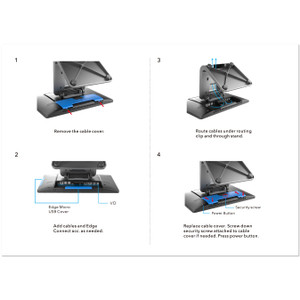
- Black Desktop Stand Included: The stand is integrated; the unit is not designed for wall or ceiling mounting without an aftermarket bracket. Check your space constraints before order—a 15.6-inch display on a stand takes roughly 18×12 inches of counter or kiosk footprint.
Integration & Compatibility
Because the E850312 ships with no OS, compatibility depends entirely on what you install. Confirm that your POS software, payment gateway, and peripherals (printers, barcode scanners, card readers) have drivers or APIs for your chosen operating system. If you plan to run Windows, verify that the Intel N97 chipset drivers are available for your Windows version before purchasing. Test the 128GB storage capacity against your application and database footprint—tight storage can degrade SSD lifespan and performance. Ethernet is the only network path; if your deployment requires wireless fallback, this is not the right choice.
When to Consider a Different Model
If you need a pre-loaded, ready-to-run POS system, look for an ELO variant that ships with Windows or a dedicated POS OS already installed—this eliminates provisioning work. If you require wall or ceiling mounting without a separate bracket, check the ELO Touch display family for wall-mounted alternatives. If your network infrastructure relies on wireless, this model's Ethernet-only design will not fit. For higher performance or larger displays, evaluate other ELO E-Series variants with faster processors or larger panel sizes.
Frequently Asked Questions
Q: Does the E850312 come with Windows or an operating system?
A: No. The E850312 ships with no OS. You must install Windows, Linux, or another operating system separately. This gives you control over licensing and software stack, but requires you to provision the device before use.
Q: Can I connect the E850312 to WiFi?
A: No. The E850312 has Ethernet connectivity only. If you need wireless capability, you'll need to add a USB WiFi adapter, but this is not a native feature and may not be officially supported.
Q: What is the physical footprint of the E850312 with its stand?
A: The stand provides a compact footprint suitable for countertops and kiosks. Exact dimensions are not listed in the available data; contact the manufacturer or a pre-sales engineer for detailed height, width, and depth specifications before finalizing space planning.
Q: Is the E850312 suitable for outdoor or high-humidity environments?
A: The E850312 is designed for indoor environments. No IP rating or environmental hardening is specified. For wet or outdoor deployments, confirm operating temperature and humidity ranges with the manufacturer before purchase.
Q: Can I mount the E850312 on a wall instead of using the stand?
A: The unit is supplied with a desktop stand. Wall or ceiling mounting would require an aftermarket bracket. Verify mount compatibility with ELO Touch support or a systems integrator before assuming custom mounting is an option.
Q: What warranty does the E850312 include?
A: Warranty details are not specified in the available data. The unit is sourced factory-new with a full US warranty path. Contact the manufacturer or a pre-sales specialist for warranty duration and coverage terms.
The ELO Touch E850312 is a no-frills, headless display platform—and that's precisely what makes it practical for integrators who need to control the entire software stack. The 1920×1080 projected-capacitive 10-touch panel is responsive and reliable, but the real play here is the bare-metal approach: you own the OS licensing, the driver stack, and the security posture. That's a huge advantage in PCI DSS and healthcare environments where regulatory audits demand transparency into what's running.
Technical Highlights:
- Intel N97 Processor & 8GB RAM: This is entry-level silicon, but it's sufficient for single-purpose POS terminals, self-order kiosks, and lightweight transaction processing. Don't load it with heavy databases or parallel applications—it will choke. Realistic workload: one full-screen POS or kiosk app, nothing else.
- 128GB SSD Storage: Fast boot and app load, but tight for Windows 10/11 plus a large transactional database. After OS installation, plan on 80–90GB usable. If your application requires offline transaction buffering or large static assets, you're cutting it close. Ensure your backend sync strategy is solid.
- Ethernet Only, No WiFi: This is a feature, not a limitation. Ethernet eliminates channel congestion, reduces latency jitter for payment processing, and simplifies compliance auditing. If your POS network is wired (as it should be), this is the right choice. Don't try to force WiFi onto it post-purchase—officially unsupported.
Deployment Considerations:
- OS Provisioning Burden: You must source, license, and test an OS before the unit is useful. If you're a one-off integrator, this adds 4–6 hours of config work. If you're deploying 50+ units, invest in a deployment image and imaging tools—will pay for itself immediately.
- Storage Headroom: 128GB is a hard cap. Monitor disk utilization monthly. Drives under 10% free space degrade SSD lifespan and performance. If your POS logs or offline buffers grow unpredictably, you'll regret this choice. No USB expansion available (not in the spec), so plan storage carefully upfront.
- No Pre-installed Drivers or Firmware Updates: You're responsible for sourcing and testing chipset drivers, BIOS updates, and touch firmware patches. Budget for driver discovery and compatibility testing before you declare the device production-ready.
The E850312 is ideal for integrators building custom retail, hospitality, or industrial kiosks where you want to control the entire software pipeline. It's a poor choice for end users expecting a plug-and-play POS system or for shops without internal IT capacity to manage OS provisioning and patching. Size the deployment team accordingly, and allocate time for driver sourcing and image testing.