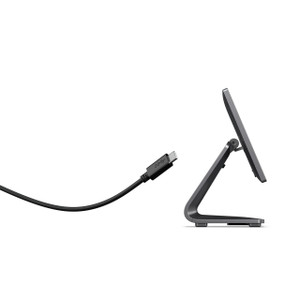
ELO Touch E315290 10.1-Inch HD LCD Monitor
Overview
The ELO Touch E315290 is a 10.1-inch wide-format LCD display built for stationary point-of-sale and kiosk deployments where space is constrained but legible image quality is non-negotiable. This is a non-touch panel — meaning no capacitive or resistive layer adds cost or complexity if your application doesn't require finger input. The 1280 × 800 HD resolution delivers sharp, readable text and graphics at typical viewing distances in checkout, service counter, and warehouse automation environments.
Key constraint: the E315290 ships without a stand. You'll need to provision a separate mounting solution — wall bracket, VESA mount, or POS stand — before deployment. That's a real consideration if your project timeline assumes a plug-and-play monitor.
Key Features
- 1280 × 800 HD Resolution: Sharp text rendering and legible interface graphics at 10.1 inches. Sufficient for small-format retail menus, order screens, and status displays. Scaling to higher resolutions (1920 × 1200) becomes necessary only if you're displaying dense data or fine-print content.
- Anti-glare Coating: Reduces reflections from overhead fluorescent or LED lighting — a genuine factor in well-lit retail and warehouse environments. If your site has direct sunlight exposure, expect more glare mitigation from higher-brightness models (not available in this spec).
- Zero-Bezel Design: Minimizes the black border around the active display area. Useful for multi-monitor video walls or when you need a clean, continuous visual surface. Single monitor? The bezel advantage is mostly aesthetic.
- USB-C Connectivity: Single USB-C port provides video input and may supply low-power charging to compatible USB-C source devices. Reduces cable clutter compared to separate HDMI + USB power arrangements. Verify your source device outputs video over USB-C; older laptops and industrial PCs may not support this.
- HDMI Input: Standard video input for compatibility with a broad range of PCs, media players, and industrial controllers. Pair this with a USB-C input for flexibility: run video over either cable depending on your host device.
- DisplayPort Input: Higher-bandwidth video standard, used on workstations and some enterprise PCs. Supports higher resolutions and refresh rates than HDMI if your source hardware requires it. For 1280 × 800, HDMI is typically sufficient.
- Non-Touch Panel: Eliminates the cost, power draw, and calibration overhead of touch sensors. Ideal for read-only displays, menu boards, and status screens where operators interact via external keyboard or POS peripherals rather than the screen itself.
- Black Finish: Neutral color for retail and industrial settings. Blends with most POS frames and mounting hardware.
- No Stand Included: Monitor must be wall-mounted, bracket-mounted, or installed into a POS stand frame. Budget mounting hardware separately; expect VESA 100 × 100 compatibility (verify before purchasing brackets).
Integration & Compatibility
The E315290 works with any host device that outputs video via USB-C, HDMI, or DisplayPort. Common deployment partners include Windows and Linux POS terminals, industrial PCs, retail kiosks, and warehouse automation controllers. Verify your source device supports at least one of these video standards. USB-C video compatibility varies by manufacturer; test before wide deployment if USB-C is your primary input path.
Power input method is not specified in available documentation — confirm whether the monitor requires an AC mains connection, 12VDC power adapter, or USB-C power delivery. This is critical for site survey and power planning.
Frequently Asked Questions
Q: Does the E315290 include a stand or wall-mount bracket?
A: No. The E315290 ships without a stand. You must source a separate VESA-compatible mount, wall bracket, or POS stand frame. Confirm VESA hole pattern (typically 100 × 100) before purchasing mounting hardware.
Q: What is the maximum brightness (nits)?
A: Brightness specifications are not provided in available documentation. If your site has strong ambient light, request brightness data from the manufacturer before committing to purchase.
Q: Can I use both USB-C and HDMI inputs at the same time?
A: Monitor multi-input behavior (picture-by-picture, input switching, priority) is not detailed in available specifications. Contact the manufacturer or test with your host device to confirm simultaneous-input support if your workflow requires it.
Q: What is the typical response time and refresh rate?
A: Response time and refresh rate specifications are not available in provided documentation. For POS and kiosk use, these are typically non-critical — standard LCD performance is sufficient. If you require specific timing data for animation or high-speed graphics, request detailed specs from the manufacturer.
Q: Is there an audio output or speaker?
A: Audio capability is not mentioned in available specifications. Assume the E315290 is display-only; source audio separately if your application requires speaker output.
Q: What power source does the E315290 require?
A: Power supply method (AC adapter, mains, USB-C power delivery) is not specified in available documentation. Confirm power requirements with the manufacturer before site planning.
The E315290 is a straightforward display appliance for scenarios where you need a small, stationary HD screen without the complexity and cost of touch input. The 1280 × 800 resolution is clean enough for retail signage, order entry screens, and warehouse control panels — but only if your content doesn't demand fine detail or multi-window layouts. The absence of a stand is the biggest gotcha; plan your mounting strategy before procurement.
Technical Highlights:
- Triple Video Input (USB-C, HDMI, DisplayPort): Gives you flexibility across older industrial PCs, workstations, and modern laptops. USB-C is convenient if your host device supports video output, but HDMI remains the fallback for devices that don't.
- Anti-Glare Coating: Genuine optical benefit in bright retail and warehouse environments — reduces hotspots and improves contrast under fluorescent lighting. Not a substitute for brightness if you're fighting direct sunlight.
- Zero-Bezel Frame: Matters only if you're building a multi-monitor wall or need an uninterrupted visual surface. Single-monitor POS deployment? This is a feature you may not need.
Deployment Considerations:
- No Stand: Non-negotiable constraint. Verify VESA compatibility and mounting hardware availability before committing. Budget an extra 2–3 weeks if sourcing custom brackets.
- Power Supply Unknown: Available documentation does not specify AC/DC power input, voltage, or wattage. This is a critical gap for site surveys and power planning — contact the manufacturer immediately to confirm power requirements.
- No Touch Layer: Correct choice if your application uses external input devices (keyboard, mouse, barcode scanner, card reader). If your operators expect to tap the screen, this monitor will frustrate them — consider a touch variant from the same family.
Best fit: small-format retail menus, warehouse status displays, and kiosk deployments where you control the input method and can mount the display yourself. Avoid if your stakeholders expect a stand in the box or if brightness and fine-detail resolution are deal-breakers.