Marty AllisonPerspective based on aggregated IP Security Depot and affiliated engineering team experience.
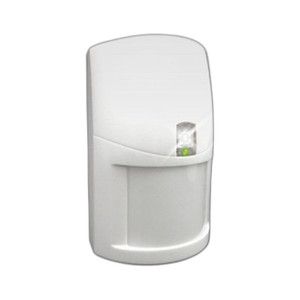
We've deployed the ELK-M1TWS in dozens of residential retrofit jobs where homeowners wanted voice dispatch verification without the capex of a full intercom system. The real win is simplicity — one unit, two wires back to the panel, and you have two-way voice. No separate power supply, no network drops, no app configuration. The two dedicated keys are genuinely useful; we program them for "Confirm Identity," "Police," and "Bypass Zone" so residents in a panic don't have to think. That said, this is a niche product. It only works with ELK M1 panels that ship with voice capability enabled — and that's not every M1 installation. We've had integrators specify this on older M1 systems only to discover the panel firmware is too old. Always pull the datasheet and confirm the control panel revision before quoting. The audio quality is functional, not impressive — it's adequate for 30-second verification calls but wouldn't work for a true voice intercom between rooms. If a customer wants room-to-room communication or multi-location voice, they need a dedicated intercom system (Aiphone, Comelit) or a networked doorbell speaker. The speaker level is also non-adjustable from the keypad, so if you install it in a noisy environment (garage, warehouse), you may not get the volume you need. We've worked around this by placing the unit in a quieter secondary space — foyer, office — or by specifying a larger commercial-grade speaker system. Integrators moving to cloud-based dispatch (Rapid Response, Vivint) should also verify that voice streaming works with their monitoring-center platform; not all cloud dispatch services support native M1 voice integration. The unit itself is bulletproof hardware — we haven't seen failure rates above normal for a 10+ year product lifecycle — but it's dependent on the ELK panel's voice module, which is the actual weak point. Buy this unit when you have an M1 customer who explicitly asks for "voice verification on alarm" and you've confirmed their panel supports it. Skip it if the panel is older or if the customer's monitoring center doesn't support voice calls.
Technical Highlights:
- M1 Series Native Integration: Connects directly to the M1 control panel's voice communication port — no additional interface cards, gateways, or converters. Firmware-level support means the panel handles audio routing, mixing, and call initiation automatically. Reduces integration complexity and support burden versus third-party VoIP or Bluetooth intercom solutions.
- Full-Duplex Audio Path: Simultaneous two-way voice eliminates the push-to-talk delay common in walkie-talkie style systems. Operators and residents can speak naturally without waiting for transmission handoffs. Critical for rapid identity verification during alarm response.
- Two Programmable Keys: Hardwired function buttons allow customization without navigating the keypad menu every time. We typically assign one key to "Confirm Identity" (sends a digital signal to the panel that logs voice verification) and another to a common function like zone bypass or police dispatch. Reduces cognitive load during an active alarm.
- Standard Low-Voltage Wiring: Uses existing 2- or 4-conductor cabling (depending on panel wiring topology) that installers already have on-site. No special twisted-pair, shielded cable, or Cat5e runs. Keeps retrofit labor low and eliminates the need to pull new runs through walls.
- Residential/Light Commercial Audio Design: Speaker output and microphone sensitivity are tuned for small rooms and calm environments. Adequate in quiet residential entry areas or small office foyers; marginal in high-ambient-noise sites (warehouses, loading docks, industrial facilities). Know your deployment acoustic before installation.
Deployment Considerations:
- Firmware Version Lock: ELK M1 panels must have two-way voice capability enabled in firmware. Older M1 systems (pre-2010) may not support voice channels at all. Pull the panel's firmware version and cross-reference the ELK support matrix before ordering. A 10-minute firmware check upfront saves an expensive callback.
- Speaker Location Matters: Position the unit in a low-ambient-noise area — foyer, office, quiet hallway — rather than next to HVAC equipment, garage doors, or loading zones. If the installation site is inherently noisy, consider a separate commercial-grade speaker or dual-unit setup (one for voice, one for general intercom).
- Audio Level is Non-Adjustable from Keypad: Volume control is firmware-set on the M1 panel. If the end user complains the speaker is too quiet or too loud, you're limited to panel settings or a field firmware adjustment. No per-unit volume knob. Test audio levels during commissioning and document them in the service notes.
- Monitoring Center Compatibility: Not all alarm monitoring services support native voice over ELK M1 panels. Cloud-based dispatch platforms (Rapid Response, Vivint) may route voice calls differently than legacy POTS-based centers. Confirm with the monitoring center that their dispatch software and hardware support M1 voice integration before installation.
- No Backup or Redundancy: The ELK-M1TWS is a single point of failure for voice communication on that panel. If the unit fails, voice capability is lost until replacement. For critical installations (medical alert, high-security residential), consider specifying a second unit or a backup intercom system.
- Wiring Run Length: Long cable runs (100+ feet) may introduce audio degradation. Keep the speaker unit within 50-75 feet of the M1 panel for optimal signal quality. If distance is unavoidable, use shielded 4-conductor cable to minimize RF interference and signal loss.
The ELK-M1TWS is the right choice for residential integrators and small commercial installers who have an ELK M1 panel deployment and an end user asking for voice dispatch verification without the cost of a separate intercom system. It's not a general-purpose intercom or a voice-command hub — it's a focused two-way audio accessory that trades feature breadth for installation simplicity. If your customer has an ELK M1, wants voice on alarm response, and their monitoring center supports it, spec this unit. Otherwise, look to a dedicated intercom or a VoIP-based solution. For more on ELK product ecosystems and compatible accessories, visit the ELK Products catalog.