Product images are provided for reference and may not represent the exact model, configuration, or included components.

Overview

SKU: CE600
UPC: 672792002991
Condition: New
Write a Review 30% OFF

ATEN DVI Single Link Console Ext. Support - CE600

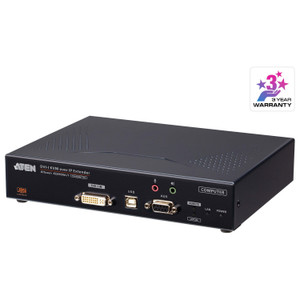
ATEN CE600 DVI Single-Link KVM Console ExtenderOverviewThe CE600 is a DVI single-link KVM console extender that lets you locate a USB keyboard, mouse,…

$654.00 $455.99 SAVE $198
Ships same business day
In stock

Quantity:

Adding to cart… The item has been added
Compatibility guidance available for your deployment
Senior specialists for pre and post-sales support
Authorized sourcing and documentation support
Shipping and lead-time confirmation before install

Laura Bennett, IPSD Senior Specialist

Talk to Laura

200+ hrs training • U.S - based

Senior Specialist • 877-277-7147

ATEN DVI Single Link Console Ext. Support - CE600

$654.00
$455.99

Overview

SKU: CE600
UPC: 672792002991
Condition: New

No Bots, Just Experts

Questions about this product? Free pre-sales support from a senior specialist — product questions, compatibility checks, BOM quotes, price confirmation — typically answered within one business day. Need camera placement or system design work? Engineering time is $175 per hour (qty 1 = 1 hour). Hardware buyers get up to one hour ($175) credited back on their order.

Description

ATEN CE600 DVI Single-Link KVM Console Extender

Overview

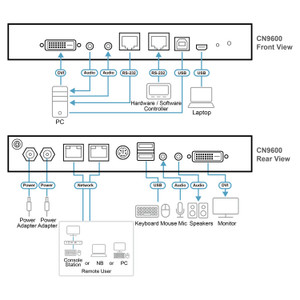
The CE600 is a DVI single-link KVM console extender that lets you locate a USB keyboard, mouse, and DVI monitor up to 60 meters away from the host system — no need to run a workstation directly at the equipment rack. Using standard Cat5e or Cat6 cabling, the CE600 carries full 1920 x 1200 resolution at 60Hz across 30 meters, or drops to 1024 x 768 at 60Hz to reach 60 meters. It pairs a local unit at the host with a remote unit (CE600R) at the operator console, connected via two RJ-45 links. For control rooms, broadcast racks, or server closets where you need a clean operator desk separated from the machine room, the CE600 handles that separation without signal converters or fiber infrastructure.

Compatibility

The CE600 is designed to work within the ATEN KVM extender ecosystem. The remote console unit designation is CE600R, connected via two RJ-45 female ports (black) on each unit. USB keyboard and mouse are supported natively — no driver installation required on the host side. Compatible with any DVI single-link video source operating within the supported resolution envelope. Pair with ATEN KVM switches or connect point-to-point between a DVI host and a remote console; the unit accepts firmware version v1.1.108. For deployments extending to 60 meters, cap resolution at 1024 x 768 — running 1920 x 1200 beyond 30 meters will degrade signal integrity.

Installation Notes

Run Cat5e or Cat6 between local and remote units — two RJ-45 connections are required. Keep humidity below 80% RH non-condensing at both ends. The remote unit (CE600R) connects the operator-side peripherals; the local unit installs at the rack. Firmware is field-upgradeable to v1.1.108 via the ATEN firmware package. Note that physical rack-mount dimensions for ATEN products follow an L x W x H convention rather than the standard W x D x H — verify orientation before mounting.

Specifications
Mount Type: Rack
Function: CE600R
Sub / Main: 2 x RJ-45 Female (Black)
Keyboard / Mouse: USB
Video: 1920 x 1200 @ 60Hz (30 m);1024 x 768 @ 60Hz (60 m);
Humidity: 0–80% RH, Non-condensing
Ce600-Ce602-User-Manual-W.Pdf (1.2 Mb: 2025-04-25
Firmware Upgrade: v1.1.108
Q&A
Reviews
Have Questions?

RELATED PRODUCTS

System Design, Deployment & Technical Support

Support services and planning resources for commercial surveillance, access control, and infrastructure deployments.

Fixed scope • Fixed price

System Design Assistance

  • Get help validating product compatibility
  • Coverage requirements
  • Storage planning and deployment architecture before you buy.
Request Design Help

Deployment & Configuration Support

  • Access fixed-scope support for rollout planning
  • User setup guidance
  • Migration and system standardization across single-site or multi-site deployments
View Support Services

Guides, Tools & Calculators

  • PoE requirements
  • Storage retention
  • Camera selection and deployment methodology
Open Technical Resources