Product images are provided for reference and may not represent the exact model, configuration, or included components.

Overview

SKU: 4Z91K18761
UPC: 085896334804
Condition: New
Write a Review 11% OFF

Lenovo Dock_repl Kensington K33480NA - 4Z91K18761

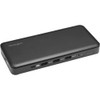
Lenovo 4Z91K18761 USB-C 10Gbps Triple Video Driverless Docking StationOverviewThe Lenovo 4Z91K18761 (also listed as SD4839P) is a desktop USB-C dockin…

$219.99 $194.99 SAVE $25
Ships same business day
In stock

Quantity:

Adding to cart… The item has been added
Compatibility guidance available for your deployment
Senior specialists for pre and post-sales support
Authorized sourcing and documentation support
Shipping and lead-time confirmation before install

Laura Bennett, IPSD Senior Specialist

Talk to Laura

200+ hrs training • U.S - based

Senior Specialist • 877-277-7147

Lenovo Dock_repl Kensington K33480NA - 4Z91K18761

$219.99
$194.99

Overview

SKU: 4Z91K18761
UPC: 085896334804
Condition: New

No Bots, Just Experts

Questions about this product? Free pre-sales support from a senior specialist — product questions, compatibility checks, BOM quotes, price confirmation — typically answered within one business day. Need camera placement or system design work? Engineering time is $175 per hour (qty 1 = 1 hour). Hardware buyers get up to one hour ($175) credited back on their order.

Description

Lenovo 4Z91K18761 USB-C 10Gbps Triple Video Driverless Docking Station

Overview

The Lenovo 4Z91K18761 (also listed as SD4839P) is a desktop USB-C docking station purpose-built for knowledge workers and IT deployments where a clean, driver-free setup is non-negotiable. It delivers 10 Gbps USB-C data throughput — fast enough to handle simultaneous SSD transfers, video output, and network traffic without a bottleneck — while pushing up to three independent displays at once, including 4K and Full HD outputs. The 85W Power Delivery pass-through charges most USB-C business laptops at full rate, eliminating the need for a separate power brick at the desk. Because it operates completely driverless, IT teams can provision workstations without managing dock firmware or driver packages — plug in, and all three monitors, Gigabit Ethernet, and data ports are live immediately under Windows 10.

Compatibility

Designed for USB-C hosts running Windows 10. The 4Z91K18761 is an alternate SKU for the Lenovo ThinkPad and ThinkCentre ecosystem — specifically targeted at systems supporting USB-C with DisplayPort Alt Mode for multi-monitor output. Verify your host laptop or desktop exposes a USB-C port with DP Alt Mode and sufficient power negotiation to take advantage of the 85W PD. Gigabit Ethernet is handled natively over USB without additional NIC drivers, making this compatible with standard managed and unmanaged switch infrastructure on enterprise floors. The driverless design means Windows 10 recognizes all connected peripherals at the OS level without third-party software.

Installation Notes

Desktop form factor — designed for flat-surface placement, not rack or wall mounting. Connect the dock to the host via a single USB-C cable; the same connection carries video, data, and power simultaneously. Confirm the host USB-C port supports DisplayPort Alt Mode before deploying across a fleet — USB-C ports that are data-only or charge-only will not drive the three display outputs. For triple-monitor configs, all three display ports on the dock must be active simultaneously, so verify the host GPU supports the required display stream count.

Specifications
Product Type: Docking Station
Ethernet Rate: Gigabit Ethernet
Operating System: Windows 10
Q&A
Reviews
Have Questions?

RELATED PRODUCTS

System Design, Deployment & Technical Support

Support services and planning resources for commercial surveillance, access control, and infrastructure deployments.

Fixed scope • Fixed price

System Design Assistance

  • Get help validating product compatibility
  • Coverage requirements
  • Storage planning and deployment architecture before you buy.
Request Design Help

Deployment & Configuration Support

  • Access fixed-scope support for rollout planning
  • User setup guidance
  • Migration and system standardization across single-site or multi-site deployments
View Support Services

Guides, Tools & Calculators

  • PoE requirements
  • Storage retention
  • Camera selection and deployment methodology
Open Technical Resources