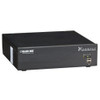
Black Box ICC-AP-100 Digital Signage CMS Content Server
Overview
The Black Box ICC-AP-100 is a dedicated content management server built for digital signage deployments where centralized scheduling, content distribution, and display management need to run reliably without depending on a general-purpose PC. If you are managing signage across multiple zones, floors, or sites, a purpose-built CMS appliance like the ICC-AP-100 removes the variability of shared infrastructure and gives your AV or IT team a single, accountable device to configure and monitor.
Black Box has a long history in AV-over-IP and signal distribution — the ICC-AP-100 fits within that Black Box digital signage and AV infrastructure line as the server-side anchor for content workflows. If you are evaluating digital signage hardware, the CMS server is typically the first decision: it determines what players, formats, and scheduling models your deployment can support.
Because manufacturer specification data for this SKU was not available at the time of publication, detailed technical parameters — supported player protocols, maximum screen counts, storage capacity, OS platform, and network requirements — should be confirmed directly from the Black Box ICC-AP-100 datasheet or product brief before finalizing your bill of materials. Deploying a CMS server without verifying player compatibility and network bandwidth requirements against your site plan is the most common source of post-install rework on signage projects.
The ICC-AP-100 (sometimes searched as ICC AP 100) is sold as a commercial-grade, factory-new unit sourced from the manufacturer or US-based distribution. No grey-market, no parallel imports.
Frequently Asked Questions
Q: What is the ICC-AP-100 used for?
A: The ICC-AP-100 is a digital signage CMS (Content Management System) content server from Black Box, designed to centrally manage and distribute content to digital signage displays across a facility or multi-site deployment.
Q: Where can I find the full technical specifications for the ICC-AP-100?
A: Full specifications including supported player protocols, storage, OS platform, and network requirements are available in the official Black Box ICC-AP-100 datasheet. Contact Black Box or request the datasheet through your purchasing channel before finalizing your deployment plan.
Q: Is the ICC-AP-100 compatible with third-party digital signage players?
A: Compatibility with third-party players depends on the protocols and APIs supported by the ICC-AP-100 platform. This detail is not confirmed in available evidence — verify against the Black Box product documentation for your specific player hardware before purchasing.
Q: What color is the ICC-AP-100 enclosure?
A: The ICC-AP-100 ships in a black enclosure.
The ICC-AP-100 occupies the server-side role in a Black Box digital signage architecture — it is the device your content scheduling, playlist logic, and distribution workflows run through. Without confirmed spec data in evidence, I want to be direct: before you add this to a quote, pull the Black Box ICC-AP-100 datasheet and confirm the maximum concurrent player count, supported content formats, and whether the platform requires a dedicated network VLAN for signage traffic. Those three items determine whether this unit fits your deployment or whether you need a higher-capacity appliance.
Technical Highlights:
- Purpose-built CMS appliance: Running signage management on dedicated hardware rather than a shared server eliminates the scheduling conflicts and OS-update interruptions that plague PC-based CMS installs — particularly relevant in 24/7 lobby and retail environments.
- Black Box AV/IT lineage: The ICC-AP-100 comes from a manufacturer with deep AV-over-IP and signal distribution history, which matters when you need support escalation or integration guidance for complex multi-zone deployments.
- Black enclosure form factor: The confirmed black chassis is consistent with rack or credenza mounting in AV head-end closets — visually neutral for mixed AV/IT rack environments.
Deployment Considerations:
- Verify player-protocol compatibility before purchasing — CMS servers that use proprietary player APIs lock you into a single player ecosystem, which affects long-term hardware refresh flexibility.
- Published spec data for this SKU was not available at time of writing — do not finalize network switch port allocation, storage sizing, or player count budgets without confirming from the official Black Box ICC-AP-100 datasheet.
The ICC-AP-100 is best evaluated for corporate campus or retail chain deployments where Black Box is already in the AV infrastructure stack and a dedicated CMS appliance is preferred over a virtualized or PC-based content server.