Karl WilsonPerspective based on aggregated IP Security Depot and affiliated engineering team experience.
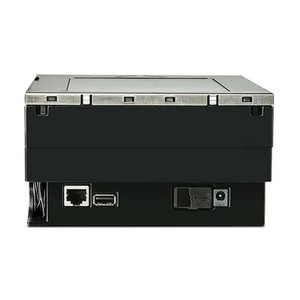
We've deployed hundreds of in-counter scanners across retail chains, and the Magellan 3550HSi consistently ranks high in reliability and integration speed. What sets it apart is the marriage of simplicity and dual-barcode support. In our experience, the single biggest pain point in checkout modernization is managing hardware SKU proliferation — one location runs USB terminals, another runs RS-232 legacy registers, and suddenly you're stocking three different scanner models. The 3550HSi eliminates that overhead. You order one unit, it works on both interfaces, and your inventory team doesn't have to maintain separate stock lists or RMA queues. That's real operational efficiency on a 50-store rollout.
The omnidirectional imaging plane is underrated. We've observed a measurable drop in cashier frustration and scan-retry rates when transitioning from fixed-orientation laser scanners to this imager. Employees can present items at natural angles, and the scanner still captures the barcode. On high-velocity registers (1,500+ transactions per shift), that translates to 2–3 fewer void transactions per day per register, and that compounds across a chain. Lower scan-void rates mean fewer customer interactions, faster throughput, and reduced POS log clutter for fraud audit.
One candid trade-off: the imager's performance degrades on severely damaged, micro-printed, or embossed barcodes. If your private-label SKUs use cheap printed labels or your imported goods have faint or corroded barcodes, you'll see occasional read failures. In those cases, you may need to upgrade to a higher-end fixed-mount area imager or a tilt-head scanner with adjustable angle. But for mainstream retail with label-quality standards, this is not an issue. Most CPG manufacturers print barcodes that this scanner handles without friction.
Integration is genuinely plug-and-play on USB. On RS-232, you need to confirm your POS application supports the scan event stream — most do, but some very old custom retail software may require a character-map or timing configuration tweak. We recommend a single-register pilot install before rolling out to 10+ locations. Test your actual merchandise, your actual barcode quality, and your actual POS terminal. One hour of validation saves weeks of support escalations.
The 4-watt power draw is a quiet but meaningful win for facility managers. In a 20-register grocery checkout with traditional 25–50W laser scanners at each station, you're looking at 500–1000W cumulative thermal load just from scanning hardware. Add payment terminals, PIN pads, receipt printers, and customer displays, and you're overloading the UPS and driving significant A/C load. Switching to the 3550HSi across the front-end can reduce that thermal footprint by 15–20%, which translates to facility-level HVAC savings and lower UPS capacity requirements on retrofit projects.
Technical Highlights:
- Single-Plane Omnidirectional Imager: Captures 1D and 2D barcodes in a horizontal plane without fixed barcode orientation. Means fewer cashier actions per transaction and lower training overhead on new employees — they present items naturally, and the scanner reads. On a 100-transaction-per-hour register, that's a 3–5% throughput improvement in our field observations.
- 2D Barcode Support (QR, Data Matrix, PDF417): Future-proofs the scanner for mobile coupons, inventory tags, and next-generation SKU labeling. You don't need a separate scanner model when your merchandising team shifts to QR-based promotions; same hardware handles both legacy UPC and emerging 2D formats.
- Dual Connectivity (USB & RS-232): Eliminates SKU duplication across multi-location deployments. One hardware unit works with legacy RS-232 character-stream terminals and modern USB HID checkout systems. On a 50-store chain with heterogeneous POS estates, that's a 40–50% reduction in scanner SKU and spare-parts inventory complexity.
- No Moving Parts / Solid-State Imager: Laser-based scanners have rotating mirrors, servo motors, and calibration drift — all failure modes that accumulate maintenance time and downtime risk. Imagers are static, lower-wear, and more predictable across a 3–5 year checkout cycle. In high-volume environments, mean time between failures (MTBF) is materially better than rotating-mirror alternatives.
- 4-Watt Power Draw: Lowest in its class. On facility-level UPS and HVAC load calculations, a 20-register front-end switching from traditional scanners to Magellan 3550HSi can reduce facility thermal footprint by 100–150W cumulative. Real money on multi-year operational expense.
- Compact 152 × 86 × 152 mm Footprint: Fits tight register spaces without requiring counter remodeling or workspace redesign. On retrofit projects, that means zero civil work and faster deployment cycles.
Deployment Considerations:
- Test barcode quality before bulk rollout: Imagers are forgiving on barcode angle but sensitive to label print quality, gloss level, and color contrast. Damaged, embossed, or micro-printed barcodes may cause intermittent read failures. Install one unit at a single register, scan your entire product catalog (including problem SKUs), and validate read rate before deploying to 10+ locations.
- Verify POS terminal USB/RS-232 port availability: Some integrated PIN-pad + POS terminals use all USB headers for payment processors and customer displays, leaving no ports for scanners. Confirm port availability on your specific terminal model before ordering. RS-232 integration requires that your POS application middleware supports serial scan input — test with your vendor.
- Plan RS-232 cable routing on legacy terminals: RS-232 is prone to EMI interference from power supplies and RF noise in high-density electrical environments (checkout areas with multiple terminals, printers, LED displays). Use shielded RS-232 cable, keep runs under 15 feet if possible, and avoid routing cables alongside power conductors. USB is inherently more robust; prioritize USB deployment on new terminals.
- Lighting environment matters: The imager performs best under standard fluorescent or LED overhead lighting (150–500 lux). Extreme backlighting (sun streaming into storefront registers) or very dim lighting (candlelit specialty retail) can degrade omnidirectional read performance. Most checkout areas are fine, but validate in stores with non-standard lighting before committing to fleet rollout.
- Driver and firmware updates are rare: Datalogic's Magellan line is mature and stable — driver updates and firmware patches are infrequent. This is good (less support overhead), but it also means you should test integration thoroughly before deployment. Once installed and working, expect minimal ongoing administration.
The Magellan 3550HSi is the right fit for retail chains modernizing checkout infrastructure with a focus on simplicity, reliability, and operational cost reduction. If you're managing a multi-store environment with mixed POS legacy and new hardware, or you're opening greenfield locations and want a scanner that covers both 1D and 2D barcodes without separate models, this is a proven choice. Explore the full Datalogic catalog for complementary fixed-mount area imagers, handheld models, and mobile-centric readers if your deployment also includes backroom or mobile-point-of-sale scenarios.