


StarTech Usb-c Multiport Adapter - 167B-USBC-MULTIPORT
Usually Ships in 2-3 Weeks
Free shipping over $499
$86.99


Manufacturer-verified compatible cameras, recorders, mounts, accessories, and licenses for this product. Adjust quantities and add the entire bundle to your cart in one click.
Questions about this product? Free pre-sales support from a senior specialist — product questions, compatibility checks, BOM quotes, price confirmation — typically answered within one business day. Need camera placement or system design work? Engineering time is $175 per hour (qty 1 = 1 hour). Hardware buyers get up to one hour ($175) credited back on their order.
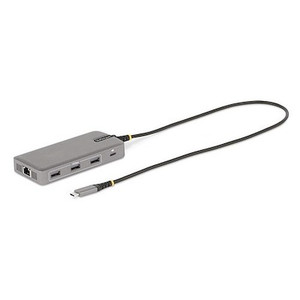
The StarTech 168W-USBC-MULTIPORT is a compact USB-C multiport adapter that converts a single USB-C port into three functional connections: a 4K 60Hz HDMI 2.0 video output, a 140W USB-C Power Delivery pass-through port, and a USB-A 3.2 Gen 1 data port running at 5Gbps. At 1.2 oz and just 2.3 inches long, it is designed for mobile workstation users, field engineers, and IT professionals who need reliable expansion without carrying bulky docking stations. The 6-inch integrated cable keeps the adapter seated firmly against the host port without adding stress to the connector — a real consideration for daily desk-to-meeting workflows. The 168W-USBC-MULTIPORT (often searched as 168W USBC MULTIPORT) is backed by a 3-year manufacturer warranty.
For IT teams standardizing on USB-C laptops, this adapter slots directly into a StarTech connectivity lineup that includes switches, cable management, and server accessories — making it easy to consolidate vendor relationships when deploying across a fleet.
The 168W-USBC-MULTIPORT connects via a USB-C host connector and requires the host port to support USB-C DisplayPort Alt Mode for the HDMI output to function — confirm your laptop's USB-C port supports DP Alt Mode before ordering. The USB 3.2 Gen 1 (5Gbps) bus type governs both data and video bandwidth allocation. Hosts with Thunderbolt 3 or 4 ports are fully compatible, as are standard USB 3.2 Gen 1 and Gen 2 ports that include DP Alt Mode. The adapter does not require driver installation on modern operating systems. For deployments involving USB-C hubs and docking accessories, this adapter occupies the single-adapter tier — purpose-built for lightweight connectivity rather than replacing a full multi-display dock. If your workflow requires simultaneous dual-monitor output or Ethernet, consider a full-featured dock in the StarTech catalog. For guidance on matching adapters to host port capabilities, the USB-C connectivity buying guide covers DP Alt Mode, Thunderbolt compatibility, and PD negotiation in detail. Teams managing conference room AV equipment alongside networking infrastructure may also find value pairing this with HDMI cables rated for 4K 60Hz (18Gbps bandwidth) to avoid signal degradation at the display end.
Q: Does the 168W-USBC-MULTIPORT require the host USB-C port to support DisplayPort Alt Mode for video output?
A: Yes. The HDMI 2.0 output relies on DisplayPort Alt Mode over the USB-C connection. If your laptop's USB-C port is data-only and does not support DP Alt Mode, the HDMI output will not function. Thunderbolt 3/4 ports universally support DP Alt Mode. Verify your host port specifications before deploying.
Q: Will the 140W PD pass-through fully charge a high-performance laptop while the adapter is in use?
A: The adapter itself consumes 10W from the bus. With a 140W PD source connected, the net delivery to the host is up to 130W — sufficient for most 15- and 16-inch performance laptops rated at 96–140W. Verify your laptop's maximum charging wattage to confirm net headroom.
Q: How many external displays can the 168W-USBC-MULTIPORT drive simultaneously?
A: One. The adapter supports a single HDMI 2.0 output at up to 4K 60Hz. It is not designed for multi-monitor configurations. If you need two or more displays from a single USB-C port, a multi-display dock or a daisy-chain capable DisplayPort setup would be required.
Q: What is the warranty on the 168W-USBC-MULTIPORT?
A: StarTech provides a 3-year manufacturer warranty on the 168W-USBC-MULTIPORT.
Q: What USB data transfer speed does the USB-A port support?
A: The USB-A port operates at USB 3.2 Gen 1 speeds — up to 5Gbps. This is fast enough for high-speed USB flash drives, external SSDs, and most USB peripherals, but it is not USB 3.2 Gen 2 (10Gbps). If you need 10Gbps USB-A throughput, look at a higher-tier StarTech dock.
Q: Is the 168W-USBC-MULTIPORT suitable for outdoor or industrial environments?
A: No. The adapter is rated for 0°C to 45°C operating temperature with 10–85% relative humidity (non-condensing). It is designed for controlled indoor environments — offices, conference rooms, mobile workstations. It is not rated for outdoor, high-humidity, or industrial use.

The 168W-USBC-MULTIPORT solves a specific and increasingly common problem: modern thin-and-light laptops ship with USB-C only, and the 140W PD pass-through spec here is what separates this adapter from the flood of 60W or 100W alternatives that leave high-wattage systems throttling under load. When I'm evaluating USB-C adapters for fleet deployments, the first number I check is net charging delivery — 140W in minus 10W self-consumption gives you 130W to the host, which keeps a 16-inch performance laptop at full CPU and GPU headroom during a presentation or field diagnostics session.
Technical Highlights:
Deployment Considerations:
The 168W-USBC-MULTIPORT is the right call for IT teams standardizing USB-C laptop fleets in corporate or higher-education environments where every desk needs a single-cable setup to a 4K monitor with full laptop charging — and where carrying a full dock to every conference room is not practical.

Manufacturer-verified compatible cameras, recorders, mounts, accessories, and licenses for this product. Adjust quantities and add the entire bundle to your cart in one click.


Looking for more StarTech products? Shop the full StarTech catalog →
Support services and planning resources for commercial surveillance, access control, and infrastructure deployments.
Fixed scope • Fixed price