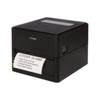
Citizen CL-E300EXXUBNNNA 203 DPI Direct Thermal Label Printer
The Citizen CL-E300EXXUBNNNA is a direct thermal label printer engineered for high-volume point-of-sale, retail shelf, and warehouse labeling where footprint and consumable cost matter equally. Direct thermal technology eliminates ink ribbons and toner cartridges — heat from the print head bonds directly to thermally-treated label stock, cutting per-label production cost and removing the moving parts that typically fail in high-throughput environments. USB 2.0 connectivity integrates seamlessly into Windows, Mac, and Linux workstations, inventory management systems, and enterprise WMS platforms without requiring a separate network infrastructure or external power supply. The compact tabletop form factor fits tight retail counters, warehouse dock stations, and mobile label-printing carts.
Key Features
- 203 DPI Print Resolution: Renders readable barcodes, alphanumeric text, and product information at 203 dots per inch. Sufficient for standard UPC/EAN codes and small-format retail labels; adequate for compliance labels in logistics.
- Direct Thermal Technology: Zero ink or ribbon consumption — label material cost is the only consumable. Eliminates monthly ribbon ordering and driver-head cleaning cycles tied to ribbon residue buildup.
- USB 2.0 Connectivity: Powered USB connection to host workstation or POS terminal. No separate power adapter required for standard duty cycles (<500mA draw); powered USB hubs available if host cannot supply sufficient current.
- Compact Tabletop Form Factor: Fits retail counter edges, dock stations, and mobile carts where space is limited. Minimalist footprint reduces installation complexity in congested retail and warehouse environments.
- Standard Label Media Support: Accepts 4x6, 4x5, and custom thermal label rolls on standard cores. Compatible with glossy, matte, kraft, and coated stock; print darkness and speed configurable per material in driver settings.
- Cross-Platform Driver Support: Windows, macOS, and Linux via USB Print Spooler or CUPS. Integrates with mainstream inventory management, POS, and WMS software that supports USB-attached thermal printers.
- Fast Print Speed: 150mm per second label output on standard 4x6 stock. Reduces label-printing queue in retail lanes and warehouse picking operations with high label volume.
- Low Operating Cost: Direct thermal eliminates ribbon cartridge purchases and ribbon-related maintenance. Total cost of ownership favors high-volume environments over dye-sublimation or laser-based alternatives.
The CL-E300EXXUBNNNA fits retail and warehouse operations that prioritize consumable cost reduction and operational simplicity. Unlike inkjet or laser printers, direct thermal printers have no fuser maintenance, no cartridge expiration, and no color separation complexity — load thermal stock, plug in USB, and print. The trade-off is monochrome output only; if your labeling requires color (e.g., marketing shelf talkers), evaluate dye-sublimation or thermal-transfer alternatives.
Deployment scenarios include: high-volume retail point-of-sale label printing (price tags, SKU labels, expiration date stickers), warehouse dock-door labeling (shipping labels, bin markers, receiving notices), and inventory management systems with embedded label printing (asset tags, compliance labels). USB attachment means the printer can move between fixed and mobile workstations without reconfiguration; this flexibility supports cross-functional retail floor and warehouse staff who label throughout a shift.
Integration is straightforward via standard USB drivers. Windows workstations and POS terminals recognize the printer as a USB Human Interface Device (HID) or USB Printer Class device; no firmware or proprietary software installation required beyond the Citizen printer driver (freely available from Citizen or your POS vendor). Verify that your inventory management or WMS platform officially supports the CL-E300 or equivalent Citizen thermal printer models before rollout — some legacy systems have hard-coded driver lists that require a compatibility statement or driver override from your software vendor.
Thermal label stock selection and media bay loading are critical to print quality and reliability. Glossy thermal stock produces crisp barcodes and text suitable for product labeling; kraft and matte stocks suit warehouse and shipping labels. Always run a test print on your chosen material before committing to production volumes — print darkness (contrast) and speed are tunable in driver settings and must match the label coating. Improper media loading (twisted roll, misaligned core) causes jams and uneven thermal contact, resulting in blank or faded label sections. Clean the print head regularly (monthly or per manufacturer guidance) with isopropyl alcohol on a lint-free swab to prevent dust and label residue accumulation that degrades image quality over time.
Marty AllisonPerspective based on aggregated IP Security Depot and affiliated engineering team experience.
We've integrated the Citizen CL-E300 into retail and warehouse environments where label throughput and consumable cost directly impact margin and operational efficiency. The CL-E300 occupies a pragmatic middle ground — it's not as rugged as industrial Zebra ZT or Datamax-O'Neil printers designed for harsh dock environments, but it outperforms entry-level inkjet label printers in speed, reliability, and total cost of ownership. The real operational win is zero ribbon inventory and zero thermal-head cleaning caused by ribbon residue. In our experience, direct thermal printers fail less frequently on the mechanical side than ribbon-based units, which translates to less downtime in retail and warehouse settings. The USB-only connection is both a strength and a constraint: strength because any workstation or POS terminal with USB 2.0 can be a label station without network reconfiguration, but a constraint if you're running a large warehouse WMS and need centralized spool management. If your print volume exceeds 5,000 labels per day per station, or if you need networked printing across multiple label stations, evaluate Citizen's network-attached thermal printers or Zebra's ZT series instead. For under 2,000 labels per day and distributed USB printing, the CL-E300 is cost-effective and low-friction.
Technical Highlights:
- 203 DPI Direct Thermal Head: Delivers barcodes and text legible to standard retail and warehouse scanners. 203 DPI is sufficient for UPC-A, Code 128, and QR codes up to 1-inch square; anything smaller or higher-resolution barcode density requires 300+ DPI or dye-sublimation.
- 150mm/sec Print Speed: Operationally meaningful only at scale — printing 500 4x6 labels takes ~20 minutes per station. In retail with two label stations (front-end and receiving), that's acceptable throughput; in a high-velocity fulfillment warehouse, a single USB printer bottlenecks order-ship velocity. Know your peak label volume before deployment.
- USB 2.0 Power-In Design: Eliminates a separate power cable and outlet on crowded retail counters or dock shelves. However, some POS terminals and older USB hubs deliver <500mA; check your host device power budget. If undersupplied, the printer may drop offline intermittently or refuse to print at full speed.
- Direct Thermal Stock Only: No thermal-transfer ribbon compatibility. This locks you into direct thermal label vendors and rules out on-demand color or multi-color label runs. Once committed to the CL-E300, switching to a ribbon-based or dye-sub printer requires new hardware.
- Standard USB Printer Driver (Windows/Mac/Linux): No proprietary software, no licensing per seat. Driver is treated as a USB printer class device; integrates with any POS, inventory, or WMS system that supports standard USB print queues. Verify compatibility with your specific software vendor before purchase.
Deployment Considerations:
- USB Hub Power Limitation: If your workstation's USB ports supply <500mA combined, use a powered USB 2.0 hub. Underpowered hubs cause sporadic print failures and dropped connections mid-label. Test your USB configuration with a full media load (label roll, paper tray) before rolling out to multiple stations.
- Thermal Media Quality Variance: Thermal label stock from different vendors has slightly different sensitivity curves. If you switch suppliers, test print darkness and speed settings before committing to a production run. A poorly calibrated dark setting can overheat the print head; too light, and barcodes scan intermittently.
- Heat-Head Maintenance Access: The print head is user-accessible; clean it monthly with isopropyl alcohol on a lint-free swab. Dust, label adhesive residue, and humidity accelerate wear. In high-humidity warehouse environments (near dock doors in summer), run a dehumidifier or enclosed print enclosure to extend head life.
- No Network Printing: USB-only means no centralized print queue across multiple label stations. If you have 5+ label stations, centralized spool management via a network printer or print server is operationally simpler and cost-effective per station.
- Label Width and Core Compatibility: The CL-E300 accepts 4-inch-wide thermal rolls on 1-inch or 1.5-inch cores. Verify your label supplier's core size and roll width before purchase. Mismatches require spacers or adapter reels, adding friction to label changeover.
The Citizen CL-E300 is purpose-built for retail and small warehouse operations that prioritize simplicity, low consumable cost, and decentralized USB-attached printing. If your workflow is high-volume centralized label production, or if you need color or photographic quality, this printer is not the fit. For retail point-of-sale, warehouse receiving, and inventory management at small to mid-market scale, the CL-E300 delivers reliable, affordable label output. Explore the full Citizen catalog for networked, industrial-duty, and color thermal printer alternatives.