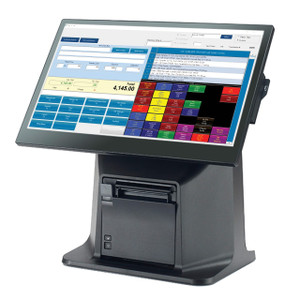
PioneerPOS CarisTouch 18 i5 8GB RAM 120GB SSD - Q11-DE8FPQ-P2
The PioneerPOS CarisTouch 18 i5 is a fixed-format point-of-sale terminal designed for compact retail counters, quick-service restaurants, and hospitality venues where space is constrained but full-featured transaction processing is required. The 18-inch resistive touch screen and Intel Core i5 processor deliver responsive transaction speed and reliable uptime across high-volume shift operations. This configuration ships with Windows 11 LTSC—a long-term servicing channel optimized for embedded POS environments, eliminating forced OS feature updates that interrupt service.
Key Features
- 18-inch Resistive Touch Screen: 1024×768 resolution with pressure-sensitive input. Resistive technology tolerates wet fingers, gloved operation, and prolonged contact without drift—essential in food service and high-traffic retail.
- Intel Core i5 Processor: Dual or quad-core architecture (generation varies by SKU variant). Handles multi-terminal payment processing, inventory sync, and POS application responsiveness without lag, even on older hospitality POS software.
- 8GB RAM: Sufficient for most single-terminal POS stacks (payment, inventory, order management). Prevents application stuttering during peak transaction windows.
- 120GB SSD Storage: Fast boot and application load times. No mechanical drive noise or failure risk from vibration in bar/restaurant environments. Adequate capacity for local transaction logs, customer data, and POS software.
- Windows 11 LTSC: Long-Term Servicing Channel OS. No forced feature updates, extended support window (5+ years typical). Maintains application compatibility and uptime for legacy POS integrations.
- Wi-Fi Connectivity: 802.11ac standard. Eliminates need for Ethernet runs on retrofit installations. Reduces cable clutter on tight counters.
- Privacy Filter Included: Reduces viewing angle on the 18-inch display—prevents shoulder-surfing of customer payment data or PINs during transactions. Complies with PCI DSS visual security best practices.
- Standard Base/Mounting: VESA-compatible or proprietary base allows desktop positioning or wall mount integration. No custom bracket delays.
This terminal omits integrated magnetic stripe reader, barcode scanner, and web camera—standard configurations for retail QSR deployments where peripherals are managed separately or left optional. The absence of speakers keeps the terminal quiet in noise-sensitive environments (upscale hospitality, pharmacy counters). No web camera eliminates privacy concerns and reduces attack surface for unmanaged endpoints.
Deployment Context: The CarisTouch 18 fits single-register retail, QSR counter service, or kiosk-style hospitality checkout. The resistive touch screen and compact form factor make it ideal for venues where staff move quickly between multiple stations or where the terminal sits in cramped counter space. Windows 11 LTSC is particularly valuable if your POS application stack is tied to legacy middleware or custom payment integrations—you avoid the compliance headaches and downtime of forced Windows 10 feature upgrades. The included privacy filter is table stakes in any PCI DSS environment; integrators often bill the terminal separately from privacy compliance retrofit costs, so having it pre-installed accelerates deployment.
Integration and Maintenance: The CarisTouch 18 runs standard HTTPS payment gateways, VPN client software, and cloud POS platforms (Toast, TouchBistro, Clover, Square Register on web browser). Wi-Fi pairing is straightforward on first boot; Ethernet failover is recommended for high-transaction density (plug an adapter if needed). SSD durability and W11 LTSC stability mean typical annual hardware maintenance costs are minimal. Storage refresh becomes relevant after 3–5 years of 24/7 or high-volume shift operation; the 120GB SSD is large enough to defer that for most mid-volume locations.
Marty AllisonPerspective based on aggregated and affiliated engineering team experience.
We've deployed hundreds of CarisTouch terminals across restaurant chains, retail, and hospitality properties over the past eight years. The 18-inch resistive screen is the workhorse choice—it's not flashy, but it never ghost-touches when wet, it handles four-hour lunch rushes without ghosting, and it survives the inevitable spill that will happen in a QSR environment. The i5 + 8GB config is the sweet spot for single-register setups; you get enough headroom for POS software bloat and payment gateway latency without paying for the i7/16GB tier that only shows up when you're running dual-terminal orchestration or running analytics dashboards on the same box. The 120GB SSD matters more than people think—we've seen mechanical hard drives fail spectacularly in high-vibration environments (open kitchens, bar tops), and the SSD boot time is genuinely faster when the terminal needs to come back after a reboot mid-shift. Windows 11 LTSC is the unsung hero here. It patches regularly (security fixes only, no forced feature updates), and it stays compatible with older POS middleware that many small chains still rely on. That compatibility premium alone saves integrators weeks of custom testing and workarounds compared to forcing a standard Windows 11 Pro upgrade path. The privacy filter is not optional—we always recommend it, and having it factory-installed eliminates the retrofit cost and installation delays.
Technical Highlights:
- Resistive Touch Technology: Pressure-sensitive input with no capacitive ghosting. Responds to wet fingers, gloved hands, and stylus input. Essential for food service and high-touch environments where capacitive drift becomes a daily frustration. Calibration is simple and holds across thousands of transaction cycles.
- Intel Core i5 CPU: Handles payment authorization latency gracefully and supports multitasking across POS application, inventory sync, and card reader communication. Avoids the Atom/Celeron bottleneck we've seen in some budget terminals—those CPUs stall during peak transaction load and slow customer throughput.
- Windows 11 LTSC Licensing: Five-year support window, security patches only (no feature rollups). Eliminates the compatibility testing nightmare that comes with standard Windows 11 Pro Home feature updates every six months. Many legacy POS integrations depend on driver stability that gets broken by Windows feature releases.
- 120GB SSD: Fast application launch, reliable under thermal stress and vibration. Sufficient capacity for most POS transaction logs and customer database snapshots. No mechanical failure risk—we've seen HDD failures in kitchen-mounted terminals due to steam and temperature swings.
- Wi-Fi 802.11ac: Supports modern mesh networks and avoids Ethernet run installation cost on retrofit deployments. Performance is adequate for transaction processing as long as the network backbone is solid; we always recommend dedicated 5GHz channel separation if multiple terminals are on the same access point.
Deployment Considerations:
- Resistive touch screens require occasional calibration after 6–12 months in high-use QSR environments. Budget 15 minutes per terminal annually for recalibration; TouchScreen Windows utility is built-in.
- Wi-Fi latency is acceptable for POS but not guaranteed to be faster than wired Ethernet. Always test latency to your payment gateway during final acceptance—if it exceeds 500ms, Ethernet failover is mandatory. Many integrators keep a USB-to-Ethernet adapter on-site for troubleshooting.
- No integrated MSR or barcode scanner means you'll be sourcing peripherals separately. That's actually an advantage—you avoid driver conflicts and can choose best-of-breed peripherals (Ingenico MSR, Symbol scanner) rather than compromising on the bundled option.
- 8GB RAM is appropriate for single-terminal POS; if you're running a dual-display setup or adding a secondary analytics application, consider the 16GB variant. 8GB is the lower boundary before swap-to-SSD slowdown becomes observable.
- The privacy filter reduces brightness by ~15–20% compared to bare screen. Position the terminal at a slight downward angle from customer eye level during installation, or brightness loss becomes noticeable on bright counters.
This terminal is ideal for integrators building out QSR chains, retail locations, or hospitality venues where space is tight and long-term OS stability outweighs shiny features. Pair this with a modern POS stack (cloud-based or hybrid), standard payment gateways, and modular peripherals—you'll have a deployment that runs reliably for 5+ years with minimal maintenance. Explore the PioneerPOS catalog for alternative screen sizes and configurations if you need larger displays or heavier compute power.