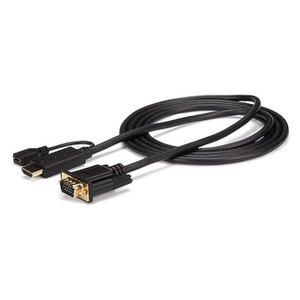
StarTech ST12MHDLNHR HDMI over Cat5e/6 Extender with IR and Audio
Overview
The StarTech ST12MHDLNHR is a point-to-point HDMI extender that pushes 1920x1200 (1080p) video at 60Hz up to 15 meters (50 feet) over a standard Cat5e or Cat6 network cable — letting you place a display well away from the source without running a long HDMI cable or accepting signal degradation. At 5.1 x 3.8 x 0.9 inches per unit and an aluminum chassis, it's compact enough to mount behind a display or tuck into an AV rack shelf. If you're distributing HDMI throughout a site — digital signage, boardrooms, training rooms, or security monitoring stations — the ST12MHDLNHR handles the last 50 feet cleanly where copper HDMI runs become unreliable.
Key Features
- 1920x1200 @ 60Hz Resolution: Supports the full 1920x1200 pixel grid at 60 frames per second, which covers every 1080p display and most 1200p professional monitors. You won't be downscaling content or accepting a frame rate penalty at the remote end.
- 15m (50ft) Extension Range: Runs over Cat5e or Cat6 — infrastructure most commercial sites already have in the walls. That 50-foot reach covers most conference rooms, training spaces, and monitoring stations without pulling new dedicated AV cable.
- 2-Channel Audio over the Same Run: The RJ-45 link carries both video and 2-channel audio, so you don't need a separate audio cable to the remote display. The 2.5mm mini-jack on the remote unit gives you a direct analog audio output for a local amplifier or powered speaker.
- Infrared (IR) Passthrough: The IR connector on the remote unit allows commands from a remote control at the display end to pass back to the source — useful in AV setups where the source device (media player, cable box, Blu-ray) is in a closet or rack room and needs to be controlled from the screen location.
- 6–12 Mbps Bandwidth Requirement: The extender requires 6 to 12 Mbps of throughput on the link — well within what a properly terminated Cat5e or Cat6 run delivers. This is a dedicated point-to-point connection, not a shared network run, so bandwidth is not a variable once cabling is correct.
- Status LED for Fast Troubleshooting: A single status LED on the unit gives you an immediate link/no-link indication during commissioning. When you're running cable to a new display location, that visual confirmation saves time versus hunting through menus.
- AC Adapter Power (100–240V Input): The universal 100–240V AC input handles any commercial power grid without a transformer swap. Output is 5V DC at 1A — the remote unit draws from the included adapter, keeping the source device's power budget unaffected.
- Aluminum Chassis, 7.5 oz: Light enough to mount behind a flat-panel display on a VESA bracket gap or velcro to a rack shelf without loading the display arm. The aluminum shell provides basic EMI shielding in environments with dense wireless or fluorescent lighting interference.
- 0°C to 40°C Operating Range: Rated for standard indoor commercial environments. Not designed for unheated warehouses, outdoor enclosures, or server rooms running extreme cold aisles — stay within the thermal range for reliable operation.
Integration and Compatibility
The ST12MHDLNHR is a passive extender pair — it does not require drivers, software, or network configuration. Source-side: any HDMI output device (PC, media player, NVR, set-top box). Display-side: any HDMI input display. The Cat5e/Cat6 run must be a dedicated point-to-point cable — do not route through a live network switch, patch panel aggregation, or PoE-carrying infrastructure. Maximum cable run is 15m (50ft); runs longer than that are outside the tested specification and may produce signal artifacts. For HDMI extension across longer distances or to multiple simultaneous displays, evaluate fiber-based extenders or matrix switcher solutions in the AV distribution category. If your deployment involves network video recorders feeding security monitoring stations, this extender handles the HDMI output leg from the NVR to a nearby secondary monitor cleanly within the 50-foot window. For AV infrastructure planning, review a display distribution buying guide to match extender type to run length and output count. Pair with a Cat6 patch cable cut to exact length to avoid coiling excess cable near the extender — excess cable length does not help and can introduce noise.
Frequently Asked Questions
Q: What is the maximum cable length supported by the ST12MHDLNHR?
A: The ST12MHDLNHR supports a maximum run of 15 meters (50 feet) over Cat5e or Cat6 cable. Exceeding this distance is outside the tested specification and may result in signal degradation or loss.
Q: Does the ST12MHDLNHR support 4K resolution?
A: No. The ST12MHDLNHR is rated to a maximum of 1920x1200 at 60Hz. It does not support 4K (3840x2160) or UHD resolutions. If 4K extension is required, a different extender model is needed.
Q: Can I run the Cat5e/Cat6 cable through a live network switch or patch panel?
A: No. The ST12MHDLNHR requires a dedicated point-to-point Cat5e or Cat6 cable between the transmitter and receiver units. Routing through a network switch or shared infrastructure will not work.
Q: Does the ST12MHDLNHR carry audio as well as video?
A: Yes. The extender carries 2-channel audio over the same Cat5e/Cat6 run. The remote unit includes a 2.5mm mini-jack output for connecting a local amplifier or powered speaker.
Q: What is the warranty on the ST12MHDLNHR?
A: The ST12MHDLNHR carries a 2-year manufacturer warranty.
Q: Does the IR passthrough allow me to control the source device from the display location?
A: Yes. The IR connector on the remote unit passes infrared commands back to the source end, allowing you to control a media player, cable box, or similar device located at the transmitter end using a remote control at the display location.
The ST12MHDLNHR is straightforward to deploy, but the 15-meter (50-foot) hard ceiling on cable length is the spec that will make or break your layout plan. I see integrators underestimate this regularly — measure the actual cable path, not the straight-line room distance, before committing to this unit.
Technical Highlights:
- 1920x1200 @ 60Hz: Covers 1080p and WUXGA display targets without frame rate compromise — clean fit for NVR output feeds and digital signage at full refresh rate.
- 6–12 Mbps Bandwidth on Cat5e/6: The link requirement is modest; a properly terminated Cat5e run handles this without issue. The constraint is physical distance (50ft), not bandwidth headroom.
- IR Passthrough on Remote Unit: Particularly useful in security monitoring rooms where the NVR or media source is racked in a separate closet — operators can use a standard IR remote at the display without a separate control cable run.
Deployment Considerations:
- Use a dedicated, straight-through Cat5e or Cat6 cable cut to length — do not pull from a live structured network run or pass through a switch. Shared infrastructure will not pass the HDMI signal protocol.
- The 0°C to 40°C operating range limits this unit to conditioned indoor spaces. Unheated server closets, loading dock offices, or outdoor kiosks in cold climates will push the extender outside its rated envelope.
The ST12MHDLNHR fits well in small conference rooms, security monitoring stations, and training environments where the display needs to sit up to 50 feet from a racked source and the building already has Cat5e/Cat6 infrastructure in the walls — no new cable pull required.