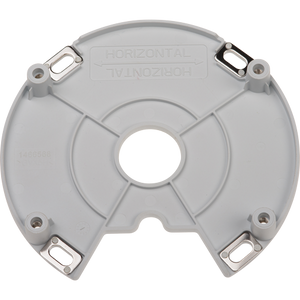
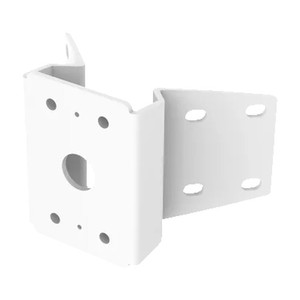
Axis 5507-501 T91D62 Adapter Mounting Bracket
The Axis 5507-501 is a retrofit mounting adapter designed to bridge legacy Pelco parapet mount hole patterns to current Axis surveillance equipment. If you're upgrading from older Pelco PTZ dome systems and want to avoid re-drilling rooflines or facade anchors, this bracket solves the structural and labor cost problem in one piece.
Overview
Replacing surveillance infrastructure often means either drilling new mounting holes—a costly, time-consuming task on rooftops or building facades—or scrapping the original installation footprint. The 5507-501 eliminates that choice. By adapting existing Pelco PTZ dome parapet mount hole patterns, it lets you mount new Axis IP cameras using the same anchor points already cut into your structure. This matters on multi-camera perimeter deployments where every hour of downtime and every drilling permit costs money.
Key Features
- Retrofit design for Pelco parapet mounts: Accepts existing hole patterns from legacy Pelco PTZ dome installations, eliminating the need to drill new anchors. On a ten-camera rooftop upgrade, this can save 8–16 labor hours and the cost of structural certification.
- Expands attachment area toward parapet: The bracket geometry shifts the mounting footprint outward, giving you flexible vertical and horizontal positioning without modifying the underlying structure. Useful when swapping to smaller camera bodies or adjusting sight lines.
- Weather-resistant construction: Designed to withstand outdoor exposure on building exteriors. Not rated for submersion, but handles rain, UV, and seasonal temperature swings typical of rooftop and facade installations.
- Includes installation hardware: Ships with fasteners and mounting template, reducing site-specific sourcing and speeding first-pass installation.
Compatibility & Integration
The 5507-501 is purpose-built for Pelco PTZ dome parapet mount hole patterns. If your legacy system uses a different Pelco mount type (wall bracket, in-ceiling pendant, or non-parapet configurations), this adapter will not fit. Verify your existing mount footprint before ordering. Once mounted, the bracket accepts standard outdoor IP camera mounting feet or adapters, making it compatible with most Axis camera models in the compact and mid-size form factor range. For very large PTZ heads or ruggedized enclosures, confirm clearance and load capacity with site documentation.
This adapter is particularly valuable in mixed-vendor upgrade scenarios common in large enterprises where legacy Pelco infrastructure coexists with newer Axis deployments. It bridges that gap without facility disruption, which is a real factor in 24/7 operational environments like warehouses, ports, and manufacturing floors.
Deployment Applications
Ideal for security integrators managing campus-wide or multi-site upgrades where structural modifications add cost and risk. Common use cases include perimeter security on industrial facilities, rooftop monitoring on retail or office buildings, and building facade coverage on hospitality properties. Also useful in warehouse automation environments where existing camera mounts are anchored to steel structures and re-drilling is impractical.
Consider a comprehensive camera selection guide if you're evaluating Axis models to pair with this bracket—form factor and weight matter when adapting to legacy mounts.
Frequently Asked Questions
Q: Will the 5507-501 work with my Pelco mount if I don't know the exact model?
A: The 5507-501 is designed for Pelco PTZ dome parapet mount hole patterns specifically. If your existing mount is a parapet model, it should fit. If it's a wall bracket, in-ceiling pendant, or other form factor, this adapter will not be compatible. Measure your existing hole spacing and compare to the installation template before purchasing.
Q: Can I use this bracket indoors?
A: Yes, but it's engineered for outdoor weather resistance. Indoors, it performs fine, but you're paying for weather protection you won't need. If your upgrade is entirely indoor, a standard Axis mounting bracket may be more cost-effective.
Q: What camera weight can the 5507-501 support?
A: Load capacity depends on the underlying Pelco mount anchor point and the fastening hardware used. Refer to your original Pelco parapet mount documentation for maximum load rating, then cross-reference with the Axis camera weight. Most compact Axis models (under 2 kg) are well within spec.
Q: Does this bracket include all fasteners?
A: Yes, the 5507-501 ships with installation hardware and a mounting template. Verify that your existing anchor points are in good condition and rated for re-use before installation.
Q: Can I position a camera at a different angle using this bracket?
A: The bracket provides some flexibility in mounting position by expanding the attachment area toward the parapet. For significant angle adjustments, you may need an additional pan-tilt or gooseneck adapter paired with the 5507-501.
Q: Is this a permanent installation or reusable?
A: The bracket is designed for permanent mounting. Once fastened to your anchor points and attached to the camera, it stays in place. If you need to relocate the camera, you can unbolt and remount, but drilling new holes is not an option.
Ted PerryPerspective based on aggregated IPSD and affiliated engineering team experience.
If you're integrating the Axis 5507-501 into a perimeter security upgrade, the core value is structural: you're eliminating drilling, which on a rooftop or facade can cost weeks of planning, permits, and downtime. The bracket reuses existing Pelco parapet mount holes—a practical solution in enterprise environments where legacy infrastructure is too embedded to ignore.
Technical Highlights:
- Pelco parapet hole pattern compatibility: Eliminates 8–16 labor hours per multi-camera installation by avoiding new drilling and structural certification on rooftops or building exteriors.
- Expanded attachment area toward parapet: Shifts mounting footprint outward, allowing flexible camera positioning without modifying underlying anchors—critical when swapping from bulky Pelco PTZ heads to compact Axis models.
- Weather-resistant construction: Handles rain, UV, and seasonal temperature cycles typical of outdoor rooftop and facade deployments; not rated for submersion or salt-spray environments.
Deployment Considerations:
- Verify your existing Pelco mount is a parapet model before purchasing—wall brackets, in-ceiling pendants, and pole mounts use different hole patterns and will not fit the 5507-501.
- Check anchor point condition and load rating. If your original Pelco mount used bolts into deteriorated concrete or corroded fasteners, you'll need to address the underlying anchor before re-using it.
- For cameras heavier than 2–3 kg or for installations where you need significant camera pan/tilt adjustment, pair this bracket with a gooseneck or adjustable pan-tilt mount.
The 5507-501 makes sense in large-scale upgrades—think 10+ camera campuses where you're ripping out aging Pelco PTZ infrastructure but can't afford weeks of structural work. In small single-camera retrofits or greenfield builds, a standard Axis mounting bracket costs less and is simpler. On warehouse automation or port perimeter projects where existing mounts are load-bearing and deeply anchored, this adapter is a real labor-saver.